Explainable AI UX: A CTO's Guide to Trust and Liability

Explainable AI UX: A CTO's Guide to Trust and Liability

A CTO's guide to explainable AI UX: which explanation patterns reduce the risk of users acting on wrong AI answers, and what engineering they require.

Explainable AI UX: A CTO's Guide to Trust and Liability

Explainable AI UX: A CTO's Guide to Trust and Liability

A CTO's guide to explainable AI UX: which explanation patterns reduce the risk of users acting on wrong AI answers, and what engineering they require.

Courts and customers now treat your AI's answers as your company's statements. Explainable AI UX decides whether users catch wrong answers before acting on them. This guide covers the patterns, engineering and metrics that matter.

Your AI's explanations can reduce liability or quietly increase it.

Illustration of a person sitting cross-legged with a laptop, reaching up to adjust elements on a large interface wireframe surrounded by gears, code snippets, speech bubbles and cloud upload icons.

TL;DR

  • In 2024, a Canadian tribunal held Air Canada liable for its chatbot's wrong answer and rejected the idea that the bot was a separate entity.

  • Research shows AI explanations can make people accept answers whether they're right or wrong.

  • Good explainable AI UX helps users catch errors, not just feel reassured.

  • Measure it by how often users accept known-wrong outputs, not by satisfaction scores.

In February 2024, a British Columbia tribunal ordered Air Canada to compensate a customer after its website chatbot described a bereavement refund policy that didn't exist. Air Canada argued the chatbot was a separate legal entity responsible for its own actions. The tribunal disagreed.

The damages were small. The principle wasn't. Every answer your AI gives is your company's answer.

That's why explainable AI UX matters to CTOs, not just designers. It covers how your product shows users why the AI produced an output, how confident it is and how to check it. Done well, it helps users catch mistakes before they act. Done badly, it makes wrong answers more convincing.

This guide is for CTOs and product leaders shipping AI features to customers. It covers why most explanations increase risk, a simple test for any explanation pattern, which patterns hold up, the engineering they depend on, and how to measure whether they're working.

What Explainable AI UX Means for Your Business
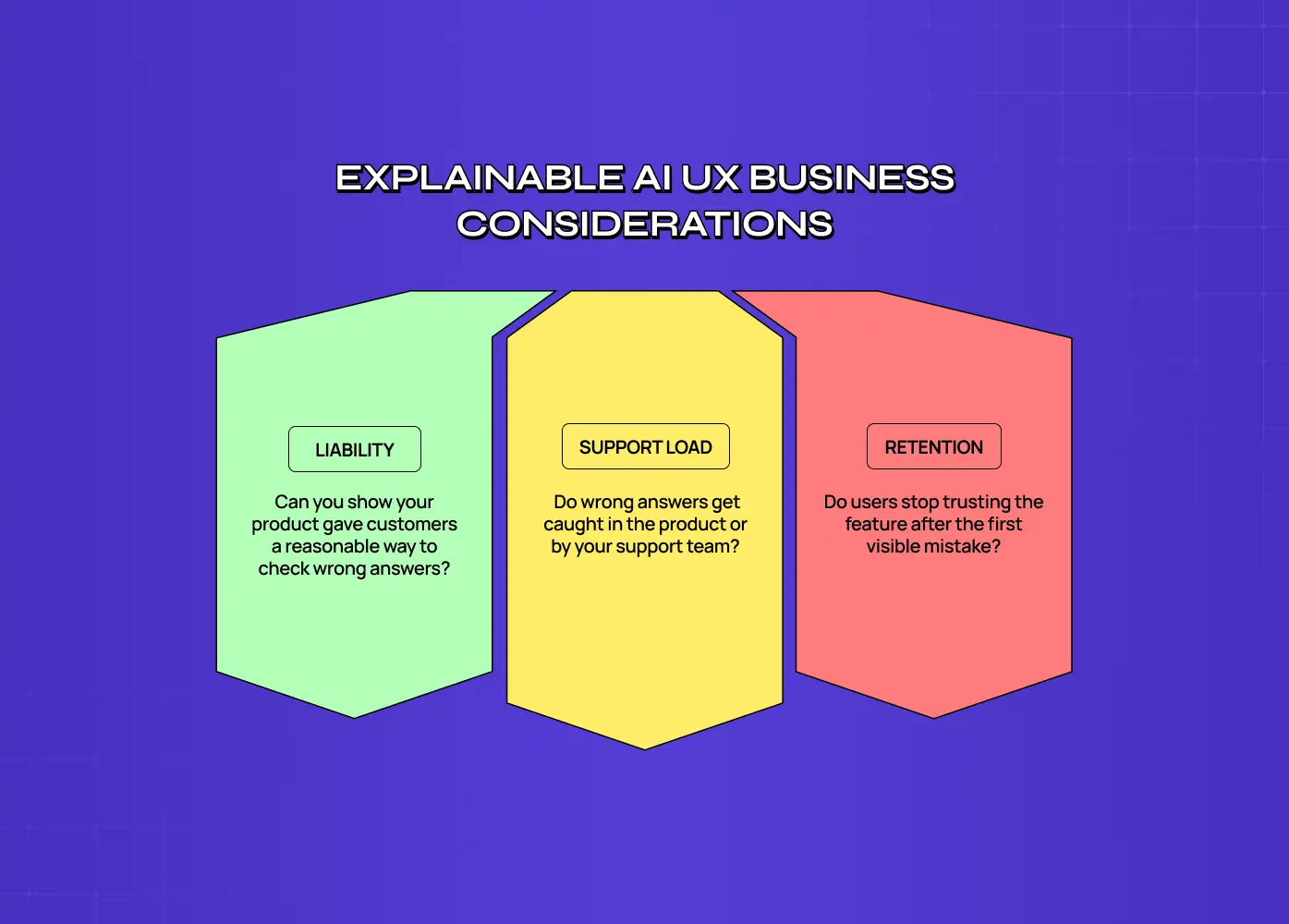
Three-panel diagram of explainable AI UX business considerations: liability, asking whether your product gave customers a reasonable way to check wrong answers; support load, asking whether wrong answers get caught in the product or by your support team; and retention, asking whether users stop trusting the feature after the first visible mistake.

Explainable AI UX is how an AI product shows users why it produced an output, how reliable that output is and how to verify it. For a business, the goal is calibrated trust: users rely on the AI when it's right and catch it when it's wrong. The opposite, overreliance, is where liability, rework and churn come from.

Most product teams approach explanations as a way to increase trust and adoption. That's half the job. If an explanation raises confidence equally for right and wrong answers, it increases adoption and risk at the same time.

For your business, the practical questions are:

  • Liability: when a customer acts on a wrong answer, can you show your product gave them a reasonable way to check it?

  • Support load: do wrong answers get caught in the product, or by your support team later?

  • Retention: do users stop trusting the feature after the first visible mistake?

The right level of investment depends on stage. At Seed, focus on the one or two outputs where a wrong answer would cost a customer money or trust, and make those checkable. By Series B, with enterprise customers and procurement reviews, you'll need consistent explanation patterns across the product, source logging for audits and a way to show buyers how your AI handles uncertainty. Enterprise security questionnaires increasingly include questions about AI accuracy and oversight, and a clear answer shortens the sales cycle.

The AI onboarding playbook top teams use to boost activation.

Reduce first-session confusion, speed up time-to-value, and build user trust, built from real onboarding audits of AI products.

No Spam. Free Lifetime

The AI onboarding playbook top teams use to boost activation.

Reduce first-session confusion, speed up time-to-value, and build user trust, built from real onboarding audits of AI products.

No Spam. Free Lifetime

Why Most AI Explanations Increase Risk Instead of Reducing It

The research is less reassuring than most pattern libraries suggest.

A CHI 2021 study by Bansal and colleagues tested whether explanations helped people and AI make better decisions together. They didn't. Explanations increased the chance that people accepted the AI's recommendation whether or not it was correct, and team accuracy didn't improve.

Nielsen Norman Group's December 2025 research on explainable AI found similar behavior in real chat products. Users rarely verify citations, even when links are hallucinated, and step-by-step reasoning shown to users often doesn't reflect how the model actually reached its answer.

The business version of this played out in 2025. Deloitte agreed to refund part of an A$440,000 contract after a report it delivered to the Australian government was found to contain a fabricated court quote and references to research papers that don't exist. The citations looked like evidence, and nobody checked them before the report went out.

A citation list isn't verification. It only looks like verification, which is what makes it risky.

A Simple Test for Any Explanation Pattern

Every explanation in your product either helps users judge when to rely on the AI, or it just makes them feel better.

We call this the Calibrate-or-Reassure Test, and it comes down to three questions your product and engineering leads can answer together.

Question

What it checks

Fails when

1. Is it faithful?

Does the explanation reflect what actually drove the output?

It's generated after the fact to sound plausible

2. Is it checkable?

Can a user verify it in seconds, in context?

Checking means opening several tabs or reading a long trace

3. Does it change behavior?

Do users act differently when the AI is wrong?

Acceptance rates are the same for right and wrong outputs

An explanation that passes all three reduces risk. One that fails any of them adds confidence without adding accuracy.

The third question is the one teams skip, because answering it means testing with deliberately wrong outputs. It's also the only one that tells you whether the explanation is doing its job.

Explainable AI UX Patterns Ranked by Risk Reduction

The explainable AI UX patterns that reduce risk most are the ones users can check quickly: the exact source passage next to a claim, highlights on specific uncertain claims, counterfactuals and verify-first steps for high-stakes decisions. Overall confidence scores and full reasoning traces tend to reassure without helping users catch errors.

Pattern

Faithful?

Checkable?

Changes behavior?

Verdict

Inline source passage next to the claim

Usually

Yes

Yes

Reduces risk

Claim-level uncertainty highlight

Depends on the signal

Yes

Yes

Reduces risk

Counterfactual ("this changes if revenue exceeds $5M")

Yes, if computed

Yes

Yes

Reduces risk

Verify-first step (user decides before seeing the AI's answer)

n/a

Yes

Strongly

Reduces risk, adds friction

Citation list at the end

Sometimes

Rarely used

Weakly

Mostly reassures

Overall confidence score ("92% confident")

Often poorly calibrated

No

Weakly

Mostly reassures

Full reasoning trace

Not reliably

Too long

Can increase acceptance

Reassures

The verify-first row comes with a trade-off. A 2021 study by Buçinca and colleagues with 199 participants found these designs reduced overreliance more than standard explanations, but participants rated them least favorably. Use them where a wrong answer is expensive, such as financial, legal or medical decisions, not for everyday suggestions.

Action check: list the three AI outputs in your product where a wrong answer costs the most. Which pattern does each use today?

The Engineering Behind Explanations That Hold Up
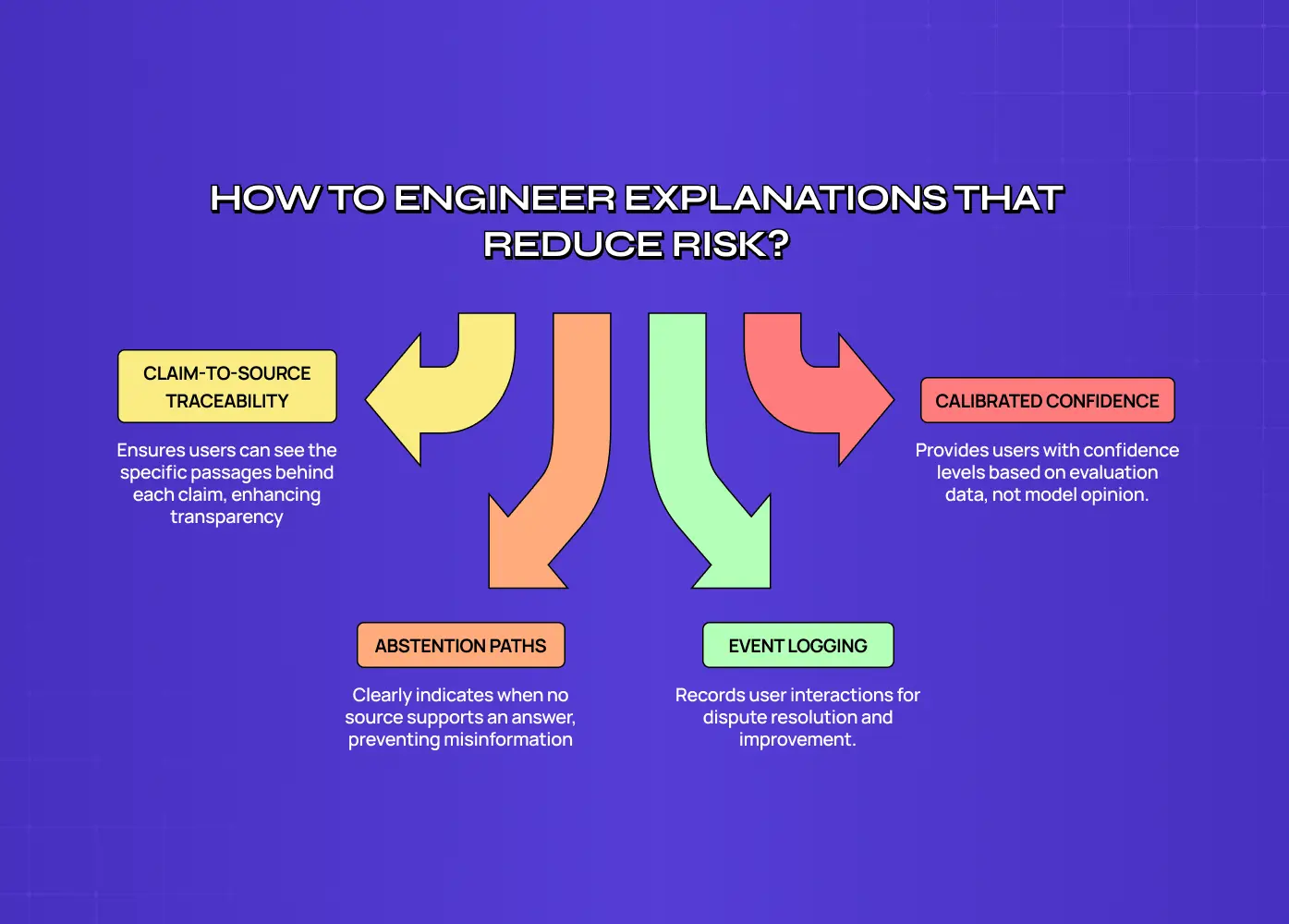
Diagram of how to engineer explanations that reduce risk, showing four requirements: claim-to-source traceability so users see the specific passages behind each claim, calibrated confidence derived from evaluation data rather than model opinion, abstention paths that state plainly when no source supports an answer, and event logging that records user interactions for dispute resolution.

Explanations that reduce risk depend on engineering decisions made well before the interface. Your system needs to keep track of which sources produced each claim, derive confidence from evaluation data rather than the model's own opinion of itself, and log what users accept and override. Without that, designers can only draw explanations, not ship faithful ones.

Four requirements to agree with your engineering lead:

1. Claim-to-source traceability. Retrieval and generation should return the specific passages behind each claim, with IDs your interface can display. Linking to a whole document isn't enough.

2. Calibrated confidence. Confidence shown to users should come from your evaluation results on similar inputs, not from asking the model how sure it is.

3. Abstention paths. When no source supports an answer, the system should say so plainly instead of generating a plausible one.

4. Event logging. Record when users open sources, edit outputs, accept or override. This is your evidence in a dispute and your data for improvement.

Data-heavy products show why structure matters as much as copy.

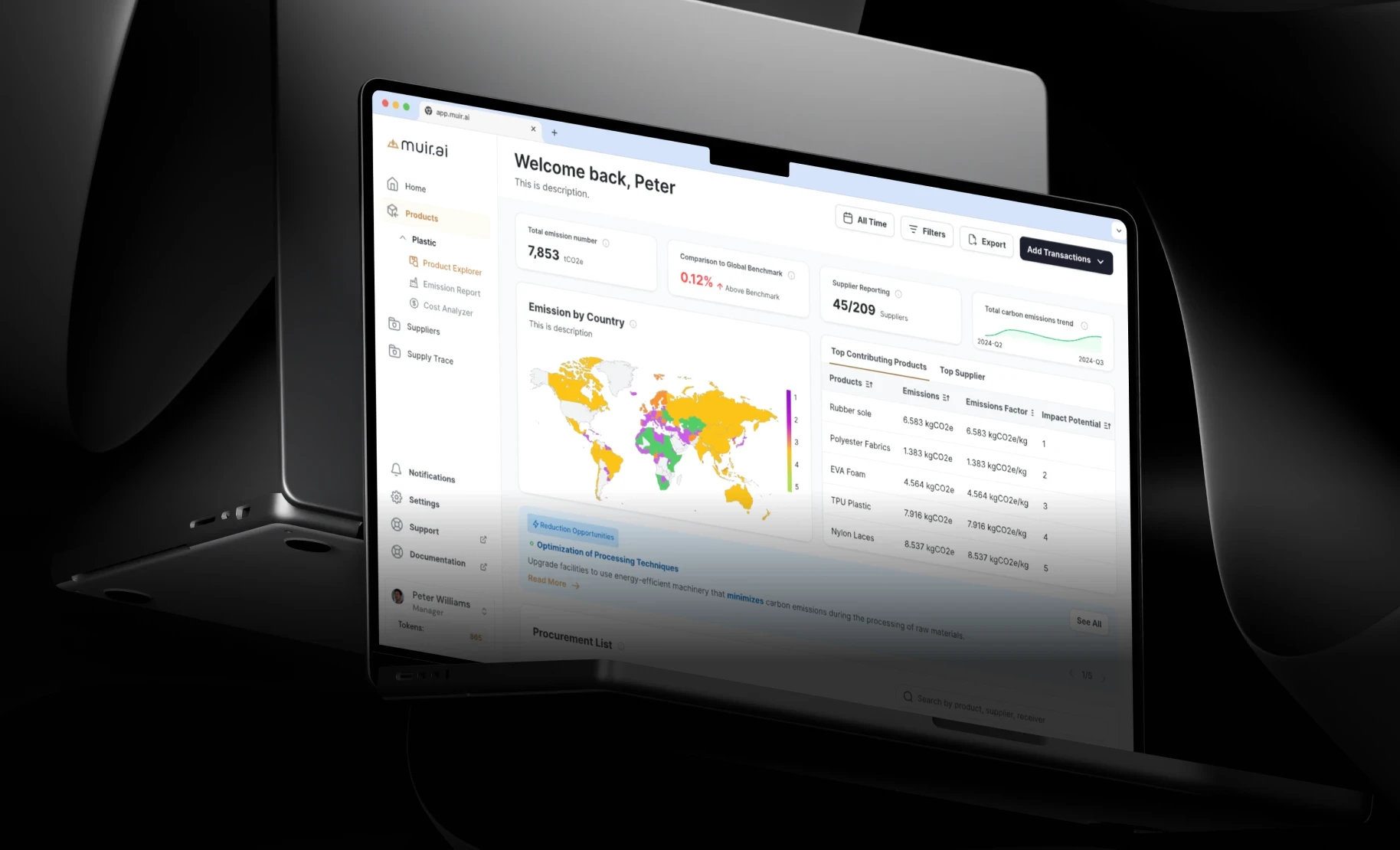
When we rebuilt Muir.AI's carbon-intelligence dashboard, emissions, origins and costs had been packed into one overwhelming interface. A summary-first view with drill-down to the underlying data let users check the numbers behind each insight, and the client said the clearer visual alignment built greater trust in their reporting. Our principles for AI dashboards users trust go deeper on this.

How to Measure Whether Explanations Are Working

Explainable AI UX is working when users accept correct AI outputs and reject incorrect ones more often than they would without the explanation. The way to measure that is to seed known-wrong outputs into usability tests and track acceptance, verification and override rates, rather than asking users how much they trust the AI.

Satisfaction scores mislead here. In the Buçinca study, the designs that worked best were the ones participants liked least.

Metrics worth reporting to leadership:

Metric

What it tells you

Warning sign

Wrong-output acceptance rate

How often users accept answers you know are wrong

No drop after adding explanations

Verification rate

How often users open a source before acting

Near zero on high-stakes outputs

Override accuracy

Whether users who reject the AI are right to

Overrides no better than chance

Time to decision

Whether explanations slow work down too much

Large jumps on routine tasks

These sit alongside the wider measures in our guide to evaluating whether an AI feature actually works.

Conclusion: What to Decide Next

  • Treat AI answers as company statements. The Air Canada ruling makes that the safe assumption.

  • Choose checkable patterns for high-stakes outputs, and stop relying on citation lists and confidence scores alone.

  • Fund the engineering behind explanations: source traceability, calibrated confidence, abstention and event logging.

If you'd like to pressure-test how your product explains its answers, book a call with our team. We'll review your highest-risk AI outputs with your product and engineering leads and show where users are most likely to accept a wrong answer.

Courts and customers now treat your AI's answers as your company's statements. Explainable AI UX decides whether users catch wrong answers before acting on them. This guide covers the patterns, engineering and metrics that matter.

Your AI's explanations can reduce liability or quietly increase it.

Illustration of a person sitting cross-legged with a laptop, reaching up to adjust elements on a large interface wireframe surrounded by gears, code snippets, speech bubbles and cloud upload icons.

TL;DR

  • In 2024, a Canadian tribunal held Air Canada liable for its chatbot's wrong answer and rejected the idea that the bot was a separate entity.

  • Research shows AI explanations can make people accept answers whether they're right or wrong.

  • Good explainable AI UX helps users catch errors, not just feel reassured.

  • Measure it by how often users accept known-wrong outputs, not by satisfaction scores.

In February 2024, a British Columbia tribunal ordered Air Canada to compensate a customer after its website chatbot described a bereavement refund policy that didn't exist. Air Canada argued the chatbot was a separate legal entity responsible for its own actions. The tribunal disagreed.

The damages were small. The principle wasn't. Every answer your AI gives is your company's answer.

That's why explainable AI UX matters to CTOs, not just designers. It covers how your product shows users why the AI produced an output, how confident it is and how to check it. Done well, it helps users catch mistakes before they act. Done badly, it makes wrong answers more convincing.

This guide is for CTOs and product leaders shipping AI features to customers. It covers why most explanations increase risk, a simple test for any explanation pattern, which patterns hold up, the engineering they depend on, and how to measure whether they're working.

What Explainable AI UX Means for Your Business

Three-panel diagram of explainable AI UX business considerations: liability, asking whether your product gave customers a reasonable way to check wrong answers; support load, asking whether wrong answers get caught in the product or by your support team; and retention, asking whether users stop trusting the feature after the first visible mistake.

Explainable AI UX is how an AI product shows users why it produced an output, how reliable that output is and how to verify it. For a business, the goal is calibrated trust: users rely on the AI when it's right and catch it when it's wrong. The opposite, overreliance, is where liability, rework and churn come from.

Most product teams approach explanations as a way to increase trust and adoption. That's half the job. If an explanation raises confidence equally for right and wrong answers, it increases adoption and risk at the same time.

For your business, the practical questions are:

  • Liability: when a customer acts on a wrong answer, can you show your product gave them a reasonable way to check it?

  • Support load: do wrong answers get caught in the product, or by your support team later?

  • Retention: do users stop trusting the feature after the first visible mistake?

The right level of investment depends on stage. At Seed, focus on the one or two outputs where a wrong answer would cost a customer money or trust, and make those checkable. By Series B, with enterprise customers and procurement reviews, you'll need consistent explanation patterns across the product, source logging for audits and a way to show buyers how your AI handles uncertainty. Enterprise security questionnaires increasingly include questions about AI accuracy and oversight, and a clear answer shortens the sales cycle.

The AI onboarding playbook top teams use to boost activation.

Reduce first-session confusion, speed up time-to-value, and build user trust, built from real onboarding audits of AI products.

No Spam. Free Lifetime

Why Most AI Explanations Increase Risk Instead of Reducing It

The research is less reassuring than most pattern libraries suggest.

A CHI 2021 study by Bansal and colleagues tested whether explanations helped people and AI make better decisions together. They didn't. Explanations increased the chance that people accepted the AI's recommendation whether or not it was correct, and team accuracy didn't improve.

Nielsen Norman Group's December 2025 research on explainable AI found similar behavior in real chat products. Users rarely verify citations, even when links are hallucinated, and step-by-step reasoning shown to users often doesn't reflect how the model actually reached its answer.

The business version of this played out in 2025. Deloitte agreed to refund part of an A$440,000 contract after a report it delivered to the Australian government was found to contain a fabricated court quote and references to research papers that don't exist. The citations looked like evidence, and nobody checked them before the report went out.

A citation list isn't verification. It only looks like verification, which is what makes it risky.

A Simple Test for Any Explanation Pattern

Every explanation in your product either helps users judge when to rely on the AI, or it just makes them feel better.

We call this the Calibrate-or-Reassure Test, and it comes down to three questions your product and engineering leads can answer together.

Question

What it checks

Fails when

1. Is it faithful?

Does the explanation reflect what actually drove the output?

It's generated after the fact to sound plausible

2. Is it checkable?

Can a user verify it in seconds, in context?

Checking means opening several tabs or reading a long trace

3. Does it change behavior?

Do users act differently when the AI is wrong?

Acceptance rates are the same for right and wrong outputs

An explanation that passes all three reduces risk. One that fails any of them adds confidence without adding accuracy.

The third question is the one teams skip, because answering it means testing with deliberately wrong outputs. It's also the only one that tells you whether the explanation is doing its job.

Explainable AI UX Patterns Ranked by Risk Reduction

The explainable AI UX patterns that reduce risk most are the ones users can check quickly: the exact source passage next to a claim, highlights on specific uncertain claims, counterfactuals and verify-first steps for high-stakes decisions. Overall confidence scores and full reasoning traces tend to reassure without helping users catch errors.

Pattern

Faithful?

Checkable?

Changes behavior?

Verdict

Inline source passage next to the claim

Usually

Yes

Yes

Reduces risk

Claim-level uncertainty highlight

Depends on the signal

Yes

Yes

Reduces risk

Counterfactual ("this changes if revenue exceeds $5M")

Yes, if computed

Yes

Yes

Reduces risk

Verify-first step (user decides before seeing the AI's answer)

n/a

Yes

Strongly

Reduces risk, adds friction

Citation list at the end

Sometimes

Rarely used

Weakly

Mostly reassures

Overall confidence score ("92% confident")

Often poorly calibrated

No

Weakly

Mostly reassures

Full reasoning trace

Not reliably

Too long

Can increase acceptance

Reassures

The verify-first row comes with a trade-off. A 2021 study by Buçinca and colleagues with 199 participants found these designs reduced overreliance more than standard explanations, but participants rated them least favorably. Use them where a wrong answer is expensive, such as financial, legal or medical decisions, not for everyday suggestions.

Action check: list the three AI outputs in your product where a wrong answer costs the most. Which pattern does each use today?

The Engineering Behind Explanations That Hold Up

Diagram of how to engineer explanations that reduce risk, showing four requirements: claim-to-source traceability so users see the specific passages behind each claim, calibrated confidence derived from evaluation data rather than model opinion, abstention paths that state plainly when no source supports an answer, and event logging that records user interactions for dispute resolution.

Explanations that reduce risk depend on engineering decisions made well before the interface. Your system needs to keep track of which sources produced each claim, derive confidence from evaluation data rather than the model's own opinion of itself, and log what users accept and override. Without that, designers can only draw explanations, not ship faithful ones.

Four requirements to agree with your engineering lead:

1. Claim-to-source traceability. Retrieval and generation should return the specific passages behind each claim, with IDs your interface can display. Linking to a whole document isn't enough.

2. Calibrated confidence. Confidence shown to users should come from your evaluation results on similar inputs, not from asking the model how sure it is.

3. Abstention paths. When no source supports an answer, the system should say so plainly instead of generating a plausible one.

4. Event logging. Record when users open sources, edit outputs, accept or override. This is your evidence in a dispute and your data for improvement.

Data-heavy products show why structure matters as much as copy.

When we rebuilt Muir.AI's carbon-intelligence dashboard, emissions, origins and costs had been packed into one overwhelming interface. A summary-first view with drill-down to the underlying data let users check the numbers behind each insight, and the client said the clearer visual alignment built greater trust in their reporting. Our principles for AI dashboards users trust go deeper on this.

How to Measure Whether Explanations Are Working

Explainable AI UX is working when users accept correct AI outputs and reject incorrect ones more often than they would without the explanation. The way to measure that is to seed known-wrong outputs into usability tests and track acceptance, verification and override rates, rather than asking users how much they trust the AI.

Satisfaction scores mislead here. In the Buçinca study, the designs that worked best were the ones participants liked least.

Metrics worth reporting to leadership:

Metric

What it tells you

Warning sign

Wrong-output acceptance rate

How often users accept answers you know are wrong

No drop after adding explanations

Verification rate

How often users open a source before acting

Near zero on high-stakes outputs

Override accuracy

Whether users who reject the AI are right to

Overrides no better than chance

Time to decision

Whether explanations slow work down too much

Large jumps on routine tasks

These sit alongside the wider measures in our guide to evaluating whether an AI feature actually works.

Conclusion: What to Decide Next

  • Treat AI answers as company statements. The Air Canada ruling makes that the safe assumption.

  • Choose checkable patterns for high-stakes outputs, and stop relying on citation lists and confidence scores alone.

  • Fund the engineering behind explanations: source traceability, calibrated confidence, abstention and event logging.

If you'd like to pressure-test how your product explains its answers, book a call with our team. We'll review your highest-risk AI outputs with your product and engineering leads and show where users are most likely to accept a wrong answer.

Have a project in mind?

Let’s talk through your idea and see what makes sense.

Harpreet Singh

Founder at Groto

Have a project in mind?

Let’s talk through your idea and see what makes sense.
Harpreet Singh

Founder at Groto

FAQ

Everything you were going to ask (and a few things you didn’t know to)

Do disclaimers like "AI can make mistakes" protect us from liability?

Not reliably. The Air Canada tribunal held the company responsible for its chatbot's statements despite the general expectation that users should check. A disclaimer helps set expectations, but a way to verify specific claims is far more defensible.

Should explanations differ for end users and administrators?

Usually yes. End users need quick, claim-level checks at the moment of decision. Administrators and auditors need deeper access, such as source logs, confidence history and override records, to review patterns across many decisions.

How do we explain outputs when our model provider is a black box?

Explain the parts you control: the sources you retrieved, the rules you applied and your own evaluation results. Avoid presenting the model's self-generated reasoning as the real cause of an answer, since it may not be.

What should the product show when no source supports an answer?

Say so directly and offer a next step, such as rephrasing, contacting a person or checking a named resource. An honest "no supported answer" costs a moment of friction and avoids a confident wrong answer that costs much more.

Do internal AI tools need the same explanation design?

The risk is different but not zero. Employees act on AI outputs in finance, legal and customer work, and internal errors can still reach customers. Prioritize explanation design by the cost of a wrong answer, not by whether the tool is internal.

How much does good explanation design slow down the product?

Claim-level sources and uncertainty highlights add little time for users when designed well. Verify-first steps add noticeable friction, which is why they belong only on high-stakes decisions. On the engineering side, source traceability can add latency, so test the trade-off early.

Do disclaimers like "AI can make mistakes" protect us from liability?

Not reliably. The Air Canada tribunal held the company responsible for its chatbot's statements despite the general expectation that users should check. A disclaimer helps set expectations, but a way to verify specific claims is far more defensible.

Should explanations differ for end users and administrators?

Usually yes. End users need quick, claim-level checks at the moment of decision. Administrators and auditors need deeper access, such as source logs, confidence history and override records, to review patterns across many decisions.

How do we explain outputs when our model provider is a black box?

Explain the parts you control: the sources you retrieved, the rules you applied and your own evaluation results. Avoid presenting the model's self-generated reasoning as the real cause of an answer, since it may not be.

What should the product show when no source supports an answer?

Say so directly and offer a next step, such as rephrasing, contacting a person or checking a named resource. An honest "no supported answer" costs a moment of friction and avoids a confident wrong answer that costs much more.

Do internal AI tools need the same explanation design?

The risk is different but not zero. Employees act on AI outputs in finance, legal and customer work, and internal errors can still reach customers. Prioritize explanation design by the cost of a wrong answer, not by whether the tool is internal.

How much does good explanation design slow down the product?

Claim-level sources and uncertainty highlights add little time for users when designed well. Verify-first steps add noticeable friction, which is why they belong only on high-stakes decisions. On the engineering side, source traceability can add latency, so test the trade-off early.

More Articles

Extreme close-up black and white photograph of a human eye

Let’s bring your vision to life

Tell us what's on your mind? We'll hit you back in 24 hours. No fluff, no delays - just a solid vision to bring your idea to life.

Profile portrait of a man in a white shirt against a light background

Harpreet Singh

Founder and Creative Director

Get in Touch

Extreme close-up black and white photograph of a human eye

Let’s bring your vision to life

Tell us what's on your mind? We'll hit you back in 24 hours. No fluff, no delays - just a solid vision to bring your idea to life.

Profile portrait of a man in a white shirt against a light background

Harpreet Singh

Founder and Creative Director

Get in Touch

Extreme close-up black and white photograph of a human eye

Let’s bring your vision to life

Tell us what's on your mind? We'll hit you back in 24 hours. No fluff, no delays - just a solid vision to bring your idea to life.

Profile portrait of a man in a white shirt against a light background

Harpreet Singh

Founder and Creative Director

Get in Touch