
AI agents can now browse, query, extract, and act inside your SaaS product on behalf of human users. UX design wasn't built for this. AX design is — but most teams don't know where to start, or what specifically changes.
Your product now has two users — humans and the AI agents working for them. Most teams are only designing for one.

TL;DR
AX design (Agent Experience design) is the discipline of designing products for AI agents, not human users. It is a parallel discipline to UX, not a replacement for it.
UX optimises for human legibility: visual hierarchy, interaction feedback, cognitive load. AX optimises for machine legibility: structured schemas, clear action documentation, parseable error states.
Most SaaS products already have agent-facing surfaces. The question is whether those surfaces have been designed for agents.
The five core AX design deliverables are: Agent Capability Map, Structured Data Schema, Action Documentation, Error Schema, and Agent Onboarding Documentation.
Dual-audience surfaces (notifications, auth flows, forms, errors) are the hardest to design because they must meet two different legibility standards simultaneously.
This blog explains what AX design is, how it differs from UX design, which product surfaces it applies to, and what the specific deliverables look like. If you are a SaaS product team, a designer, or a founder trying to understand what designing for AI agents actually means in practice, this is where to start.
For most of the history of digital product design, the answer to "who is this interface for?" had one answer: a human being. Someone with eyes, a cursor, and a goal they needed to accomplish. UX design, the discipline of making interfaces legible, usable, and valuable for people, was built entirely around that assumption.
That assumption no longer holds.
AI agents can now interact with your SaaS product on behalf of your users. They can query your API, extract data, trigger workflows, fill forms, read notifications, and execute multi-step tasks without a human touching a screen. In 2026, an AI agent managing a user's CRM outreach, scheduling their calendar, or processing their invoices is not a futuristic scenario. It is a current use case for a growing share of SaaS products.
This changes something fundamental about product design. Your interface now has two distinct audiences with different needs, different capabilities, and different failure modes — and on the human side, that surface is increasingly one of many AI-composed interfaces rather than a hand-drawn screen. The human user needs visual clarity, interaction feedback, and cognitive legibility. The AI agent needs structured data, unambiguous action schemas, predictable outputs, and machine-readable content. Designing for one without accounting for the other does not just underserve the second audience. It actively creates friction for them.
AX design (Agent Experience design) is the discipline that addresses the second audience. And for SaaS teams building products in 2026, understanding where UX design ends and AX design begins is no longer optional.
What Is AX Design (and Why It Is Not Just "UX for AI")
AX design, or Agent Experience design, is the discipline of designing products and interfaces for AI agents that interact with those products autonomously: reading data, calling APIs, executing actions, and producing outputs on behalf of human users.
AX design is not a variant of UX design — which is why understanding UX design fundamentals first clarifies exactly what AX is diverging from. It is a parallel discipline that solves a different set of problems for a fundamentally different kind of user.
The distinction matters because these design discipline types optimise for fundamentally different things:
UX design optimises for human perception and cognition: visual hierarchy, interaction feedback, information scent, and cognitive load.
An interface that is well-designed for UX is one that a person can navigate, understand, and use effectively.
AX design optimises for machine legibility and interoperability: structured data schemas, clear action boundaries, unambiguous field definitions, and predictable error responses.
An interface that is well-designed for AX is one that an AI agent can reliably parse, query, and act within.
A dashboard that a human reads intuitively (because of visual weight, colour cues, and layout conventions the human has learned to interpret) may be completely illegible to an agent that can only read its underlying data structure. Conversely, an API that an agent can navigate with precision may be entirely unreadable to a human without documentation. Good UX and good AX are not automatically the same thing, and for most SaaS products, they require different design decisions.
The concept of AX was formally articulated in the Design in Tech Report 2026 by John Maeda, which described the shift from designing for human users to designing for the agents acting on their behalf as one of the defining transitions in digital product design. As AI agents become standard intermediaries between humans and software, the design of agent-readable, agent-operable surfaces becomes as important as the design of human-readable, human-operable ones.
How UX Design and AX Design Solve Different Problems
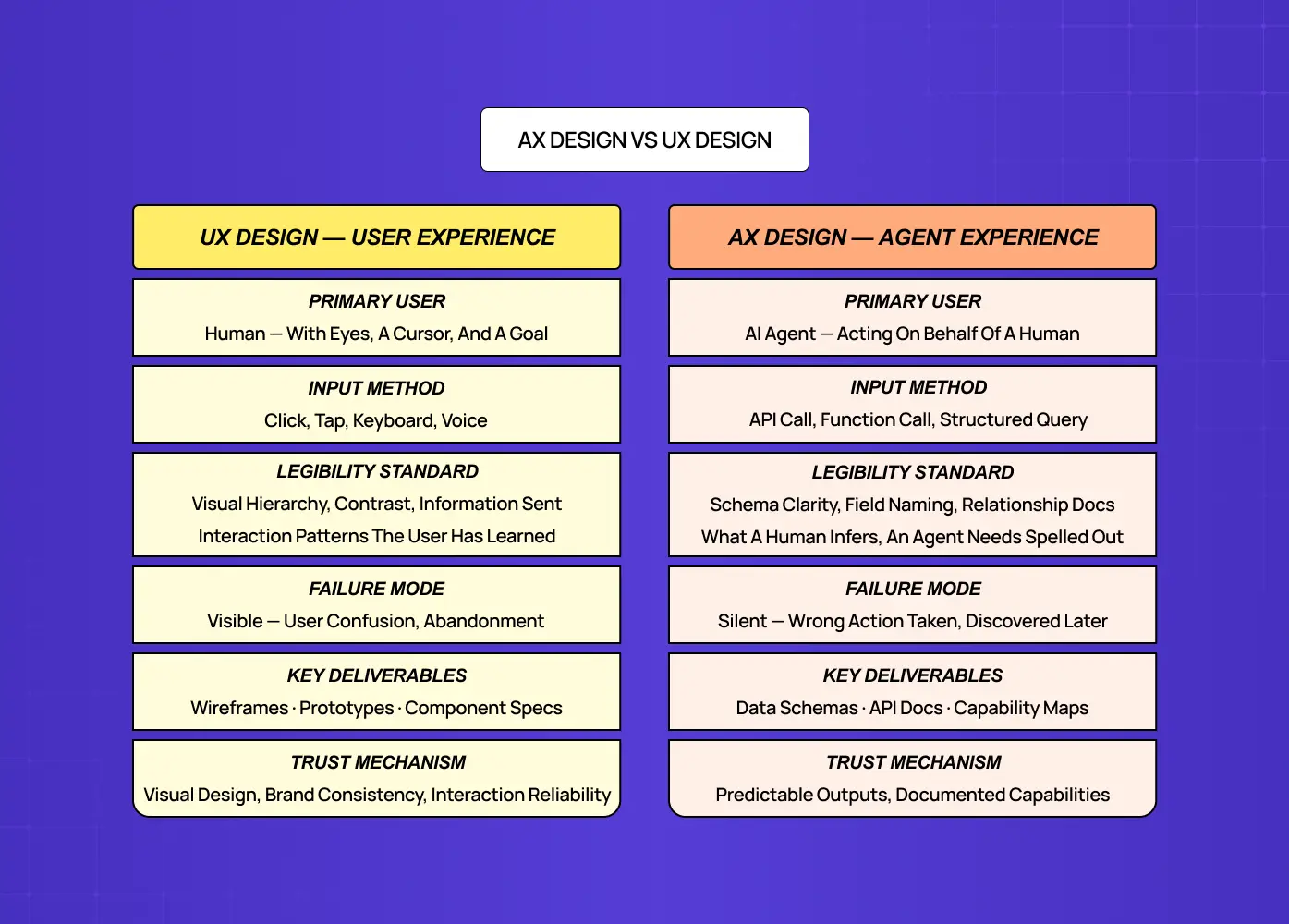
The clearest way to understand where UX design ends and AX design begins is to compare them directly across the dimensions that matter for product teams.
Dimension | UX Design | AX Design |
Primary user | Human | AI agent |
Input method | Click, tap, keyboard, voice | API call, function call, structured query |
Output consumed | Visual interface, copy, interaction feedback | Structured data, JSON/XML, documented schemas |
Legibility standard | Visual hierarchy, contrast, information scent | Schema clarity, field naming, relationship documentation |
Error handling | Friendly error messages, recovery paths | Machine-parseable error codes, structured failure states |
Trust mechanism | Visual design, brand consistency, interaction reliability | API versioning, predictable outputs, documented capabilities |
Key deliverable | Wireframes, prototypes, component specs | Data schemas, API documentation |
Failure mode | User confusion, abandonment, support tickets | Agent misinterpretation, incorrect action, silent failure |
Pay particular attention to the last row.
The most important column in that table is the last one. Common UX failures are visible: a confused user generates support tickets, abandonment data, and user research findings. AX failures are often silent. An AI agent that misinterprets a field definition, acts on incomplete data, or encounters an undocumented state does not file a support ticket. It takes the wrong action, produces a wrong output, and the human user discovers the problem later, often too late to easily reverse it.
This is why AX design is a distinct discipline and not a subset of UX: the failure modes are different, the success criteria are different, and the design deliverables are different — and neither set of deliverables is served by the same UX design methods.
The Dual Audience Surface Map: Which Surfaces Need UX, AX, or Both
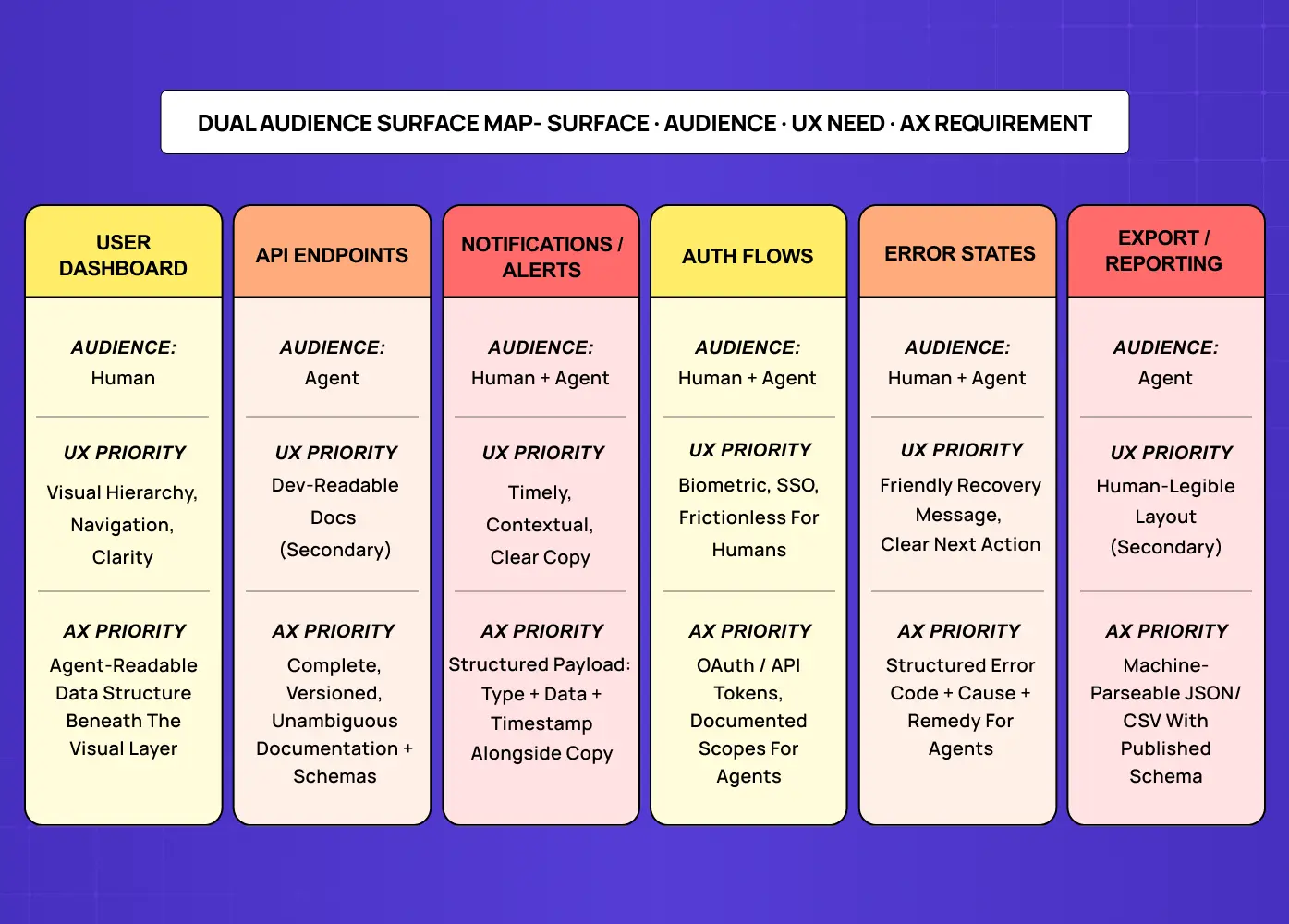
The most practical question for a SaaS product team confronting AX design is: what, specifically, needs to change in our product? The answer depends on which surfaces in your product AI agents are likely to interact with, and in what capacity.
The Dual Audience Surface Map, developed by Groto (letsgroto.com), classifies every product surface by its primary audience (human, agent, or both) and maps the design priorities and deliverables for each.
Surface | Primary Audience | Design Priority | Key AX Requirement |
User dashboard | Human | UX: hierarchy, navigation, clarity | Agent-readable data structure behind the visual layer |
API endpoints | Agent | AX: schema clarity, action docs | Complete, versioned, unambiguous documentation |
Notification / alert | Both | UX copy + machine metadata | Structured payload alongside human-readable message |
Auth flows | Both | UX: biometric, SSO for humans | AX: OAuth / API token for agents, documented scopes |
Search and filter | Both | UX: visual controls for humans | AX: query parameters + documented filter logic |
Forms and data entry | Both | UX: label clarity, validation UX | AX: explicit field types, required/optional schema |
Error states | Both | UX: friendly recovery messages | AX: structured error codes + cause + next action |
Export / reporting | Agent | AX: structured output formats | Machine-parseable data (JSON/CSV) with schema docs |
The key insight from the Surface Map is that most SaaS products already have agent-facing surfaces. They are just not designed for agents. Your API documentation was probably written for human developers, not AI agents. Your error messages were written for human users. Your data export format may not have a published schema.
AX design does not require building new surfaces. It requires designing the agent layer of surfaces that already exist — a principle that maps directly onto how product design systems are structured: the token and schema layer beneath the visual interface is exactly where agent-readable components live.
What AX Design Actually Requires: The Specific Deliverables
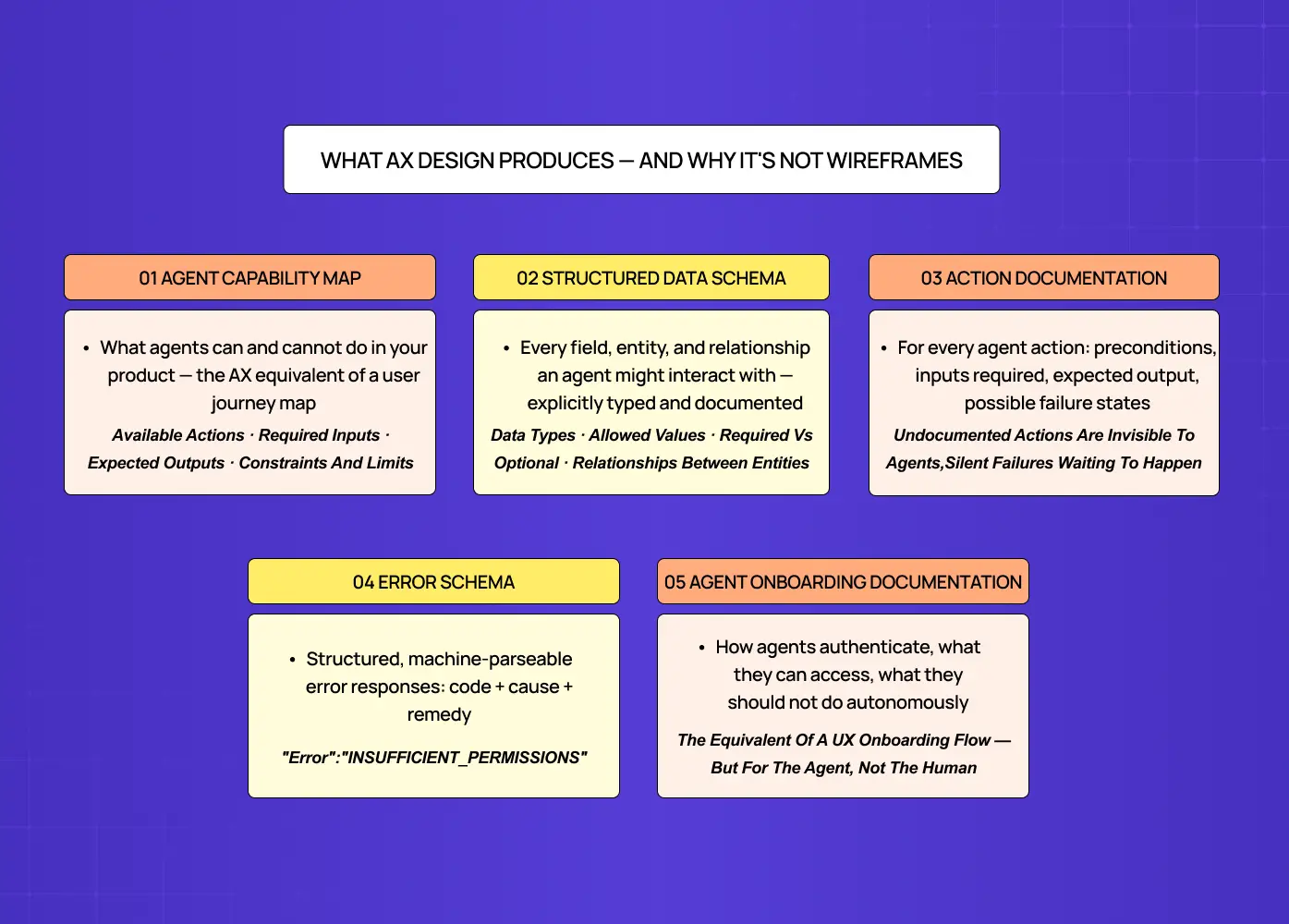
One reason SaaS teams struggle to start with AX design is that the deliverables look different from what design teams typically produce. AX design does not always produce wireframes or prototypes. It often produces documentation, schemas, and structured specifications that look more like engineering work than design work.
The five core AX design deliverables are:
Agent Capability Map
A document that describes what an AI agent can and cannot do within your product: which actions are available, what data they require, what outputs they produce, and what constraints apply. This is the AX equivalent of a user journey map — building one well draws on the same digital design foundations as any journey map: understanding goals, constraints, and where system behaviour meets user expectation. It defines the agent's experience of your product from entry to outcome.
Structured Data Schema
Every field, entity, and relationship in your product that an agent might interact with needs an explicit schema: data type, allowed values, required versus optional, and relationship to other entities. What a human infers from context and visual convention, an agent needs in writing.
Action Documentation
For every action an agent can take in your product (triggering a workflow, updating a record, sending a communication) there needs to be clear documentation of the preconditions, the inputs required, the expected output, and the possible failure states. Undocumented actions are invisible to agents — and for teams tracking design ROI metrics, this is where agent errors concentrate and where the cost of missing AX is most directly quantifiable.
Error Schema
Agent-facing errors need structured, machine-parseable responses: a code that identifies the error type, a cause description the agent can use to adjust its behaviour, and a next-action recommendation. "Something went wrong" is a UX error message. {"error": "INSUFFICIENT_PERMISSIONS", "cause": "write_access_required", "remedy": "request_scope_upgrade"} is an AX error message.
Agent Onboarding Documentation
The equivalent of a UX onboarding flow, but for agents: a structured guide to how an agent should authenticate, what it can access, what it should not do autonomously, and how to interpret the product's outputs. Without this, agents operating in your product are navigating without a map.
Where UX and AX Overlap, and Why That Is Where Most Teams Get Stuck
The surfaces where UX and AX overlap (the dual-audience surfaces) are the hardest to design well because they require meeting two different legibility standards simultaneously.
Consider a notification. For the human recipient, a great notification is timely, contextually relevant, written in natural language, and leads to a clear next action. For an AI agent processing that notification, a great notification has a structured payload: a type field that identifies what kind of event it represents, a data field with the relevant entities, and a timestamp. The human-readable copy and the machine-readable metadata coexist in the same notification, and both need to be designed.
Most teams default to designing for the human and treating the machine layer as a secondary concern. This works until agents start processing those notifications and acting on them based on what they can parse, which is often less than what the human would intuit from the copy.
The design principle for dual-audience surfaces is progressive enrichment: design for the human first, then add the structured metadata layer that makes the same surface agent-readable. This approach does not compromise the UX. It adds a layer beneath it — the same logic that underpins building accessible products: both disciplines serve additional audiences by adding structured layers without disrupting the primary human experience. The human sees the same polished interface. The agent sees the structured payload.
This is also where a design partner with AX experience becomes valuable. Most UX design teams know how to design for humans. Fewer know how to design the metadata layer that makes the same surface legible to agents, which requires understanding both core UX standards requirements and the agent's interaction model.
Does Your SaaS Product Need AX Design Right Now?
Three signals that your product has reached the point where AX design is a priority:
Your users are already using AI agents with your product. If your users are using tools like ChatGPT, Cursor, Zapier AI, or custom agents to interact with your API or extract data from your product, your product already has an agent audience — a shift that reflects the broader UX design shifts redefining who products are actually built for. The question is whether those agents are operating with designed AX or navigating without one.
You are adding AI agent features to your product. If your product will have AI agents that act within it (automating workflows, processing data, taking actions on behalf of users) the agent's interaction with your product's own surfaces is an AX design problem, not a UX one — and this includes mobile surfaces, where mobile UX trends in 2026 increasingly centre on ambient AI features operating on users' behalf.
Your API is public or partner-accessible. Any surface accessible via API is potentially accessible to an AI agent. If your API documentation was written for human developers, it may not be structured for agents, which means any agent using it is operating on inferred behaviour rather than designed AX.
If none of these apply, standard UX investment is the right priority — and the design scope decision between UX and broader product design is the right frame for evaluating where that investment should land. But for the majority of SaaS products in 2026, at least one of these signals is already present, and the gap between where the AX design should be and where it currently is will only widen as agent usage grows.
What Groto Does Differently for AX Design
At Groto, we work with SaaS teams at the intersection of UX and AX: products where both human users and AI agents are active audiences that need deliberate design.
Our approach starts with the Dual Audience Surface Map: an audit of every product surface to classify its primary audience and identify the gap between the current design and what the secondary audience (human or agent) needs. For most clients, this is the first time AX has been treated as a deliberate layer of product UX strategy rather than an afterthought. For most products, this surface audit reveals three or four high-priority AX gaps: surfaces that agents are already interacting with but that have not been designed for agent legibility.
We address those gaps without disrupting the UX. The goal is never to rebuild the human-facing interface for the benefit of agents. It is to add the agent layer (structured schemas, capability documentation, error architecture) beneath the existing UX, so both audiences are served by the same surface.
For SaaS teams adding AI agent features to an existing product, we also design the agent's internal experience: how the agent navigates the product's own surfaces, what data it can access, and what controls are in place so human users remain in the loop — the crux of the copilot versus agent design decision. This is the intersection of AX design and the Agent Handoff Framework: designing both the agent's interaction with the product and the human's interaction with the agent.
If your product is at the point where AI agents are part of the experience (either as users of your product or as features within it) the design investment needed is different from what a traditional UX agency provides.
Key Takeaways
AX design (Agent Experience design) is the discipline of designing products for AI agents that interact autonomously: reading data, calling APIs, and taking actions on behalf of human users. It is parallel to UX design, not a subset of it.
UX design optimises for human legibility: visual hierarchy, interaction feedback, cognitive load. AX design optimises for machine legibility: structured schemas, clear action documentation, parseable error states.
The Dual Audience Surface Map (Groto) classifies every product surface by primary audience (human, agent, or both) and identifies the specific design deliverables required for each.
Most SaaS products already have agent-facing surfaces. The question is whether those surfaces have been designed for agents or whether agents are navigating them without designed AX.
The five core AX design deliverables are: Agent Capability Map, Structured Data Schema, Action Documentation, Error Schema, and Agent Onboarding Documentation.
Dual-audience surfaces (notifications, auth flows, search, forms, errors) are the hardest to design because they must meet two different legibility standards simultaneously. The right approach is progressive enrichment: design for the human first, then add the structured metadata layer for agents.
AX design is a current priority for any SaaS product where users are already using AI agents with the product, where agent features are being added, or where the API is publicly accessible.