
SaaS teams are adding AI agents to products designed for human actors — and the mismatch is eroding trust. This is the complete framework for designing agentic interfaces that keep users in control while AI does the work.
The interface contract for AI agents is different — here's how to get it right.

TL;DR
Designing for AI agents is a fundamentally different challenge from designing AI features — the interface must account for autonomous action, not just AI output.
The five core challenges are: predictability, control, transparency, handoff, and failure recovery.
The Agent Integration Ladder maps four autonomy levels — Suggest, Assist, Delegate, Automate — to distinct design requirements.
Four UX patterns every agentic interface needs: Intent Preview, Autonomy Dial, Handoff with Context, and Structured Outcome Log.
Most SaaS teams should start at Level 2 (Assist) and move up the ladder as user trust is established.
Most SaaS teams building AI agents are doing it backwards. They design the agent — defining its capabilities, tooling, and LLM logic — then look for somewhere to put it in the existing interface. The result is a chat panel bolted onto a product that was never built for autonomous action, or an "AI mode" toggle that drops users into a different interaction model with zero preparation.
According to McKinsey's 2025 Global Survey on AI, 62% of organizations are already experimenting with agents — part of a broader shift in how AI is transforming UX and UI development at the product level. But Gartner expects more than 40% of those projects to be canceled by 2027. The reason isn't model quality. Projects stall because users didn't trust the system, didn't understand what it just did, or felt they'd lost control of their work.
That's a design problem — and it's one that most SaaS teams aren't solving early enough.
At Groto, we work with SaaS teams at the exact transition point where they move from "we have an AI feature" to "we have an AI agent in our product." The design work required for that shift is substantially different from anything that came before it. Here's what getting it right actually looks like.
What Are AI Agents — and Why Are They Different?
AI agents are software systems that don't just respond to instructions — they pursue goals. Given an objective, an agent breaks it into steps, executes them across tools and systems, and adapts based on what it encounters. No human confirmation required at each step.
This is a different category from the AI most SaaS products have shipped so far. A grammar suggestion, a generated summary, a smart recommendation — these are AI features. They respond when called upon. An agent that monitors your CRM, identifies stalled deals, and sends follow-ups on a schedule is an actor, not a tool.
The shift is already underway — and understanding how teams are using agentic AI for faster UX workflows makes clear why SaaS teams that haven't thought seriously about agentic design are already behind.
What makes designing for AI agents genuinely hard isn't the AI — it's the interface contract. The implicit agreement between the system and the user about what the agent is allowed to do, what it must communicate, and how the user takes control back. Most products getting this wrong aren't failing on model quality. They're failing on design.
AI Features vs. AI Agents — Why the Distinction Changes Everything
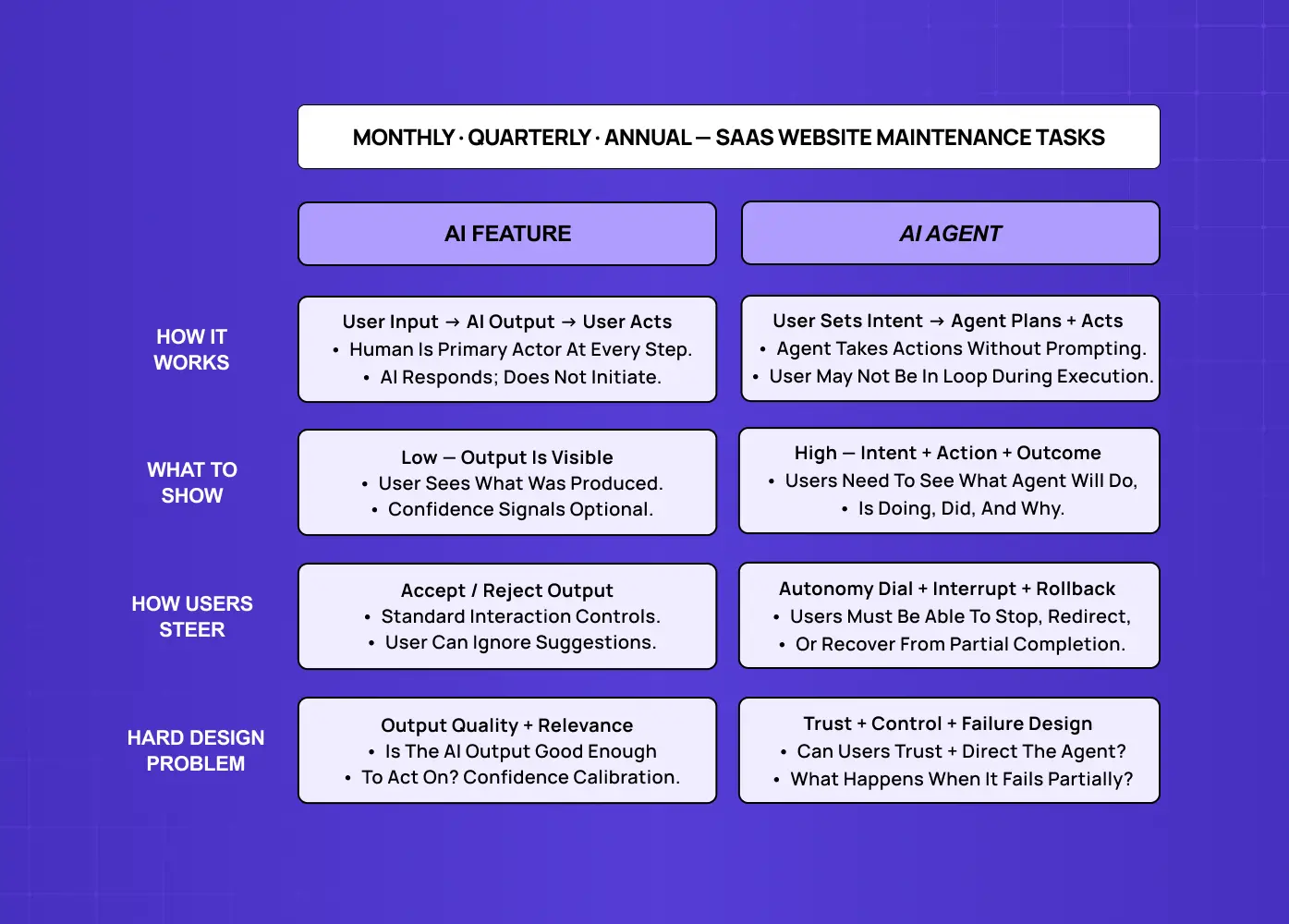
The design requirements change completely depending on which category you're in — the assistant vs agent divide.
AI features are reactive. The user acts, the AI responds. The user remains the primary actor; the AI enhances their decision. Design for AI features extends familiar principles — surface the output clearly, make it easy to accept or reject, signal confidence where it matters.
The interface contract is: user input → AI output → user decision.
AI agents are proactive and autonomous. The user sets a goal, and the agent executes the steps to reach it — potentially across multiple systems, without asking permission at each step.
The interface contract shifts entirely: user sets intent → agent plans → agent acts → user receives outcome.
This distinction matters — the full picture of how AI UX differs from traditional UX for SaaS products starts with this reactive vs. proactive divide — because the design challenges of agentic interfaces simply don't exist in reactive AI features:
Reactive features don't take irreversible actions while you're not watching.
They don't interact with external systems on your behalf.
They don't need to communicate what they're about to do before doing it.
The moment you move from a reactive feature to a proactive agent, you have a new design problem: how do you build an interface that maintains user trust, control, and comprehension when the system is acting on their behalf?
Why Interface Design Is the Real Problem in Agentic AI
The agentic AI market is growing from $5.25 billion in 2024 toward $199 billion by 2034 at a 43.84% CAGR, with voice interfaces emerging as one of the highest-growth application areas — the future of UX design with AI and voice interfaces is already reshaping agentic product decisions. By 2028, 33% of enterprise software applications will include agentic AI, up from less than 1% in 2024. The technology investment is accelerating — but trust is the bottleneck.
82% of organizations intend to integrate AI agents within 1–3 years, but are also mindful of the need to establish guardrails to validate AI-made decisions, ensuring transparency and accountability — requirements that sit at the center of the AI-driven UX practices every business should know.
An AI agent operating inside a SaaS product changes a foundational assumption: that every significant action — submitting, sending, updating, deleting — is taken by a human making a deliberate choice. When an agent can take those actions, that assumption breaks. If the interface wasn't designed to surface what the agent is doing, why it's doing it, what it's about to do next, and how to take control back — the user experience isn't just suboptimal. It actively erodes trust.
The 5 Core Design Challenges of Agentic Interfaces
Before introducing a framework, it's worth naming the five challenges that agentic interfaces create — because each one requires a different design response.
1. Predictability
Users need to form a mental model of what the agent will do before it does it — and the challenge of integrating AI into SaaS UX is that most products were never built with this expectation in mind. If the agent's behavior regularly surprises users — even with good outcomes — trust erodes. The design challenge: make agent intent legible before execution, not just logged afterward.
2. Control
The user needs to be able to stop, modify, or take over from the agent at any point. Designing genuine control is harder than it looks — especially when agent actions are time-sensitive, irreversible, or chained across multiple steps. Cosmetic control (an "undo" button that doesn't actually work for that action type) is worse than no control, because it creates false confidence.
3. Transparency
When the agent acts, the user needs to understand what it did and why. This isn't just audit logging — it's real-time communication of agent reasoning in language users can interpret. "The agent sent an email" is less useful than "The agent sent a follow-up to James because three days had passed since the last interaction."
4. Handoff
Most agentic workflows involve moments where the agent needs human input — information it doesn't have, a decision that carries risk, or an action requiring explicit authorization. Poorly designed handoffs break workflow, breed distrust, or cause users to ignore the interruption entirely.
5. Failure and Recovery
Agents fail differently from traditional software. A failed database query returns an error. A failed agent may have partially completed a multi-step task, leaving the system in an ambiguous state. Designing for agent failure means designing for partial completion, graceful rollback where possible, and clear communication about what was and wasn't done — and it's worth studying why copilot UX feels broken and how to fix it before these failure modes reach production.
The Agent Integration Ladder — A Framework for Agentic UX
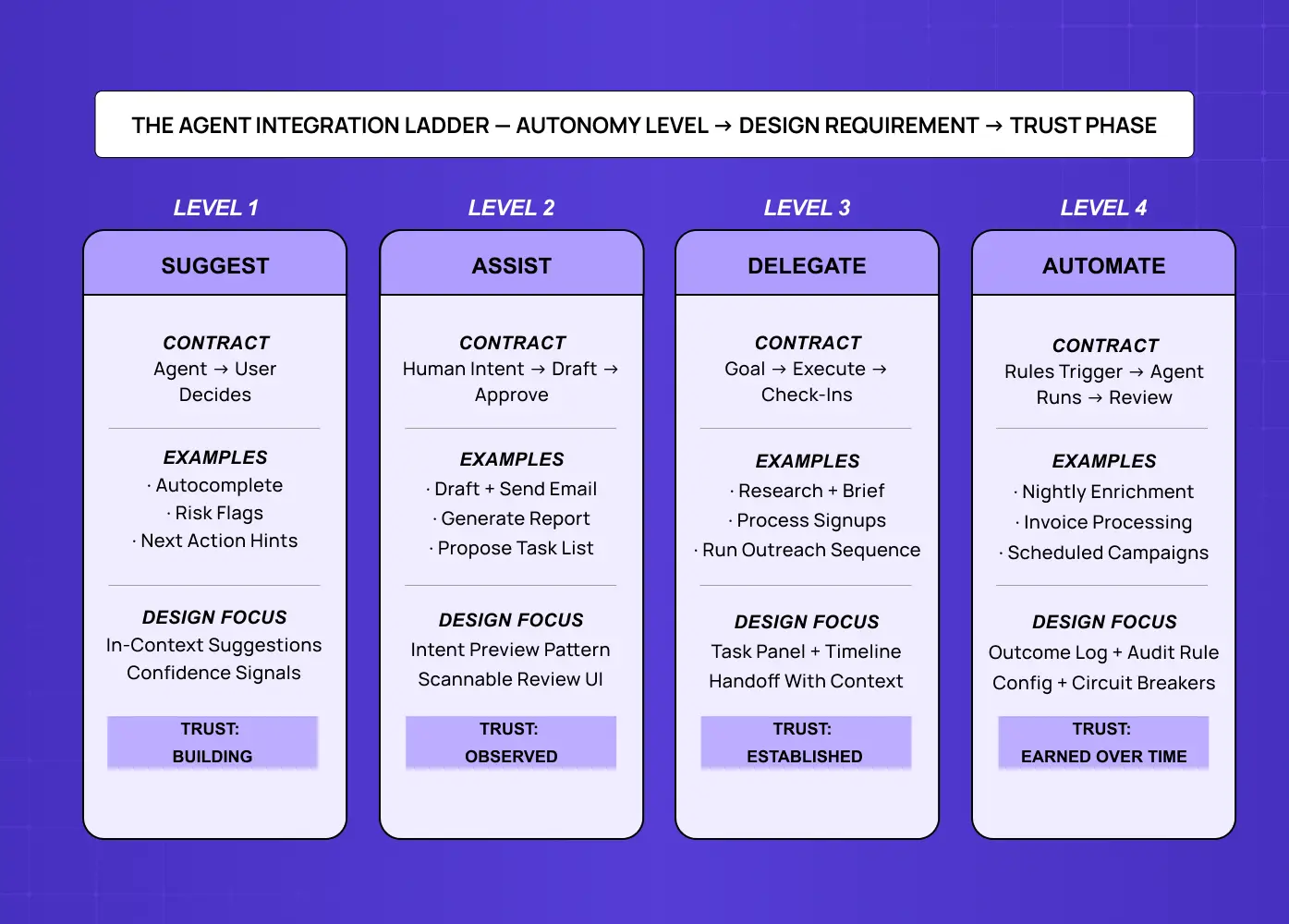
The most important insight in designing for AI agents is that autonomy isn't binary. There's a spectrum, and the right design patterns at each level are different. We call this the Agent Integration Ladder.
Level 1 — Suggest
The agent surfaces recommendations, predictions, or options.
The human decides whether to act on them.
Examples: smart autocomplete, risk flagging, recommended next action.
Design focus: Surface suggestions in-context without breaking the user's primary workflow — this applies across modalities, including the principles of voice user interface design, where a verbal confirmation replaces a tap but the same in-context constraint holds. Confidence signals matter either way — users calibrate trust based on observed accuracy over time.
Level 2 — Assist
The agent drafts an action and presents it for approval before execution.
Examples: draft an email, generate a report, propose a task list.
Design focus: The review step is the core interaction — and mastering AI copilot design at this level means making the draft structured and scannable, not a wall of text users approve without reading. One-click approval works for low-stakes actions; for higher-stakes ones, friction is a feature.
Level 3 — Delegate
The human sets a goal; the agent executes with check-ins at defined moments.
Examples: "draft the quarterly report and flag anything needing my input," "process new signups but escalate accounts over 1,000 seats."
Design focus: The task panel becomes the primary interface element — showing what the agent has done, what's in progress, what's next, and where the intervention points are. Chat is secondary; structured task timelines are primary.
Level 4 — Automate
The agent runs fully on a defined schedule or trigger; the human reviews outcomes and configures rules.
Examples: nightly data enrichment, automated invoice processing, scheduled email campaigns.
Design focus: Audit and control. Users need a clear history of every agent action, simple rule management, and circuit breakers — limits that define the boundaries of agent autonomy without requiring intervention on every action.
Most SaaS teams building their first agent should start at Level 2. Level 1 is a feature enhancement, not truly agentic. Levels 3 and 4 require a depth of trust that takes time to earn. Jumping directly to Level 4 with new users is one of the most reliably trust-destroying decisions a SaaS team can make.
4 UX Patterns Every Agentic Interface Needs
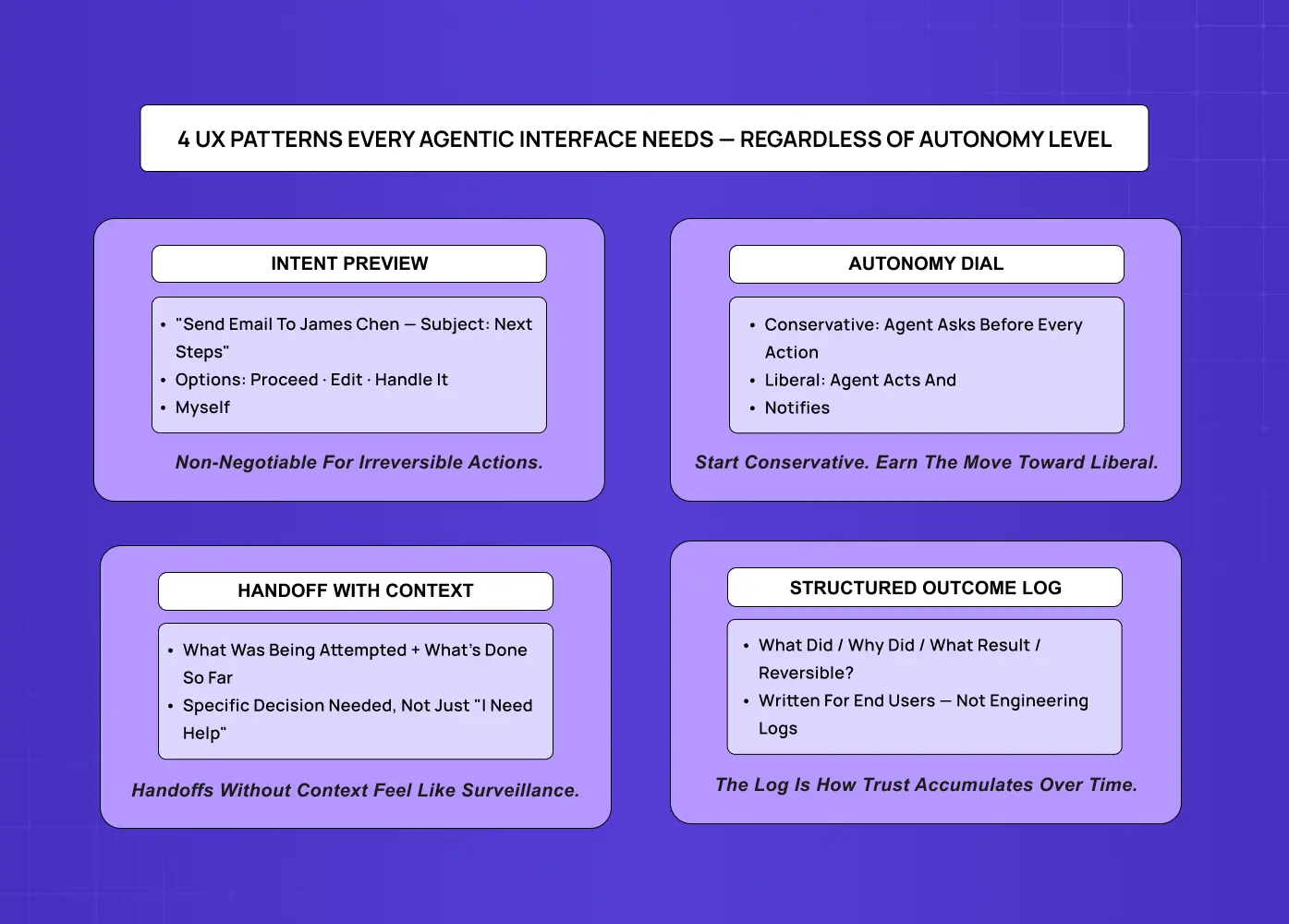
Regardless of where on the Agent Integration Ladder a product sits, these four UX patterns define effective agentic interfaces.
Pattern 1: Intent Preview
Before the agent takes a significant action, it shows the user exactly what it's about to do and offers three options: Proceed, Edit, or Handle it myself. The preview is specific — "Send a follow-up email to James Chen at Acme Corp, subject: 'Next steps from our call'" rather than "Send follow-up email." For irreversible actions, this preview is non-negotiable. For reversible ones, it can be time-limited — the agent proceeds after a short window unless interrupted.
Pattern 2: Autonomy Dial
A user-accessible control that sets the agent's level of independence on a spectrum — from "ask before every action" to "act and notify." Users should be able to adjust this globally and per task type. The Autonomy Dial externalizes what is otherwise an invisible configuration, and it gives users a concrete mechanism to extend trust as they accumulate positive experience with the agent.
Pattern 3: Handoff with Context
When the agent needs human input, the handoff must carry full context — not just "I need help," but: what was being attempted, what has been done, what specific decision is needed, and what happens next once the user responds. The handoff should appear in the user's natural workspace, not in a separate panel requiring context-switching. Agents that interrupt without context feel like surveillance, not assistance.
Pattern 4: Structured Outcome Log
Every significant agent action is logged in a structured, readable format answering four questions:
What did the agent do?
Why did it do it (what goal or condition triggered the action)?
What was the result?
Can this action be reversed, and if so, how?
This log is written for the end user, not the engineering team. It becomes one of the primary trust-building mechanisms in agentic interfaces — users who can see a clear, sensible action history become comfortable extending more autonomy over time.
Real example: When we designed Barista — an AI-powered PR platform for editorial teams — one of the core challenges was making AI actions feel legible and safe to delegate. Rather than defaulting to a chat window, we built a structured content editor where each AI action (drafts, revisions, prompts) was displayed alongside its output, with tools to review, revise, or revert. Team members could comment directly in the workflow rather than context-switching to a separate thread. The result was an interface that felt like a collaborative colleague — not an autonomous black box.
Common Mistakes SaaS Teams Make When Designing for AI Agents
Building the agent and the UX on separate tracks.
Agentic interface design decisions — handoff points, intent previews, what constitutes a reviewable vs. fully autonomous action — interlock with agent architecture decisions. The UX design process for agentic products must begin before the agent architecture is finalized — if the design team is handed a finished agent and asked to wrap a UI around it, half the hard decisions have already been made without design input.
Defaulting to chat
While the UX best practices for AI chatbots cover question-answering and content generation well, chat is a poor interface for AI that takes actions. Structured work — tasks with sub-tasks, status, owners, and outcomes — needs structured UI. The task panel, timeline, and outcome log serve agentic work better than a chat window. Chat belongs as a secondary escalation channel, not the primary control surface — and further out, agent-generated UI points toward interfaces the agent composes per task rather than pre-built panels.
Treating transparency as an afterthought
"We'll add logging later" is the most common form of this mistake. The problem is that real-time transparency — status indicators, intent previews, active task descriptions — is a design requirement, not a post-launch feature. If the agent acts silently and produces a log afterward, users can check compliance but can't course-correct in progress.
Designing only for happy paths
Agentic systems fail in more complex ways than traditional software — they partially complete tasks, make decisions based on incomplete information, and take actions that are correct by their logic but wrong by the user's intent. If the design doesn't address these failure modes, the first significant agent error will feel like a betrayal rather than a recoverable event. Speculative design methods are one of the most practical tools for stress-testing agentic scenarios before they reach production — mapping edge cases and partial failures before users encounter them.
Skipping the trust-building phase
Trust in AI agents accumulates through demonstrated reliability across low-stakes actions. Launching a Level 3 or Level 4 agent to users with no prior experience of the system asks them to trust an autonomous actor with no track record — one of the most consequential AI UX design mistakes a product team can make, and one of the hardest to recover from once trust is lost. The Agent Integration Ladder is both a design framework and a trust curriculum — start at Level 1 or 2, let users observe, and move up as trust is earned.
Why Groto for AI Agent UX Design
We work with SaaS teams specifically at the transition from AI feature to AI agent — where the design complexity increases significantly and the stakes of getting it wrong are higher.
What we bring to agentic UX projects:
Architecture-informed design. We get involved at the start of the agent's development cycle, not after it's built. Interface decisions — what the agent must communicate, what requires human review, what the handoff model looks like — are made alongside technical decisions, not after them.
Structured task UI expertise. We don't default to chat. We design task panels, timelines, outcome logs, and intent preview flows that match the structured nature of agentic work.
Trust-first sequencing. We map every agentic product to the Agent Integration Ladder and design for the level of trust users actually have — not the level the team wishes they had.
Proven AI product design. From Barista (AI editorial assistant for PR teams) to Camb.ai (AI dubbing platform for global content creators) to LearnSphere (AI-powered edtech), we've built the design patterns that make AI feel usable, trustworthy, and worth extending autonomy to.
If your SaaS product is moving from AI features to AI agents, a discovery call is where we figure out which level of the ladder you're on and what the design needs to be to make the next stage work.
Conclusion
AI agents and AI features require fundamentally different design approaches — one is reactive, the other is proactive, and the interface contract changes completely.
The five core design challenges in agentic interfaces are predictability, control, transparency, handoff, and failure recovery — each requiring a distinct design response.
The Agent Integration Ladder (Suggest → Assist → Delegate → Automate) maps autonomy levels to design requirements and serves as a trust-building curriculum — start at Level 2.
Four non-optional UX patterns: Intent Preview, Autonomy Dial, Handoff with Context, and Structured Outcome Log.
Chat is not the default interface for agentic AI — structured task UIs, timelines, and outcome logs serve agentic work more effectively.
Agentic design requires early involvement — architecture and interface decisions need to be made together, not sequentially.