
Harpreet Singh

Founder and Creative Director

How to Go From Wireframe to Prototype: A Step-by-Step UX Guide

Jan 24, 2026

A practical UX guide explaining how to transition from wireframes to prototypes, clarify interactions, reduce design rework, and validate user flows before development.

Harpreet Singh

Founder and Creative Director

How to Go From Wireframe to Prototype: A Step-by-Step UX Guide

Jan 24, 2026

A practical UX guide explaining how to transition from wireframes to prototypes, clarify interactions, reduce design rework, and validate user flows before development.

Moving from wireframe to prototype isn’t just a visual upgrade — it’s a shift from structure to behavior. This guide walks through a clear, practical UX process to turn static layouts into testable, user-validated experiences.

Wireframes define structure. Prototypes test behavior. This guide shows how to bridge both.


Transitioning from a wireframe to a prototype is one of the most pivotal moments in the UX process.
Wireframes help you define structure and intent, while prototypes help you validate flow, interaction, and user understanding before investing in high-cost engineering.

In this guide, we’ll cover:

  • What each artifact really means (wireframe vs mockup vs prototype)

  • A clear wireframe to prototype process

  • Practical steps for converting wireframes into testable prototypes

  • Tips to reduce rework and increase usability before development

Wireframe vs Mockup vs Prototype: What’s the Difference?
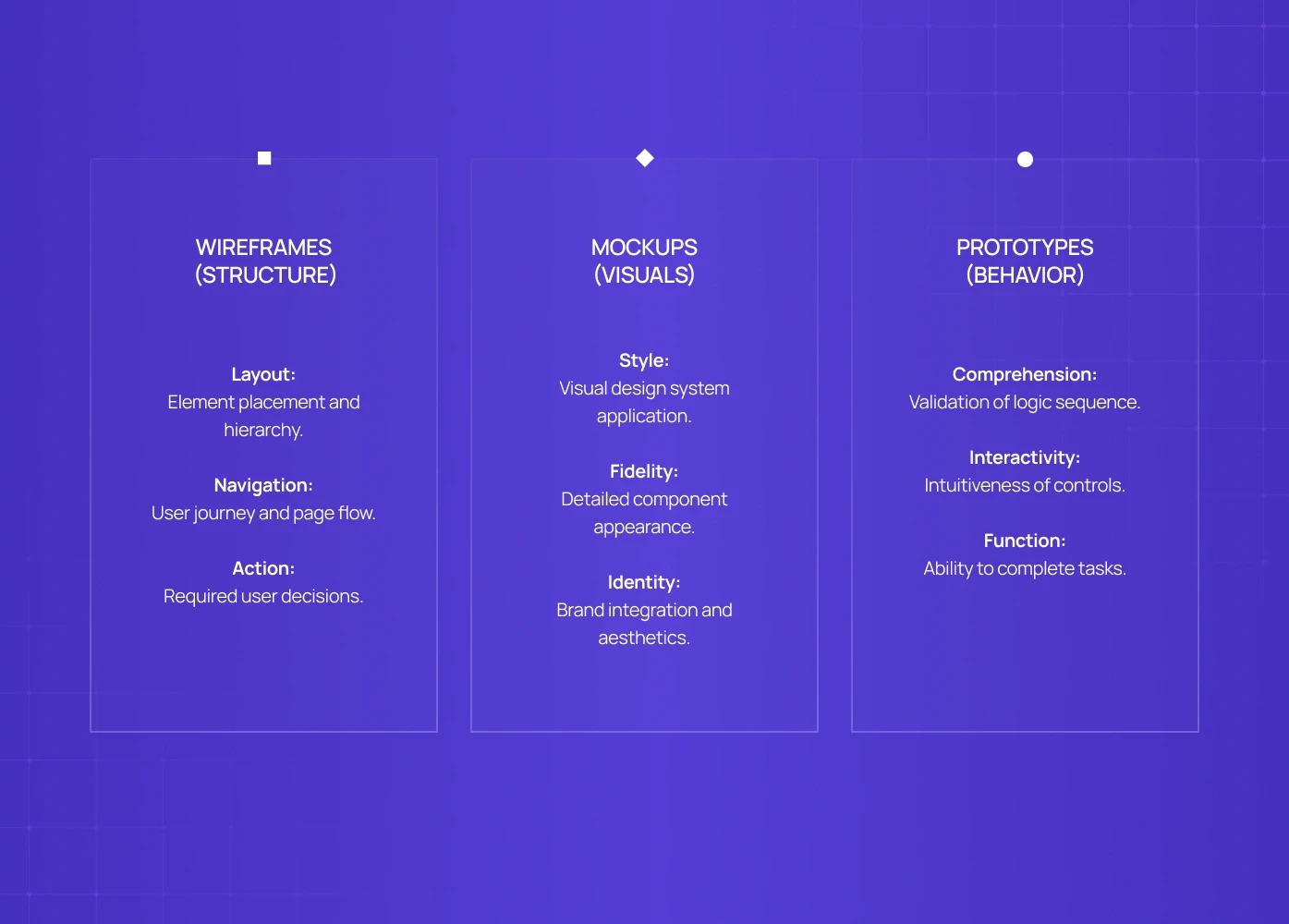

Before you convert anything, you need clarity on what you’re building.

Wireframes

Low-fidelity, structural outlines showing layout, hierarchy, and basic interaction zones. Think of them as UX skeletons.

They answer:

  • What elements go where?

  • What is the page flow?

  • What decisions are we asking the user to make?

Mockups

High-fidelity, static visual designs that show how the interface looks. Mockups refine typography, color, spacing, and visual language, but they’re not interactive.

They answer:

  • What is the visual design system?

  • How do components appear?

  • How does branding integrate?

Prototypes

Interactive simulations of finished flows — clickable, scrollable, and usable like a real product.

They answer:

  • Does the user actually understand the sequence?

  • Are interactions intuitive?

  • Do flows support task completion?


This distinction matters because the wireframe to prototype process is not just a visual upgrade - it’s a shift from structural thinking to behavior thinking.

The Wireframe to Prototype Process: Step by Step

Here’s the practical path most teams follow.

Step 1: Validate the Wireframes First

Before any visuals:

  • Review your wireframes with stakeholders

  • Check if the logic aligns with business goals

  • Confirm that the hierarchy reflects user intent

Questions to ask:

  • Does this flow support the primary user task?

  • What assumptions are we making?

  • Where might users hesitate?

Wireframes should be cheap to change. Identify ambiguity early.

Step 2: Map Out the Interactions

For every wireframed screen, list the expected user actions:

Screen

Expected Action

Next Screen

Success Condition

Home

Tap Get Started

Sign-Up

Shows sign-up form

Sign-Up

Enter email

Next step

Field validation

Feature List

Tap Item

Item Detail

Item detail view

This activity makes the invisible — decisions — visible. It becomes the blueprint you’ll use when you actually build the prototype.

Step 3: Define Scope Before Design Fidelity

Don’t leap into mockups immediately.

A common mistake in the wireframing to prototyping transition is over-designing too early.

Decide:

  • Which flows need fidelity first?

  • Which screens can remain low-fi during testing?

  • Which micro-interactions matter for validation?

This prioritization reduces wasted effort.

Step 4: Apply Visuals Where They Add Value

Once the flows are confirmed:

  • Bring in color, type hierarchy, spacing, icons

  • Apply your design system

  • Keep visuals consistent with your brand and product patterns

At this stage, you’re technically moving toward mockups - but only for the elements that will matter in testing.

Remember: visuals that don’t affect behavior should not slow down interaction testing.

Step 5: Build the Prototype

Now convert your wireframes (with visual context) into an interactive prototype.

How to do this depends on your toolchain, but the core idea is:

Make the experience feel real enough that users forget they’re testing a prototype.

Prototype characteristics:

  • Clickable navigation

  • Functional inputs

  • Conditional flows (e.g., show error on empty field)

  • Feedback (highlights, transitions, confirmations)

At this point, you’re not building production code - you are simulating the experience.

Step 6: Test Early, Test Often

Use the prototype to:

  • Validate task success

  • Observe hesitation or confusion

  • Capture time-to-task metrics

Testing methods:

  • Remote unmoderated tests

  • In-person moderated sessions

  • Guerrilla usability tests

Your goal at this stage is understanding user behavior, not getting perfect UI.

This is the heart of the wireframe to prototype process — you’re validating intent and interaction before dev.

Practical Tips for the Wireframe → Prototype Journey


Below are insights that make the transition smoother and more reliable.

1. Don’t Prototype Everything at Once

Start with your core conversion paths. Prototype them first.

This keeps early testing focused and productive.

2. Prototype at the Right Fidelity

Too low and users think “it’s not real.”
Too high and you waste design hours before knowing if flows work.

Balance fidelity with testability.

3. Use Annotations for Ambiguous Areas

When handoffs to developers or stakeholders happen, note expected behavior:

Tap outside modal closes modal
First error message priority
Delay before auto-suggest appears

These annotations reduce miscommunication later.

4. Prototype Error and Edge States

Don’t ignore states like:

  • form errors

  • empty data screens

  • slow network

These are where real users feel friction.

5. Involve Engineers Early

Early developer input helps you prototype patterns that are feasible and performant.

This usually shortens the dev timeline later.

Converting Wireframe to Mockup: When and Why

Sometimes teams want a mockup step between wireframe and prototype.

You do this when:

  • visuals matter for buy-in

  • branding needs early validation

  • design system patterns are unsettled

But a mockup alone will not answer interaction questions.

So treat mockups as supportive artifacts, not the end goal.

Challenges in Wireframing to Prototyping: And How to Avoid Them


Here are three common pitfalls teams hit:

1. Prototyping Without Clear Goals

If you can’t state what you expect users to do with the prototype, the test won’t help you.

Fix: Define success criteria before prototype creation.

2. Ignoring Edge Cases

Users don’t only test “happy paths.”

Fix: Prototype and test:

  • form errors

  • slow feedback

  • empty states

3. Moving Too Fast to Hi-Fi

Jumping to full design before interaction clarity creates rework.

Fix: Design fidelity only where it affects understanding.

When It Makes Sense to Skip a Prototype

Yes, sometimes.

If:

  • you’re early in product discovery

  • the goal is strategy validation, not design validation

  • you’re still exploring problem space with users

Then you might stay at the wireframe level, conduct research, and iterate wireframes before prototyping.

But once your goal is to gauge intent, flow, or interaction, the prototype becomes essential.

Final Thought

Going from wireframe to prototype is a shift in lens:
From layout and intent to interaction and behavior.

Done right, this process reduces guesswork, increases confidence, and shortens product development cycles.
Approach it as a conversation with users - not a handoff to developers - and your prototypes will become powerful learning tools.

FAQs

1. What is the wireframe to prototype process?
It’s the structured transition from low-fidelity layout (wireframes) to interactive, testable simulations (prototypes), ensuring task validation before development.

2. Why not jump straight from wireframe to code?
Prototyping reveals interaction issues early. Code commits late and is harder to change.

3. Is a mockup the same as a prototype?
No. A mockup is a visual design artifact. A prototype simulates experience and interaction.

4. When should I prototype vs mockup?
Prototype when you want to test behavior. Mockup when you want to discuss visuals.

5. What tools are best?Tools like Figma, Adobe XD, and Webflow support this process, but the method matters more than the tool.

Moving from wireframe to prototype isn’t just a visual upgrade — it’s a shift from structure to behavior. This guide walks through a clear, practical UX process to turn static layouts into testable, user-validated experiences.

Wireframes define structure. Prototypes test behavior. This guide shows how to bridge both.


Transitioning from a wireframe to a prototype is one of the most pivotal moments in the UX process.
Wireframes help you define structure and intent, while prototypes help you validate flow, interaction, and user understanding before investing in high-cost engineering.

In this guide, we’ll cover:

  • What each artifact really means (wireframe vs mockup vs prototype)

  • A clear wireframe to prototype process

  • Practical steps for converting wireframes into testable prototypes

  • Tips to reduce rework and increase usability before development

Wireframe vs Mockup vs Prototype: What’s the Difference?


Before you convert anything, you need clarity on what you’re building.

Wireframes

Low-fidelity, structural outlines showing layout, hierarchy, and basic interaction zones. Think of them as UX skeletons.

They answer:

  • What elements go where?

  • What is the page flow?

  • What decisions are we asking the user to make?

Mockups

High-fidelity, static visual designs that show how the interface looks. Mockups refine typography, color, spacing, and visual language, but they’re not interactive.

They answer:

  • What is the visual design system?

  • How do components appear?

  • How does branding integrate?

Prototypes

Interactive simulations of finished flows — clickable, scrollable, and usable like a real product.

They answer:

  • Does the user actually understand the sequence?

  • Are interactions intuitive?

  • Do flows support task completion?


This distinction matters because the wireframe to prototype process is not just a visual upgrade - it’s a shift from structural thinking to behavior thinking.

The Wireframe to Prototype Process: Step by Step

Here’s the practical path most teams follow.

Step 1: Validate the Wireframes First

Before any visuals:

  • Review your wireframes with stakeholders

  • Check if the logic aligns with business goals

  • Confirm that the hierarchy reflects user intent

Questions to ask:

  • Does this flow support the primary user task?

  • What assumptions are we making?

  • Where might users hesitate?

Wireframes should be cheap to change. Identify ambiguity early.

Step 2: Map Out the Interactions

For every wireframed screen, list the expected user actions:

Screen

Expected Action

Next Screen

Success Condition

Home

Tap Get Started

Sign-Up

Shows sign-up form

Sign-Up

Enter email

Next step

Field validation

Feature List

Tap Item

Item Detail

Item detail view

This activity makes the invisible — decisions — visible. It becomes the blueprint you’ll use when you actually build the prototype.

Step 3: Define Scope Before Design Fidelity

Don’t leap into mockups immediately.

A common mistake in the wireframing to prototyping transition is over-designing too early.

Decide:

  • Which flows need fidelity first?

  • Which screens can remain low-fi during testing?

  • Which micro-interactions matter for validation?

This prioritization reduces wasted effort.

Step 4: Apply Visuals Where They Add Value

Once the flows are confirmed:

  • Bring in color, type hierarchy, spacing, icons

  • Apply your design system

  • Keep visuals consistent with your brand and product patterns

At this stage, you’re technically moving toward mockups - but only for the elements that will matter in testing.

Remember: visuals that don’t affect behavior should not slow down interaction testing.

Step 5: Build the Prototype

Now convert your wireframes (with visual context) into an interactive prototype.

How to do this depends on your toolchain, but the core idea is:

Make the experience feel real enough that users forget they’re testing a prototype.

Prototype characteristics:

  • Clickable navigation

  • Functional inputs

  • Conditional flows (e.g., show error on empty field)

  • Feedback (highlights, transitions, confirmations)

At this point, you’re not building production code - you are simulating the experience.

Step 6: Test Early, Test Often

Use the prototype to:

  • Validate task success

  • Observe hesitation or confusion

  • Capture time-to-task metrics

Testing methods:

  • Remote unmoderated tests

  • In-person moderated sessions

  • Guerrilla usability tests

Your goal at this stage is understanding user behavior, not getting perfect UI.

This is the heart of the wireframe to prototype process — you’re validating intent and interaction before dev.

Practical Tips for the Wireframe → Prototype Journey


Below are insights that make the transition smoother and more reliable.

1. Don’t Prototype Everything at Once

Start with your core conversion paths. Prototype them first.

This keeps early testing focused and productive.

2. Prototype at the Right Fidelity

Too low and users think “it’s not real.”
Too high and you waste design hours before knowing if flows work.

Balance fidelity with testability.

3. Use Annotations for Ambiguous Areas

When handoffs to developers or stakeholders happen, note expected behavior:

Tap outside modal closes modal
First error message priority
Delay before auto-suggest appears

These annotations reduce miscommunication later.

4. Prototype Error and Edge States

Don’t ignore states like:

  • form errors

  • empty data screens

  • slow network

These are where real users feel friction.

5. Involve Engineers Early

Early developer input helps you prototype patterns that are feasible and performant.

This usually shortens the dev timeline later.

Converting Wireframe to Mockup: When and Why

Sometimes teams want a mockup step between wireframe and prototype.

You do this when:

  • visuals matter for buy-in

  • branding needs early validation

  • design system patterns are unsettled

But a mockup alone will not answer interaction questions.

So treat mockups as supportive artifacts, not the end goal.

Challenges in Wireframing to Prototyping: And How to Avoid Them


Here are three common pitfalls teams hit:

1. Prototyping Without Clear Goals

If you can’t state what you expect users to do with the prototype, the test won’t help you.

Fix: Define success criteria before prototype creation.

2. Ignoring Edge Cases

Users don’t only test “happy paths.”

Fix: Prototype and test:

  • form errors

  • slow feedback

  • empty states

3. Moving Too Fast to Hi-Fi

Jumping to full design before interaction clarity creates rework.

Fix: Design fidelity only where it affects understanding.

When It Makes Sense to Skip a Prototype

Yes, sometimes.

If:

  • you’re early in product discovery

  • the goal is strategy validation, not design validation

  • you’re still exploring problem space with users

Then you might stay at the wireframe level, conduct research, and iterate wireframes before prototyping.

But once your goal is to gauge intent, flow, or interaction, the prototype becomes essential.

Final Thought

Going from wireframe to prototype is a shift in lens:
From layout and intent to interaction and behavior.

Done right, this process reduces guesswork, increases confidence, and shortens product development cycles.
Approach it as a conversation with users - not a handoff to developers - and your prototypes will become powerful learning tools.

FAQs

1. What is the wireframe to prototype process?
It’s the structured transition from low-fidelity layout (wireframes) to interactive, testable simulations (prototypes), ensuring task validation before development.

2. Why not jump straight from wireframe to code?
Prototyping reveals interaction issues early. Code commits late and is harder to change.

3. Is a mockup the same as a prototype?
No. A mockup is a visual design artifact. A prototype simulates experience and interaction.

4. When should I prototype vs mockup?
Prototype when you want to test behavior. Mockup when you want to discuss visuals.

5. What tools are best?Tools like Figma, Adobe XD, and Webflow support this process, but the method matters more than the tool.

Extreme close-up black and white photograph of a human eye

Let’s bring your vision to life

Tell us what's on your mind? We'll hit you back in 24 hours. No fluff, no delays - just a solid vision to bring your idea to life.

Profile portrait of a man in a white shirt against a light background

Harpreet Singh

Founder and Creative Director

Get in Touch

Extreme close-up black and white photograph of a human eye

Let’s bring your vision to life

Tell us what's on your mind? We'll hit you back in 24 hours. No fluff, no delays - just a solid vision to bring your idea to life.

Profile portrait of a man in a white shirt against a light background

Harpreet Singh

Founder and Creative Director

Get in Touch

Harpreet Singh

Founder and Creative Director

How to Go From Wireframe to Prototype: A Step-by-Step UX Guide

Jan 24, 2026

A practical UX guide explaining how to transition from wireframes to prototypes, clarify interactions, reduce design rework, and validate user flows before development.

Moving from wireframe to prototype isn’t just a visual upgrade — it’s a shift from structure to behavior. This guide walks through a clear, practical UX process to turn static layouts into testable, user-validated experiences.

Wireframes define structure. Prototypes test behavior. This guide shows how to bridge both.


Transitioning from a wireframe to a prototype is one of the most pivotal moments in the UX process.
Wireframes help you define structure and intent, while prototypes help you validate flow, interaction, and user understanding before investing in high-cost engineering.

In this guide, we’ll cover:

  • What each artifact really means (wireframe vs mockup vs prototype)

  • A clear wireframe to prototype process

  • Practical steps for converting wireframes into testable prototypes

  • Tips to reduce rework and increase usability before development

Wireframe vs Mockup vs Prototype: What’s the Difference?


Before you convert anything, you need clarity on what you’re building.

Wireframes

Low-fidelity, structural outlines showing layout, hierarchy, and basic interaction zones. Think of them as UX skeletons.

They answer:

  • What elements go where?

  • What is the page flow?

  • What decisions are we asking the user to make?

Mockups

High-fidelity, static visual designs that show how the interface looks. Mockups refine typography, color, spacing, and visual language, but they’re not interactive.

They answer:

  • What is the visual design system?

  • How do components appear?

  • How does branding integrate?

Prototypes

Interactive simulations of finished flows — clickable, scrollable, and usable like a real product.

They answer:

  • Does the user actually understand the sequence?

  • Are interactions intuitive?

  • Do flows support task completion?


This distinction matters because the wireframe to prototype process is not just a visual upgrade - it’s a shift from structural thinking to behavior thinking.

The Wireframe to Prototype Process: Step by Step

Here’s the practical path most teams follow.

Step 1: Validate the Wireframes First

Before any visuals:

  • Review your wireframes with stakeholders

  • Check if the logic aligns with business goals

  • Confirm that the hierarchy reflects user intent

Questions to ask:

  • Does this flow support the primary user task?

  • What assumptions are we making?

  • Where might users hesitate?

Wireframes should be cheap to change. Identify ambiguity early.

Step 2: Map Out the Interactions

For every wireframed screen, list the expected user actions:

Screen

Expected Action

Next Screen

Success Condition

Home

Tap Get Started

Sign-Up

Shows sign-up form

Sign-Up

Enter email

Next step

Field validation

Feature List

Tap Item

Item Detail

Item detail view

This activity makes the invisible — decisions — visible. It becomes the blueprint you’ll use when you actually build the prototype.

Step 3: Define Scope Before Design Fidelity

Don’t leap into mockups immediately.

A common mistake in the wireframing to prototyping transition is over-designing too early.

Decide:

  • Which flows need fidelity first?

  • Which screens can remain low-fi during testing?

  • Which micro-interactions matter for validation?

This prioritization reduces wasted effort.

Step 4: Apply Visuals Where They Add Value

Once the flows are confirmed:

  • Bring in color, type hierarchy, spacing, icons

  • Apply your design system

  • Keep visuals consistent with your brand and product patterns

At this stage, you’re technically moving toward mockups - but only for the elements that will matter in testing.

Remember: visuals that don’t affect behavior should not slow down interaction testing.

Step 5: Build the Prototype

Now convert your wireframes (with visual context) into an interactive prototype.

How to do this depends on your toolchain, but the core idea is:

Make the experience feel real enough that users forget they’re testing a prototype.

Prototype characteristics:

  • Clickable navigation

  • Functional inputs

  • Conditional flows (e.g., show error on empty field)

  • Feedback (highlights, transitions, confirmations)

At this point, you’re not building production code - you are simulating the experience.

Step 6: Test Early, Test Often

Use the prototype to:

  • Validate task success

  • Observe hesitation or confusion

  • Capture time-to-task metrics

Testing methods:

  • Remote unmoderated tests

  • In-person moderated sessions

  • Guerrilla usability tests

Your goal at this stage is understanding user behavior, not getting perfect UI.

This is the heart of the wireframe to prototype process — you’re validating intent and interaction before dev.

Practical Tips for the Wireframe → Prototype Journey


Below are insights that make the transition smoother and more reliable.

1. Don’t Prototype Everything at Once

Start with your core conversion paths. Prototype them first.

This keeps early testing focused and productive.

2. Prototype at the Right Fidelity

Too low and users think “it’s not real.”
Too high and you waste design hours before knowing if flows work.

Balance fidelity with testability.

3. Use Annotations for Ambiguous Areas

When handoffs to developers or stakeholders happen, note expected behavior:

Tap outside modal closes modal
First error message priority
Delay before auto-suggest appears

These annotations reduce miscommunication later.

4. Prototype Error and Edge States

Don’t ignore states like:

  • form errors

  • empty data screens

  • slow network

These are where real users feel friction.

5. Involve Engineers Early

Early developer input helps you prototype patterns that are feasible and performant.

This usually shortens the dev timeline later.

Converting Wireframe to Mockup: When and Why

Sometimes teams want a mockup step between wireframe and prototype.

You do this when:

  • visuals matter for buy-in

  • branding needs early validation

  • design system patterns are unsettled

But a mockup alone will not answer interaction questions.

So treat mockups as supportive artifacts, not the end goal.

Challenges in Wireframing to Prototyping: And How to Avoid Them


Here are three common pitfalls teams hit:

1. Prototyping Without Clear Goals

If you can’t state what you expect users to do with the prototype, the test won’t help you.

Fix: Define success criteria before prototype creation.

2. Ignoring Edge Cases

Users don’t only test “happy paths.”

Fix: Prototype and test:

  • form errors

  • slow feedback

  • empty states

3. Moving Too Fast to Hi-Fi

Jumping to full design before interaction clarity creates rework.

Fix: Design fidelity only where it affects understanding.

When It Makes Sense to Skip a Prototype

Yes, sometimes.

If:

  • you’re early in product discovery

  • the goal is strategy validation, not design validation

  • you’re still exploring problem space with users

Then you might stay at the wireframe level, conduct research, and iterate wireframes before prototyping.

But once your goal is to gauge intent, flow, or interaction, the prototype becomes essential.

Final Thought

Going from wireframe to prototype is a shift in lens:
From layout and intent to interaction and behavior.

Done right, this process reduces guesswork, increases confidence, and shortens product development cycles.
Approach it as a conversation with users - not a handoff to developers - and your prototypes will become powerful learning tools.

FAQs

1. What is the wireframe to prototype process?
It’s the structured transition from low-fidelity layout (wireframes) to interactive, testable simulations (prototypes), ensuring task validation before development.

2. Why not jump straight from wireframe to code?
Prototyping reveals interaction issues early. Code commits late and is harder to change.

3. Is a mockup the same as a prototype?
No. A mockup is a visual design artifact. A prototype simulates experience and interaction.

4. When should I prototype vs mockup?
Prototype when you want to test behavior. Mockup when you want to discuss visuals.

5. What tools are best?Tools like Figma, Adobe XD, and Webflow support this process, but the method matters more than the tool.

Extreme close-up black and white photograph of a human eye

Let’s bring your vision to life

Tell us what's on your mind? We'll hit you back in 24 hours. No fluff, no delays - just a solid vision to bring your idea to life.

Profile portrait of a man in a white shirt against a light background

Harpreet Singh

Founder and Creative Director

Get in Touch

Extreme close-up black and white photograph of a human eye

Let’s bring your vision to life

Tell us what's on your mind? We'll hit you back in 24 hours. No fluff, no delays - just a solid vision to bring your idea to life.

Profile portrait of a man in a white shirt against a light background

Harpreet Singh

Founder and Creative Director

Get in Touch