
Most SaaS founders pick a no-code design agency like they pick a restaurant — by how it looks. Six months later they're paying for a rebuild because the platform never matched what the site actually needed to do. Here's how to avoid that entirely.
The wrong no-code platform doesn't just cost money. It costs you a rebuild.

Most SaaS founders pick a no-code design agency the same way they pick a restaurant — they look at the photos, pick the one that looks good, and find out later whether it actually fits. By then they've already signed, already paid a deposit, and already watched their Webflow site hit CMS limits six months after launch because they needed a content-heavy product hub and the agency built them a Framer portfolio site instead.
The no-code agency category has expanded faster than most teams' ability to evaluate it. In 2020, "no-code" in agency context meant Squarespace and Webflow. By 2026, it means Framer, Webflow, Squarespace, Editor X, Wix Studio, and an emerging class of AI-assisted site builders — each with meaningfully different capabilities, limitations, and ideal use cases. Choosing the wrong one isn't a cosmetic problem. It's a rebuild problem.
This is the framework for getting the platform decision right before you sign with anyone.
TL;DR
A no-code website design agency builds sites on visual development platforms — the value comes from design thinking, not just platform execution.
The three platforms that dominate serious SaaS agency work: Webflow (CMS-heavy, SEO-critical sites), Framer (fast, visually distinctive, lean content), Squarespace (non-technical maintainability).
Choosing the wrong platform for your site's requirements is the most common — and most expensive — no-code agency mistake.
The No-Code Site Decision Stack: evaluate by content volume, interaction complexity, CMS maintainability, SEO requirements, and timeline/budget — in that order.
No-code has genuine hard limits: custom checkout flows, real-time data, deep backend integration, and complex personalisation all require code.
Custom development makes sense when the site has application-like functionality, or when the team needs total infrastructure ownership.
The handover model matters as much as the design quality — a beautiful site you can't update is a liability.
What a No-Code Website Design Agency Actually Does
The label covers more than most people assume.
At minimum, a no-code design agency builds websites using visual development platforms — no HTML, CSS, or JavaScript written from scratch. What separates good agencies from commodity site-builders is the design depth they bring to the platform — and understanding what a UI/UX design agency actually delivers in terms of roles and deliverables is the baseline for telling the difference before you've signed.
A no-code agency without design depth produces templates with your brand colours applied. A no-code agency with design depth produces a bespoke build — every interaction, hierarchy decision, and content structure considered for your specific audience and business objective. The standards that define what that depth looks like in practice are covered in the guide on modern web design principles every business should know. The platform is a constraint they work within. The design thinking is what they bring.
For SaaS teams specifically, a no-code design agency should be doing three things:
Designing for conversion — trial signups, demo requests, and conversion-focused UI design for paid acquisition landing pages.
Designing for brand credibility — the site needs to communicate that the product is serious and the team is competent before a single word is read.
Designing for maintainability — your marketing team should be able to update the site without reopening the agency engagement every time, the same independence the AI builder alternative promises but rarely delivers with design quality.
That third point is where no-code genuinely changes the value proposition over custom development. A well-structured Webflow site can be managed by a non-technical marketing hire with a day of training. A custom-coded site almost always requires a developer for content updates — a perpetual dependency on engineering resources that most early-stage SaaS teams can't afford. For teams still working through the broader UX agency vs. in-house designer decision, that dependency question is one of the clearest factors in the comparison.
The Three Platforms SaaS Teams Actually Use
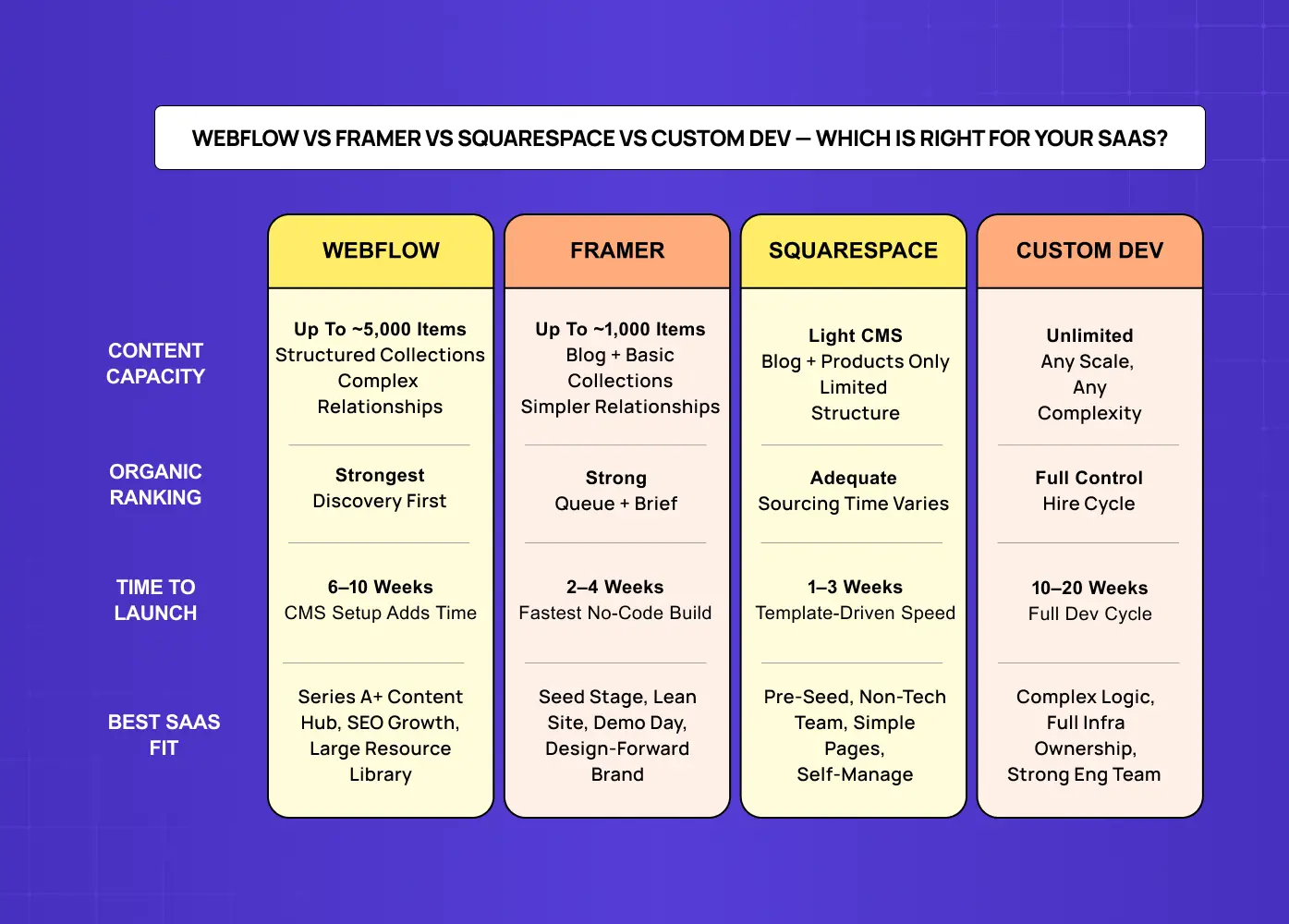
Before evaluating any agency, understand what their platform of choice is actually optimised for. The three that dominate the serious agency space are Webflow, Framer, and — for specific cases — Squarespace, with a newer wave of AI site builders starting to encroach..
Webflow
Webflow is the most capable no-code platform for complex marketing sites. Mature, flexible CMS that handles hundreds of structured content pages. A visual interaction engine that supports sophisticated animations without a developer. Hosting infrastructure built for enterprise-level traffic.
Webflow is right when:
You have significant structured content — blog, documentation, case studies, resource library.
You need granular SEO control: custom meta, structured data, redirects, sitemap management.
You expect the site to grow in complexity over the next 12–18 months and don't want a rebuild — for teams already past that point, the guide on how to redesign a website covers the process when a rebuild does become necessary.
Framer
Framer started as a prototyping tool for product designers. It's evolved into a capable site builder with CMS functionality, built-in analytics, and increasingly competitive SEO tooling. Faster to iterate in for experienced designers. The visual output can be exceptional — and the cost floor is lower than Webflow. For concrete examples of what that ceiling looks like in production, the best website design examples collection includes sites built across all major no-code platforms.
Framer is right when:
You need a high-quality, visually distinctive site quickly — 3–6 weeks vs. 6–10 for Webflow.
Your content volume is manageable (under 50 pages of structured CMS content).
Your audience is design-sensitive — developers, designers, investors — and you need the site to feel cutting-edge.
For pre-seed and seed-stage SaaS companies that need a great-looking site before Demo Day, Framer is usually the faster and more cost-effective path — the full comparison of Framer vs Webflow for high-converting sites covers when each platform wins and why.
Squarespace
Squarespace sits at a different tier — more constrained in design flexibility and CMS power than either Webflow or Framer, but with the most accessible editing interface for non-technical teams.
Squarespace is right when:
Your website needs are genuinely simple: homepage, pricing, about, contact, basic blog.
Your marketing team includes people with no design or tech background.
Removing the "we can't update without the agency" problem is the top priority.
Most serious no-code agencies don't lead with Squarespace for SaaS clients — it caps out too quickly. But it's worth naming clearly so teams can self-select when the constraints actually fit.
The No-Code Site Decision Stack
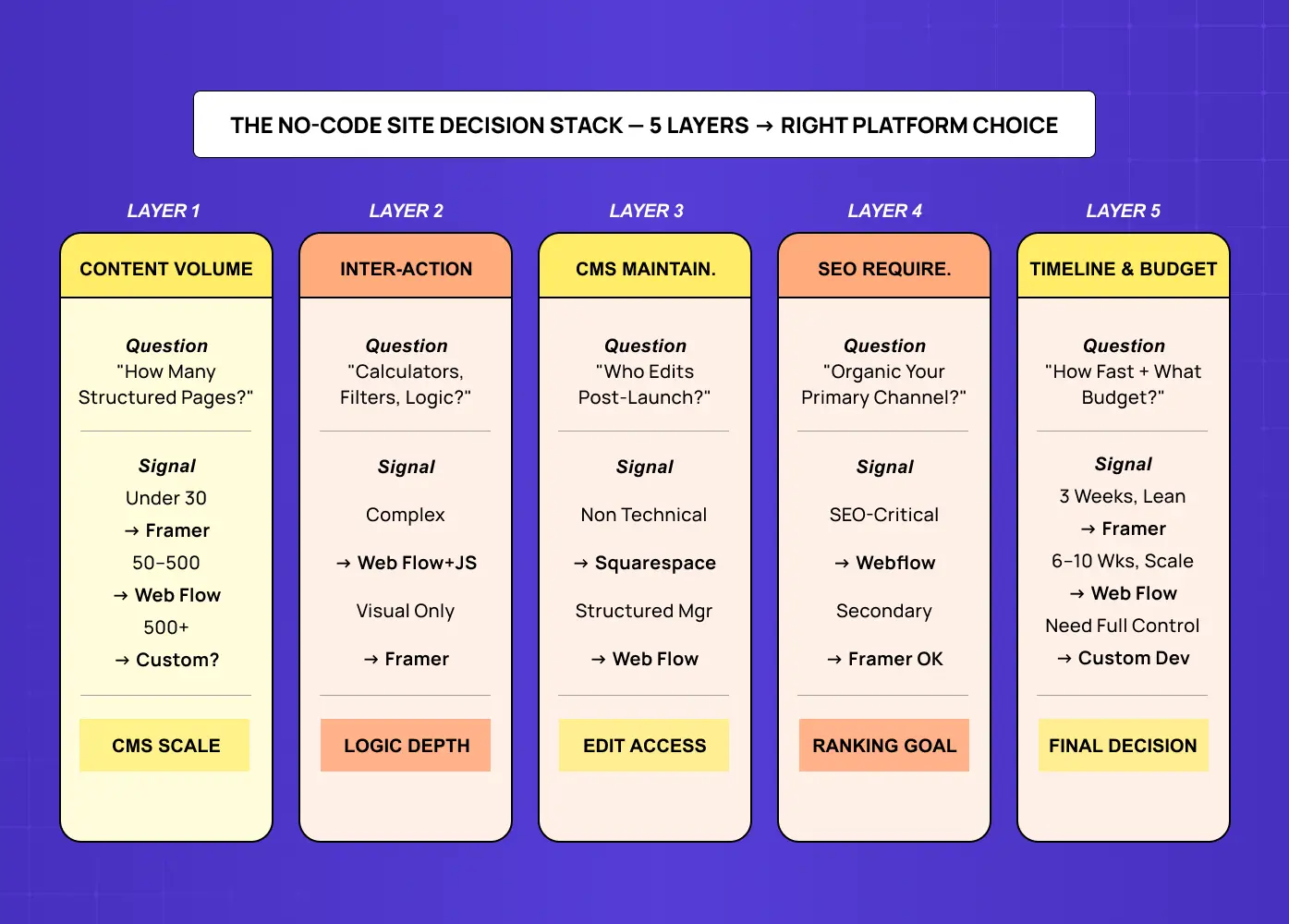
The most common mistake in evaluating an outsourced site build is starting with the portfolio and working backward. The right process starts with your site's requirements and maps to the platform that meets them.
We call this the No-Code Site Decision Stack. Five layers. Work through them in order before you look at a single agency portfolio.
Layer 1: Content Volume
How many pages of structured content does the site need to manage?
Under 30 pages → Framer handles it cleanly.
50–500 pages → Webflow is the more maintainable choice.
Several hundred with complex tagging and filtering → you're approaching the edge of what any no-code platform handles well; custom development deserves a conversation.
Layer 2: Interaction Complexity
Does the site need to do anything beyond standard content display? Dynamic pricing calculators, interactive feature demos, complex filter/search interfaces, A/B testing infrastructure, personalised content by segment?
The more interaction complexity you need, the more you're pushing toward Webflow's JavaScript integration capabilities — or past no-code entirely. Framer handles animations and visual transitions elegantly — and interactive no-code builds shows what that ceiling looks like across real production sites, which helps teams calibrate whether Framer's interaction range actually covers their requirements before committing. Complex application-like interactions, less so.
Layer 3: CMS Maintainability
Who is updating the site after launch, and how comfortable are they?
Non-technical marketing hire → all three platforms work; Squarespace is most forgiving.
Content manager comfortable with structured content types → Webflow's CMS is excellent.
The founder, on demand, quickly → Framer's editor is fastest for simple changes.
Layer 4: SEO Requirements
How important is organic search to your acquisition model?
If your site needs to rank for competitive SaaS keywords, own content categories, and run a blog as a primary growth channel — Webflow's SEO tooling is the strongest of the three. Framer has improved significantly, but Webflow is still the better choice for teams with aggressive SEO programmes. If SEO is secondary and paid acquisition or outbound drives pipeline, this layer matters less.
Layer 5: Timeline and Budget
No-code agencies build faster than custom development — typically 30–60% faster depending on platform and scope. Within no-code, Framer projects move faster than Webflow because the platform requires less structural setup.
3 weeks to Demo Day → Framer, almost certainly.
8 weeks, building foundation for 2 years → Webflow.
What No-Code Agencies Can and Can't Do
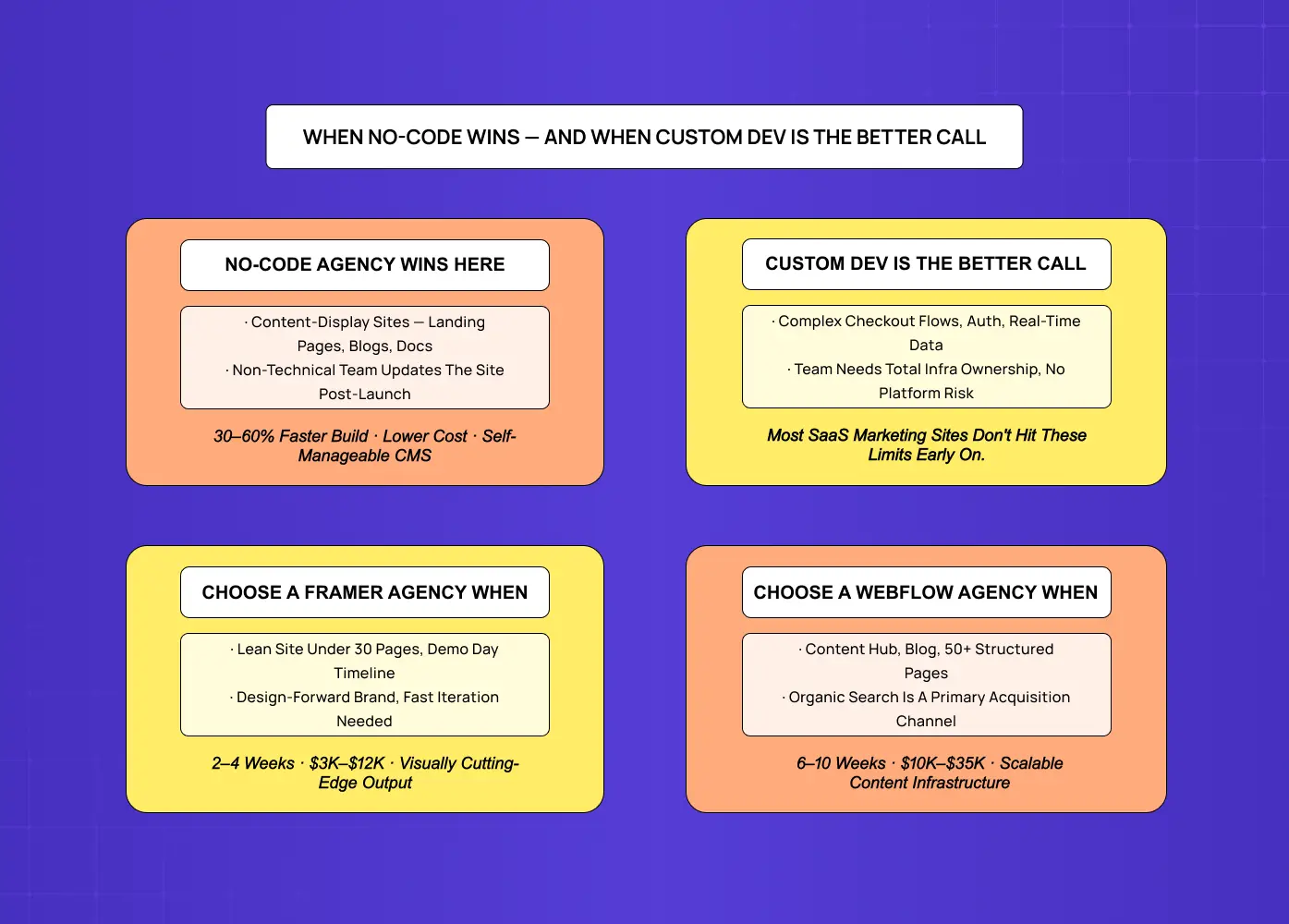
The no-code label creates expectations that sometimes get in the way of accurate evaluation.
What they can do well:
No-code agencies can produce visually sophisticated, responsive, fast-loading websites that are indistinguishable from custom-developed sites for the vast majority of SaaS use cases — the guide to responsive web design services covers what that output should look like and how to evaluate it. They can structure a CMS that lets your marketing team operate the site independently. They can implement conversion-focused landing page designs with iteration speed that custom development can't match — testing a headline or restructuring a section doesn't require a developer. For SaaS teams iterating their marketing site alongside the product, that operational speed is genuinely valuable.
What they can't do:
No-code has real hard limits. Custom checkout flows with complex pricing logic require code regardless of platform. Real-time data displayed from your product's database isn't a no-code problem. Deep integrations with enterprise marketing tools that don't have native connectors will need JavaScript or a developer to fill the gap.
The other limit is more subtle: platform dependency. A site built on Webflow is owned by Webflow. If the platform changes pricing or capabilities, migration is non-trivial. Custom code is yours. For most SaaS marketing sites, that's an acceptable trade-off. For teams who need total infrastructure ownership, it's worth naming before you sign.
We've seen SaaS companies spend three months and $25,000 on a no-code site rebuild because the original agency chose the wrong platform for the content requirements. The rebuild cost more than getting the platform decision right the first place — the web design agency pricing guide gives readers the full cost context for benchmarking any agency engagement before signing.
How to Evaluate a No-Code Design Agency: 5 Questions That Matter
1. Which platforms does the agency specialise in — and why?
Agencies that build in every platform are typically exceptional at none. TThe best no-code agencies have a platform specialisation — the same narrowing you see with AI-focused design agencies that go deep on one kind of product. Ask specifically which platform they recommend for your use case and ask them to justify it. If the answer is "we use whatever the client needs," push for the specific recommendation. Generalism in execution is a warning sign — for the complete agency selection framework beyond platform specialisation, the guide on how to choose the right web design agency covers the full decision criteria.
2. Can you see examples at a similar content scale?
Portfolio pieces usually show visual output, not structural capability — a structured UI/UX portfolio evaluation framework gives you the questions to look past that and assess whether the agency can handle your site's actual complexity. Ask for examples of sites with similar CMS complexity to yours. The visual quality of a 5-page Framer site tells you almost nothing about an agency's ability to architect a 300-page Webflow content hub.
3. What does the handover look like?
The most common complaint about no-code agencies: the site they deliver is difficult to update without returning to the agency. Ask specifically — what training do you provide? What documentation does the client receive? Can the client make structural changes without agency involvement? The answers reveal whether the agency has thought seriously about post-launch ownership — the guide on website structure covers the architectural decisions that determine how much flexibility a client actually has after handover.
4. How do you handle platform limitations?
Every project hits something the platform doesn't natively support. Ask how they handle it. Custom JavaScript? Third-party embeds? Workarounds that create technical debt? The most experienced agencies have a principled approach to the boundary between no-code and code — and they're transparent about when a project is crossing it.
5. What is the site's performance baseline?
No-code sites can be fast or slow depending on how they're built. Ask for Core Web Vitals data from recent client sites. An agency that can't produce it either doesn't measure performance or doesn't want you to see the numbers.
When Custom Development Is Still the Right Choice
The case for no-code is strong for the majority of SaaS marketing sites. But there are conditions where custom development is the better call — and a good no-code agency should tell you this honestly instead of selling you their platform regardless. The full framework for making that call is covered in the guide on responsive web design vs custom frontend builds.
Custom development makes more sense when:
The site has complex application-like functionality: custom authentication, real-time data, complex personalisation.
The team has strong engineering capacity and wants total infrastructure ownership.
The site needs deep backend integrations that exceed no-code platform API capabilities.
The design requirements are so distinctive and interaction-heavy that no-code platforms would constrain the output.
None of these are common for SaaS marketing sites at seed or early Series A. They become more relevant later — larger engineering teams, more mature marketing infrastructure, later funding stages. The No-Code Site Decision Stack is designed for the stage where no-code genuinely adds speed and maintainability value. For most SaaS teams, that's a wide window.
Conclusion
The best no-code website design agency for your SaaS company isn't the one with the most impressive portfolio. It's the one that correctly identifies which platform matches your site's requirements, designs within that platform with conversion and maintainability in mind, and hands over something your team can actually operate.
Here's what actually compounds:
Platform choice should be driven by the No-Code Site Decision Stack — content volume, interaction complexity, CMS maintainability, SEO requirements, and timeline/budget — not by what the agency prefers to build in.
Framer is right for speed, visual quality, and lean content sites. Webflow is right for CMS-heavy, SEO-critical, scalable marketing infrastructure. Squarespace is right when non-technical maintainability is the primary requirement.
The handover model matters as much as design quality. A beautiful site you can't update without reopening an agency engagement is a liability, not an asset.
No-code has real limits — know where they are before you sign, not after you hit them.
The platform decision made wrong costs more in rebuilds than getting it right the first time would have — the guide on how much a website redesign costs gives readers the numbers to make that comparison concrete before they commit.
If you're trying to decide between platforms, evaluate agencies, or figure out whether no-code is the right call at your current stage — a discovery call is where that gets sorted.