
UX research is how design teams stop guessing and start knowing. This guide covers what it actually is, how it differs from both user research and UX design, the core research types and methods, and what it produces once the study wraps.
UX research turns design guesswork into decisions backed by real user data.

TL;DR
What is UX research? It is the structured process of understanding user behaviors, needs, and motivations through observation, interviews, and data analysis, so design decisions are based on evidence instead of guesswork.
UX research is different from user research. UX research applies specifically to product and interface decisions, while user research is a broader umbrella that includes market and business research too.
Research falls into a few key pairs: qualitative vs quantitative, generative vs evaluative, and attitudinal vs behavioral. Most strong design teams use a mix of all three.
Good UX research happens throughout the product lifecycle, not just at the start. We use it during discovery, mid-design validation, pre-launch testing, and after release.
Skipping UX research does not save time. It just moves the cost downstream, into redesigns, support tickets, and lost conversions.
What Is UX Research?
UX research is the practice of studying how real users think, behave, and feel when they interact with a product, so that design and product decisions are grounded in evidence rather than assumption. It combines methods borrowed from psychology, anthropology, and data science to answer one core question: does this experience actually work for the people using it?
At its simplest, UX research replaces internal opinions with external proof. Instead of a team debating what users probably want, researchers go find out what users actually want, need, and struggle with. That insight then feeds directly into wireframes, prototypes, and final interfaces.
We think of UX research as the foundation layer of design work, one of the core UX disciplines every project rests on. Visual polish and clever interactions matter, but they only succeed when they are built on an accurate understanding of the user. Without that foundation, even a beautifully designed product can fail to convert, retain, or satisfy the people it was built for.
This is why research sits at the start of nearly every project we take on. Before a single wireframe gets drawn, we want to know who the user actually is, what they are trying to accomplish, and where their current experience is falling short. That early clarity shapes every decision that follows, from user flows and information architecture down to the wording of a single button.
UX Research vs User Research: What's the Difference
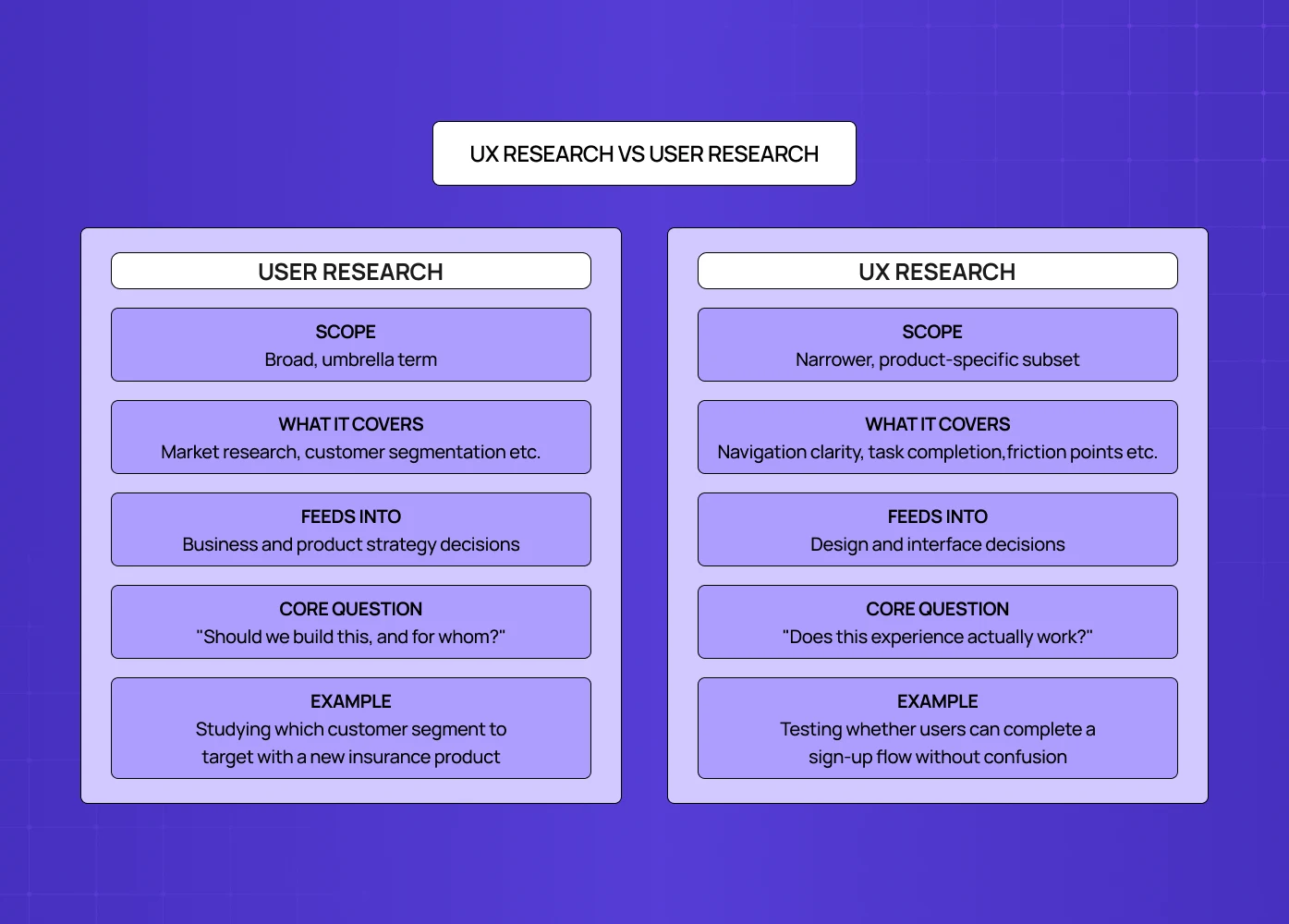
These two terms get used interchangeably, and while they overlap heavily, they are not identical.
User research is the broader umbrella term. It covers any study of users, and can include market research, customer segmentation, brand perception studies, and business viability research alongside product-specific work.
UX research is a subset of user research that focuses specifically on how users experience a digital product or interface. It is narrower in scope and tied directly to design and usability outcomes, things like navigation clarity, task completion, friction points, and satisfaction with the interface itself.
Aspects | User Research | UX Research |
Scope | Broad, umbrella term | Narrower, product-specific subset |
What it covers | Market research, customer segmentation, brand perception, business viability | Navigation clarity, task completion, friction points, interface satisfaction |
Feeds into | Business and product strategy decisions | Design and interface decisions |
Core question | "Should we build this, and for whom?" | "Does this experience actually work?" |
Example | Studying which customer segment to target with a new insurance product | Testing whether users can complete a sign-up flow without confusion |
In practice, most design teams use the terms loosely, and that is fine. What matters more is understanding that UX research always ladders up to a design or product decision, while user research can serve broader business strategy too.
A simple way to keep the two straight: if the insight helps you decide what to build, that is user research. If the insight helps you decide how something should look, flow, or function once you have decided to build it, that is UX research. Most projects need both, just at different points in the timeline.
UX Research vs UX Design: What's the Difference
These two are closely related but they are not the same discipline.
UX research sits in the discovery and validation space. It uncovers user needs, flags usability problems, and confirms whether a concept actually works, using real data rather than opinion.
UX design sits in the execution space. It takes those research insights — often framed in a design brief — and turns them into the actual interface, the layout, the visual hierarchy, and the interaction patterns a user will touch.
Why UX Research Matters in the Design Process
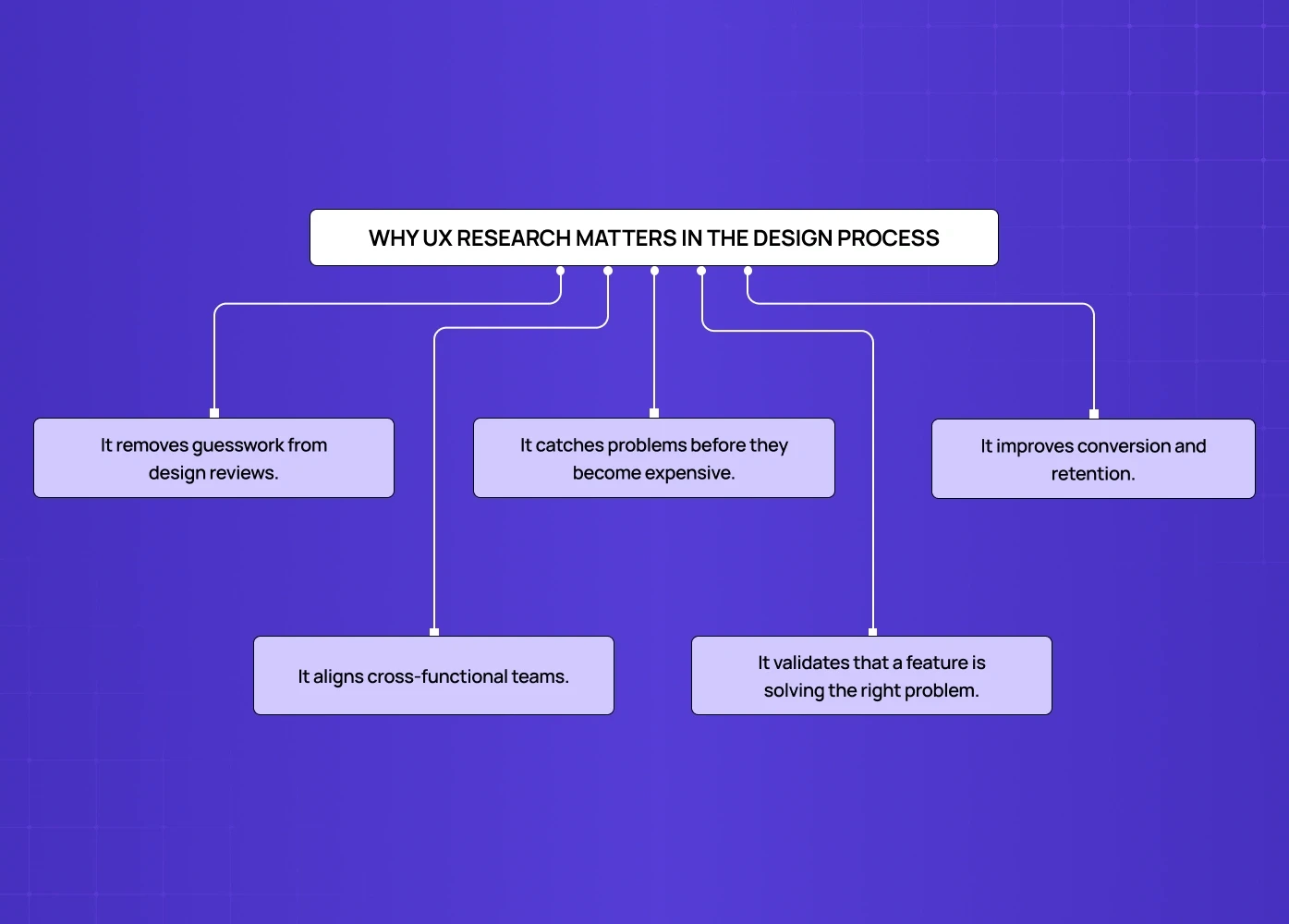
Design without research is a series of educated guesses. Research turns those guesses into decisions backed by real user behavior. Here is what that actually gets you.
It removes guesswork from design reviews, replacing opinion with user-informed design — teams reference what users actually said or did.
It catches problems before they become expensive. A usability issue found in a prototype costs a redesign. The same issue found after launch costs a redesign plus lost users, support load, and rebuilt trust.
It improves conversion and retention. When friction points are identified and fixed early, the entire funnel benefits, from sign-up through to repeat use.
It aligns cross-functional teams. Designers, product managers, and engineers rarely disagree on facts. Research gives everyone the same facts to work from.
It validates that a feature is solving the right problem. Plenty of features ship successfully from a technical standpoint and still fail because they solved a problem users did not actually have.
This is not just a design philosophy, the ROI of UX shows up in the numbers too. Forrester's widely cited research has estimated that every dollar invested in UX returns about one hundred dollars, a 9,900 percent return. The figure is older and broad across industries, but the direction it points in still holds: catching problems through research is consistently cheaper than fixing them after launch.
We saw this play out clearly while working with PolicyBazaar.
This idea is often summarized as the 1:10:100 rule: a problem caught during research might cost around a dollar to fix, catching it during development costs closer to ten dollars, and fixing it after launch can run a hundred dollars or more. It is a commonly cited industry framework rather than a hard verified statistic, but the direction holds.
Before any redesign work began, we ran research to understand who their users actually were and where they were dropping off during the insurance shopping journey. That research, built on user interviews and platform data analysis, showed that most visitors were arriving on mobile, which shaped our decision to design mobile-first rather than adapting a desktop layout down. The result was a smoother, less confusing sign-up journey, directly informed by what the research uncovered rather than by assumption.
Types of UX Research
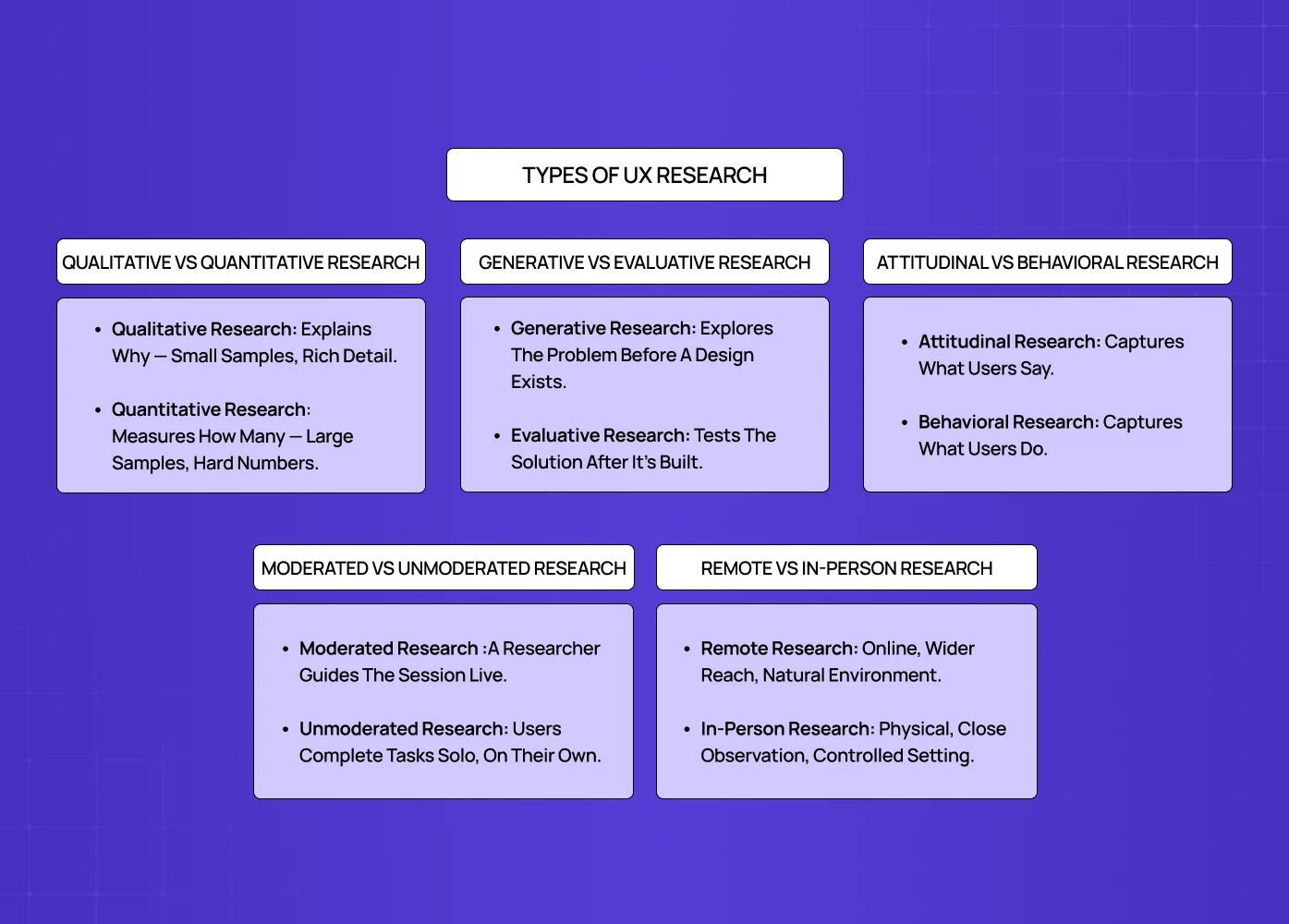
UX research is not one single activity. It is a set of methods and research methodologies that fall into a few key pairs, and most effective research strategies combine more than one.
Qualitative vs Quantitative Research
Qualitative research answers the question "why." It involves smaller sample sizes and methods like interviews, usability testing, and open-ended surveys, producing rich, detailed insight into user motivations and pain points.
Quantitative research answers the question "how many" or "how often." It relies on larger sample sizes and methods like analytics tracking, A/B testing, and closed-ended surveys, producing data that can be measured and compared at scale.
Neither replaces the other. Quantitative data tells you where a problem exists. Qualitative data tells you why it is happening. A drop-off spike on a checkout page is quantitative. Learning that users are abandoning because the shipping cost feels hidden until the last step is qualitative.
Generative vs Evaluative Research
Generative research happens early, before a solution exists.Its goal is to explore the problem space and uncover unmet needs — including the gaps a rival gap analysis reveals in competitors' experiences — that should shape what gets designed in the first place.
Evaluative research happens after something has already been designed, whether that is a wireframe, prototype, or live product. Its goal is to test whether the existing design actually works for users, through methods like usability testing or a heuristic evaluation.
For example, exploring how small business owners currently track expenses, before any product exists, is generative. Watching those same users try to complete an expense entry in a working prototype is evaluative.
Attitudinal vs Behavioral Research
Attitudinal research captures what users say. Interviews and surveys fall here, and they reveal beliefs, preferences, and self-reported experiences.
Behavioral research captures what users do. Session recordings, analytics, and usability testing fall here, and they reveal actual actions, which do not always match what people say they will do.
The gap between what users say and what users actually do is one of the most common reasons research gets misinterpreted. Strong research strategies pair both types together rather than relying on just one. One deliverable that captures both at once is an empathy map, which plots what a user says, thinks, does, and feels side by side.
Moderated vs Unmoderated Research
Moderated research is a live session where a researcher guides the participant in real time, asking follow-up questions as they go. It works well for complex workflows or early, unpolished prototypes that need context to make sense.
Unmoderated research lets participants complete tasks independently through an automated testing tool, with no researcher present. It works well when you need a larger sample size quickly, or want to test across multiple time zones without scheduling constraints.
Remote vs In-Person Research
Remote research happens digitally, through video calls or unmoderated testing platforms. It gives you access to a wider pool of participants and lets you see how people use a product on their own devices, in their own environment.
In-person research happens physically, in a lab, office, or out in the field. It is the better choice when you need to observe body language closely, test physical hardware, or run a study on sensitive, pre-release software that cannot leave a controlled setting.
When Should You Conduct UX Research?
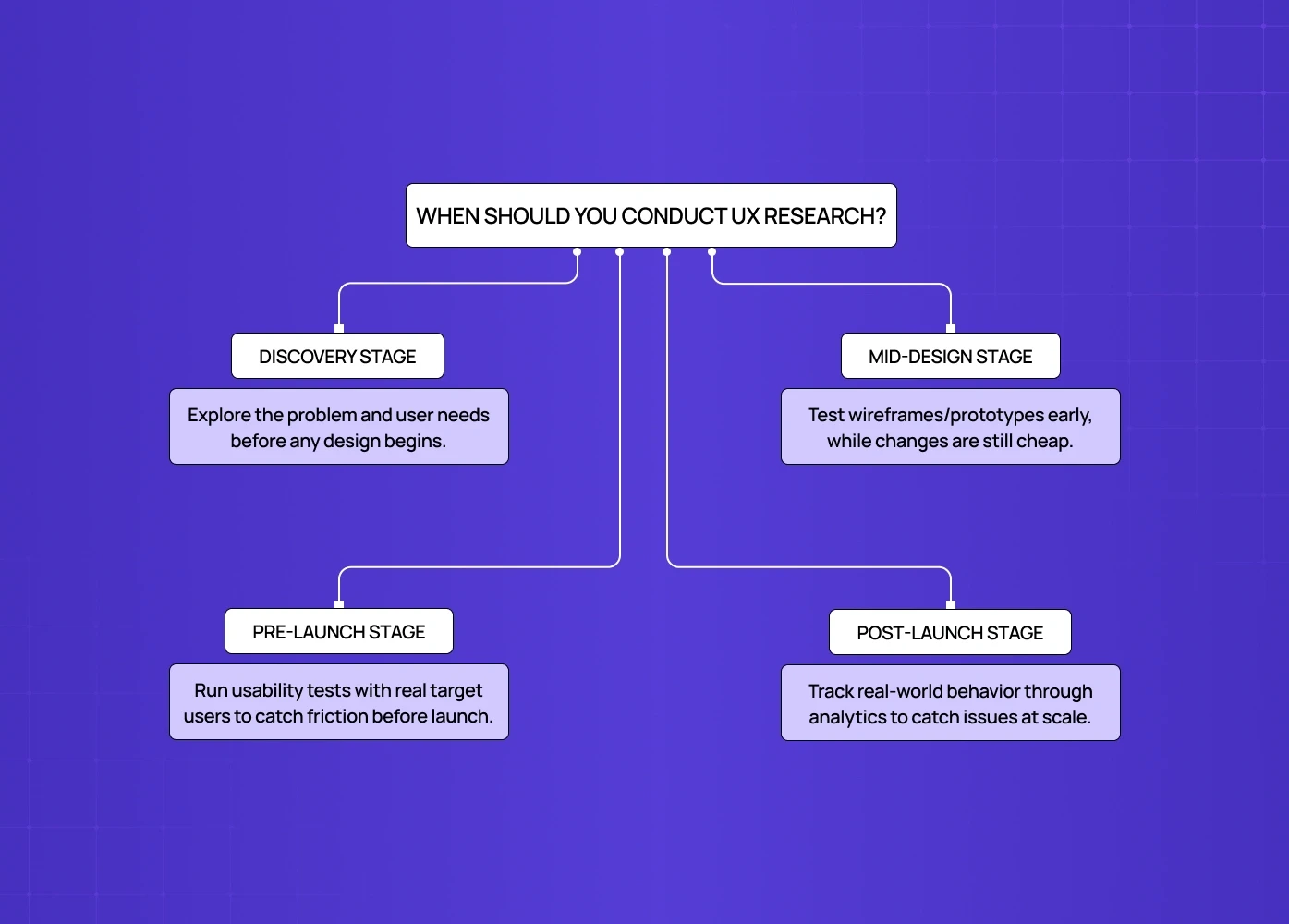
Research is not a single phase you complete and move past. It belongs at multiple points across the product lifecycle, threaded through the end-to-end design process.
Discovery stage: understand the problem space, user needs, and existing behaviors before any design work begins. This is where generative research does most of its work.
Mid-design stage: validate wireframes and prototypes with real users before committing engineering resources to a full build. Small adjustments here are cheap. The same fixes after development starts are not.
Pre-launch stage: run usability testing to catch friction points while changes are still cheap to make, ideally with users who match your actual target audience rather than convenient stand-ins.
Post-launch stage: track behavior through analytics, session recordings, and a periodic UX audit to catch issues that only surface at scale, once real usage patterns emerge that testing in a controlled setting could not predict.
Skipping research at any one of these stages does not eliminate risk. It just delays when that risk shows up, usually at a point where it is more expensive to fix.
Common UX Research Methods at a Glance
There is a wide toolkit of UX research methods available, and the right one depends on what stage you are at and what question you are trying to answer.
User interviews: one-on-one conversations that surface motivations, frustrations, and context. Best used early, when you need depth over scale.
Usability testing: watching users complete real tasks on a prototype or live product to spot friction. Best used once there is something concrete to test.
Surveys: structured questions sent to a large group, useful for quantifying attitudes or preferences across a broad user base.
Card sorting: understanding how users mentally group and label information, useful for navigation and information architecture work.
A/B testing: comparing two versions of a design against real user behavior to see which performs better, ideal for optimizing an existing flow.
Session recordings and heatmaps: passive behavioral data showing exactly how users move through an interface, useful for spotting issues you did not know to look for.
Diary studies: users log their experience with a product over time, useful for understanding long-term behavior patterns that a single session cannot capture.
Contextual inquiry: observing users in their natural environment while they use a product, revealing context that lab settings miss entirely.
Focus groups: a guided discussion with a small group of users to surface early conceptual feedback and shared pain points. Best used when exploring high-level attitudes before concrete design work begins.
Tree testing: a text-only exercise where users navigate a simplified menu structure to find a specific item. Best used when validating or refining your site's navigation and information architecture.
Five-second tests: showing users a single screen for five seconds to gauge immediate visual clarity. Best used when checking whether a landing page's value proposition is instantly understandable.
How many users do you actually need?
For qualitative usability testing, five users per segment is usually enough. Nielsen Norman Group's foundational research found that testing with five users surfaces roughly 85 percent of core usability issues, after which you mostly see the same patterns repeat. Quantitative studies need a bigger pool, generally 30 to 40-plus participants, to clear statistical significance.
If you want a deeper breakdown of how a researcher actually runs these methods day to day, we cover that in detail in what does a UX researcher do.
What UX Research Produces
UX research does not end when the last interview wraps up. The raw data needs to turn into deliverables the rest of the team can actually use.
User personas: semi-fictional profiles that capture the behaviors, motivations, and frustrations of your real target users.
Customer journey maps: timelines that show every touchpoint a user has with your product, along with their shifting emotions at each stage.
Empathy maps: simple four-quadrant visuals covering what a user says, thinks, does, and feels, sometimes extended into UX storyboards that play out a full scenario step by step.
Affinity maps: research notes and quotes grouped into logical themes to reveal patterns.
Research reports: summaries that lay out the methodology used, the key findings, and prioritized recommendations for the team.
Conclusion
UX research is not an optional extra layered onto design work. It is the process that makes design decisions defensible, measurable, and actually useful to the people a product is built for.
UX research studies real user behavior to remove guesswork from design decisions.
It is a focused subset of the broader field of user research.
Strong research strategy combines qualitative and quantitative, generative and evaluative, and attitudinal and behavioral methods.
Research belongs across the entire product lifecycle, not just at the start.
Skipping it does not remove risk, it just pushes that risk further downstream where it costs more to fix.
We treat research as the starting point for every design engagement we take on, whether it is handled in-house or by one of the leading user experience research firms, because a well-designed interface built on the wrong assumptions still fails the people using it.
Ready to make your product decisions research-backed instead of guesswork-backed? If you want a UX research agency in your corner, book a call with us and let's talk about your next design project.