PRD Template Guide: What to Include, How to Write One, and What Changes for AI Products

10 min read

10 min read

UX Design

PRD Template Guide: What to Include, How to Write One, and What Changes for AI Products

A practical guide to PRD templates, what to include, how to write one, where to find free formats, and what changes when the feature you're specifying is AI powered

PRD Template Guide: What to Include, How to Write One, and What Changes for AI Products

10 min read

10 min read

UX Design

PRD Template Guide: What to Include, How to Write One, and What Changes for AI Products

A practical guide to PRD templates, what to include, how to write one, where to find free formats, and what changes when the feature you're specifying is AI powered

Staring at a blank PRD template? This guide covers what every product requirements document needs, a step-by-step writing process, free template formats to start from, and the specific sections you need to add once your feature is AI powered and non-deterministic.

Everything you need to write a PRD, plus what changes for AI features.
Purple-themed illustration of a person interacting with a browser window containing a grid of rounded rectangular interface cards.

TL;DR

  • A PRD (product requirements document) is the single reference a team uses to align on what they're building, who it's for, and why. Get the format right and everything downstream gets easier.

  • A good PRD template includes an overview, target users, success metrics, scope, requirements, and open questions, at minimum.

  • Writing one follows a repeatable process: define the problem, gather input, draft, get feedback, and treat the document as living rather than final.

  • You can build a PRD template in Google Docs, Notion, Word, or GitHub, depending on how your team already works. We've listed free starting points for each below.

  • If the feature you're specifying is AI powered, the classic "given X, return Y" format breaks down. We cover exactly what changes, and give you a complete AI PRD template near the end.

If you've typed "prd template" into a search bar, you're probably staring down a blank document and a deadline. Maybe you've written PRDs before and just want a clean starting point. Maybe you're a first-time PM who keeps hearing the term and has no idea what actually goes inside one, or you're trying to work out whether what you need is a PRD at all rather than a design brief. Either way, a PRD template is really just a repeatable shape for a document that answers one question well: what are we building, for whom, and how will we know it worked. Everything else, the sections, the headers, the level of detail, is in service of that one question. We'll walk through what a PRD includes, how to actually write one from a blank page, where to find a template you can start using today, and then get into something most generic templates miss entirely: what changes when the feature you're specifying is an AI feature that doesn't behave the same way twice.

What Is a PRD, and What Should It Include?
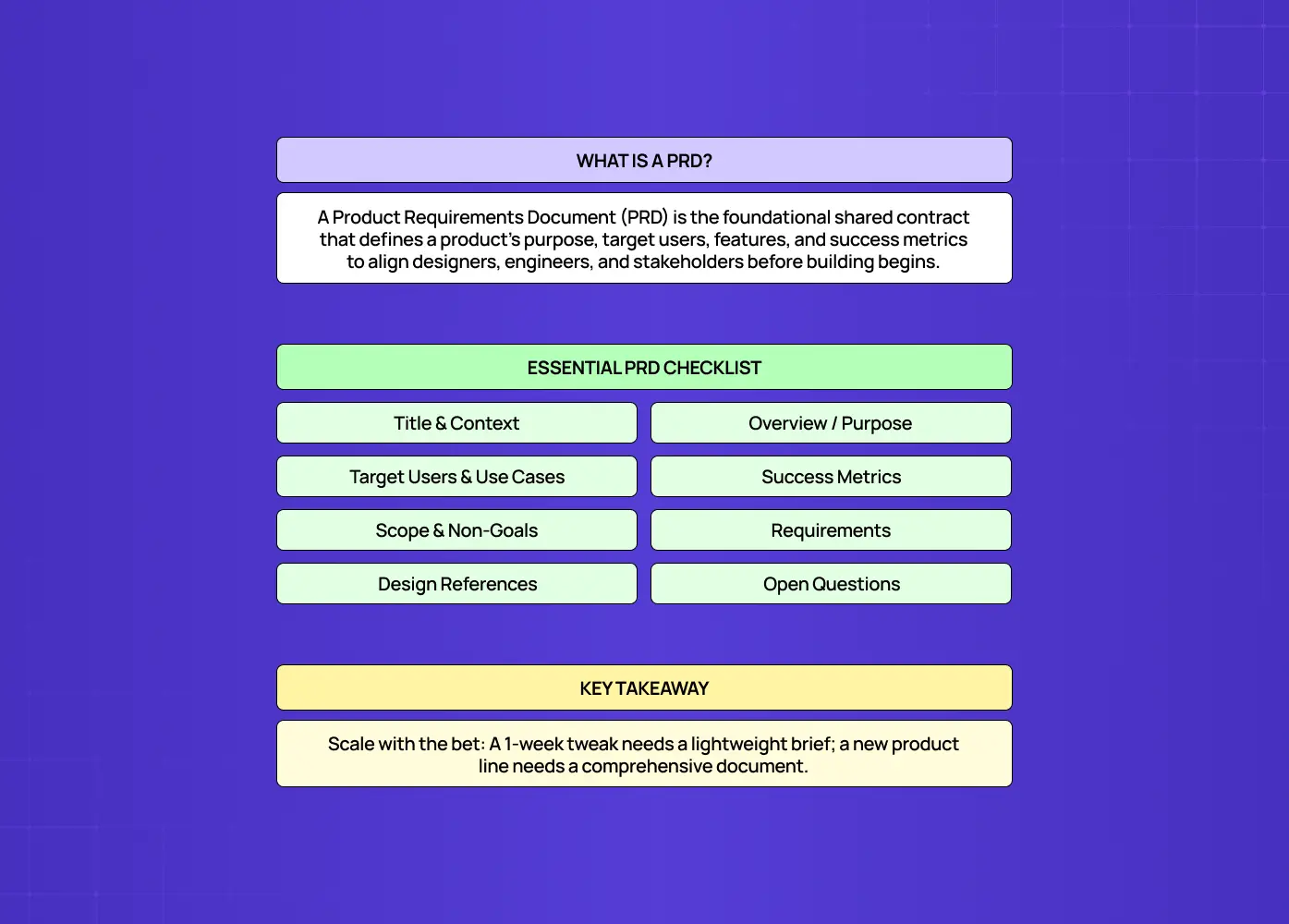
Infographic explaining what a Product Requirements Document is, with an essential PRD checklist covering purpose, users, success metrics, scope, requirements, references, and open questions.

A product requirements document is a written guide that captures a product or feature's purpose, its target users, and the behavior it needs to have. It's usually written by a product manager, but it exists to serve everyone downstream of that PM: designers who need to know the constraints they're designing within, engineers who need to know what "done" looks like, and stakeholders who need a single place to check what's actually being built. Where that ownership line actually falls is worth settling early, and product design vs product management covers the split in detail.

A PRD is not a design spec and it's not an engineering ticket. It sits above both. Think of it as the contract everyone agrees to before the detailed work starts.

At minimum, a solid PRD template includes:

  • Title and context, so anyone opening the doc knows what project it belongs to and when it was last touched.

  • Overview, a short paragraph on what this is and why it matters right now.

  • Target users and use cases, who this is for and the specific situations they'll use it in. UX persona examples are a useful gauge of how specific to get here.

  • Success metrics, how you'll know the feature actually worked once it ships.

  • Scope and non-goals, what you're building and, just as importantly, what you've decided not to build.

  • Requirements, the specific features or behaviors, usually prioritized.

  • Design references, links to mockups, flows, or low fidelity wireframes once they exist.

  • Open questions, the things you genuinely don't know yet.

That's the skeleton. Some teams add stakeholder sign-off sections, some pull timelines straight from the product design roadmap, some fold in competitive research. The right amount of detail depends on the size of the bet you're making. A one-week feature tweak doesn't need the same PRD as a new product line.

The UX playbook that takes you from MVP traction to Series A growth

Identify the UX mistakes silently killing your activation rate and the exact fixes to improve conversions without a full product redesign.

No Spam. Free Lifetime

The UX playbook that takes you from MVP traction to Series A growth

Identify the UX mistakes silently killing your activation rate and the exact fixes to improve conversions without a full product redesign.

No Spam. Free Lifetime

How to Write a PRD: Step-by-Step Guide for Beginners
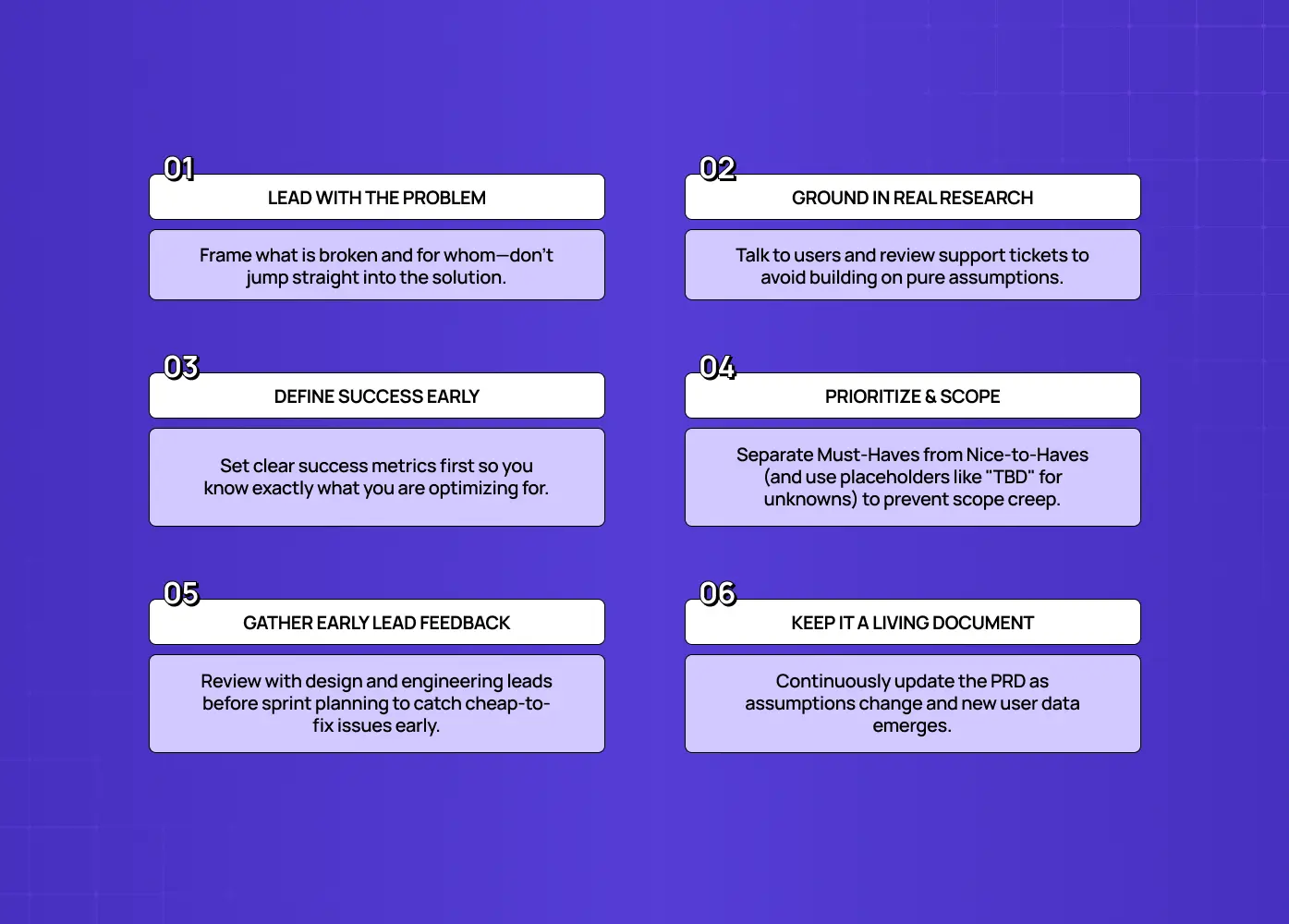
Infographic presenting six product-development principles: lead with the problem, ground in research, define success early, prioritize scope, gather early feedback, and keep documentation current.

Writing a PRD isn't about filling in a template top to bottom in order. It's a sequence of decisions, and the template is just where you record them. Here's the process we'd recommend if you're starting from scratch.

  • Start with the problem, not the solution. Write one or two sentences describing what's broken or missing today, and for whom. If you can't state the problem without describing your solution, you probably haven't found the real problem yet.

  • Talk to the people who'll be affected. Pull in a few conversations with actual users or support tickets before you draft anything. Even lightweight UX research at this stage beats a confident guess, and it's the input that stops requirements being invented at a desk. A PRD built entirely from assumptions tends to fall apart the moment it hits engineering.

  • Define what success looks like before you define the feature. Decide on your success metrics early. If you need a shortlist to choose from, the standard UX metrics for SaaS are the place to start. It's much easier to scope a feature correctly when you know what you're optimizing for.

  • Draft the requirements and prioritize them. List what the feature needs to do, then separate "must have" from "nice to have." That split is the same call you make in MVP UX design, and it's where most scope creep gets stopped before it starts. Leave placeholders like TBD where you genuinely don't know yet.. A PRD in progress is allowed to have gaps.

  • Get feedback before you consider it final. Share the draft with design and engineering leads before it goes wider. Their early input often changes scope in ways that are much cheaper to absorb now than after a sprint has started.

  • Treat it as a living document. Requirements shift as you learn more. Update the PRD rather than letting it drift out of sync with what's actually being built.

We see this play out in our own process at Groto. When we're scoping a redesign or a new product surface for a client, the requirements we start with rarely match what we ship exactly. What keeps a project on track isn't a perfect first draft, it's a PRD that gets revisited every time an assumption turns out to be wrong. On AI-driven projects like Camb.ai, that habit matters even more, since the requirements themselves often shift once you see how the model actually behaves in front of real users.

PRD Templates: Free Resources to Get Started Quickly
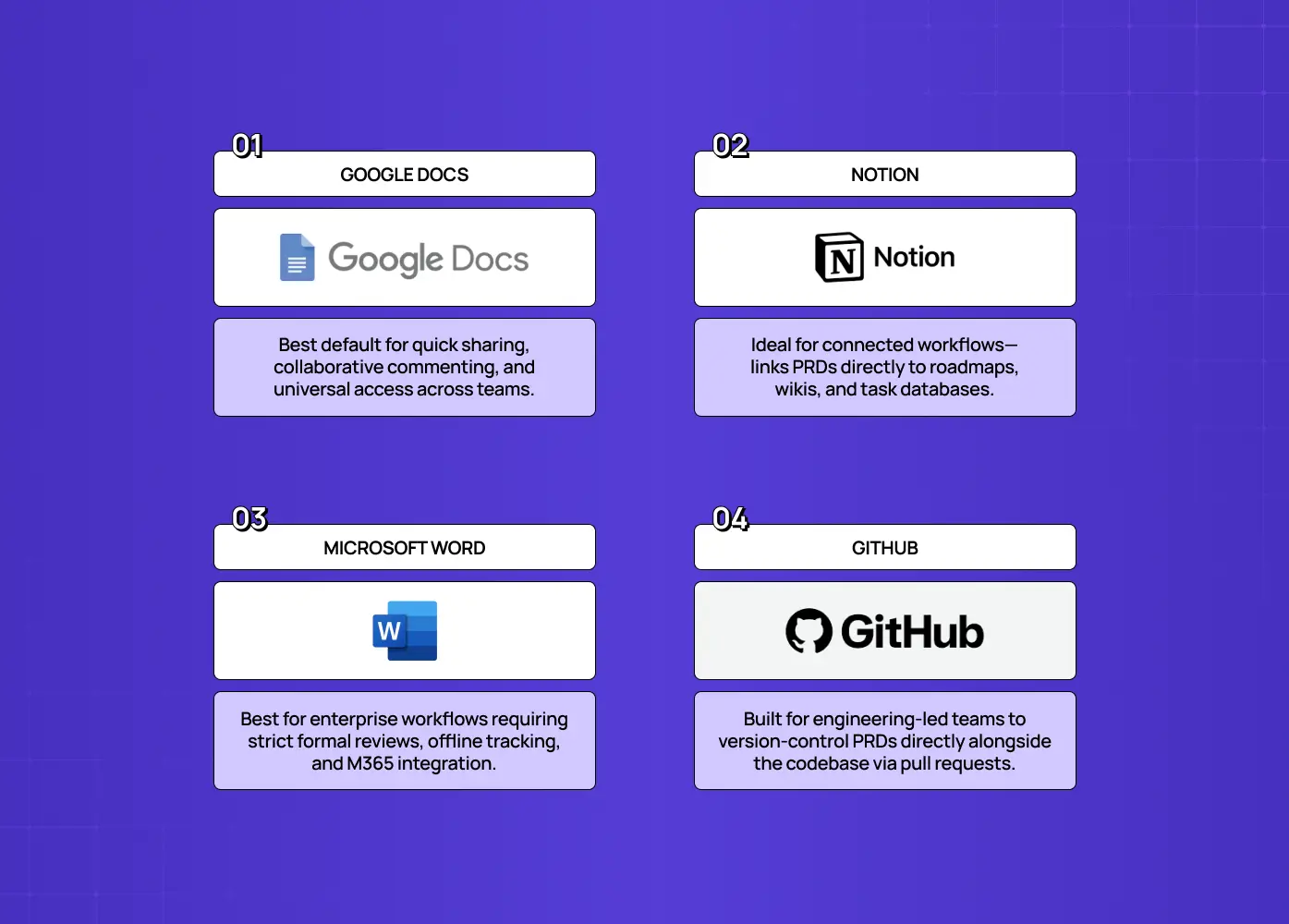
Infographic comparing Google Docs, Notion, Microsoft Word, and GitHub as PRD documentation tools, with their ideal use cases and strengths.

You don't need to build a PRD template from scratch. What matters more is picking a format that fits how your team already works, since a template nobody opens is worse than no template at all.

  • Google Docs: the most common starting point for small and mid-size teams. Easy to comment on, easy to share, and nearly everyone already has an account. Good default if you're not sure what else to use.

  • Notion: works well if your team already lives in Notion for wikis, product roadmaps, or specs.You can link a PRD directly to related database entries, tickets, or design docs, which cuts down on duplicate information scattered across tools.

  • Word: still common in larger, more traditional organizations, especially where documents need to be versioned, tracked, or distributed offline. If your company standardizes on Microsoft 365, a Word-based PRD template will fit existing review workflows better than anything else.

  • GitHub: a good fit for engineering-heavy teams that want the PRD to live alongside the codebase, get reviewed through pull requests, and stay versioned with the same history as the code it describes.

Whichever format you pick, the free template is really just the header structure from the section above (overview, users, success metrics, scope, requirements, open questions) turned into a reusable file. The same logic applies to every recurring document your team writes, including the UX design proposal. The value isn't in the tool, it's in having the same shape every time so reviewers know exactly where to look for what they need.

Why Classic PRD Templates Break for AI Products

Everything above works well for traditional, deterministic features. Then you try to apply it to an AI feature and it quietly falls apart. Anyone who has shipped an AI powered SaaS product has hit this at least once, usually in the sprint after the spec was signed off.

Every classic PRD template rests on a hidden assumption: the system is deterministic. Feed it the same input and you get the same output, every time, so you can write a requirement, test it once, and call it done. AI features violate that assumption at the core. A large language model, even with the same prompt, can return different responses on different runs. Wrap it in retrieval, tools, and guardrails, and the range of possible outputs grows further. There's no single "correct" output to assert against. There's a range of acceptable ones, and a quality level measured across many examples.

This breaks three things in a classic PRD template:

  • Acceptance criteria stop mapping to reality. "Given X, return Y" assumes a fixed answer, and AI features don't have one.

  • User stories that assume a fixed response miss the point. They don't account for variable outputs or the ways a response can be wrong. The user flows need branches for uncertain and incorrect outputs, not just the happy path.

  • "Done" stops being a one-time check. Model behavior can drift, so quality has to be measured continuously, not verified once and archived.

Writing a PRD for an AI product means replacing these deterministic assumptions with tools built for probability.

The Big Shift: From Acceptance Criteria to Evaluation Criteria

Here's the single most important change: for AI features, acceptance criteria become evaluation criteria. Instead of "given X, return Y," you define how you'll measure whether the AI's behavior is good enough, across many inputs. This is why practitioners now say evals are the new PRD, and why the blunt rule of thumb is, if you can't write the eval, you can't ship the AI feature.

An eval is a repeatable test of your AI's behavior. It's built from three things you can write down, version, and run on demand:

  • A curated dataset of representative inputs, typically 100 to 500 examples, covering both the common "head" cases and the messy long tail, ideally drawn from real production traffic and real failure tickets.

  • A set of metrics or graders that judge output quality.

  • A quality threshold you must hit to ship, for example, at least 90 percent of the eval set passes the grader.

Unlike a static acceptance criterion, an eval runs automatically, continuously, and on every change, so it specifies desired behavior, defines acceptance, tracks progress, and catches regressions. In an AI PRD, the eval framework does much of the job that acceptance criteria used to.

What Changes in an AI Product PRD: The New Sections
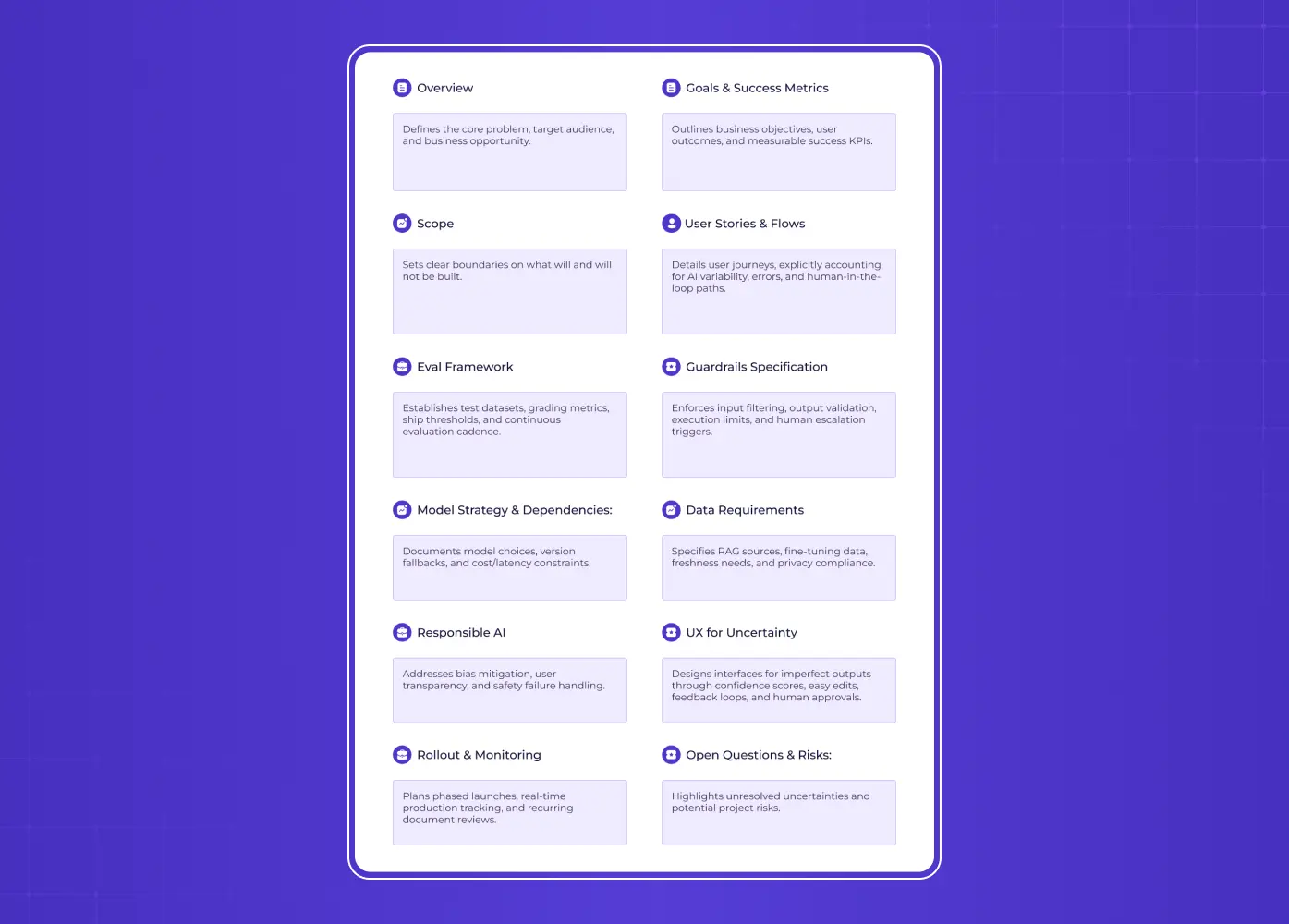
Two-column AI product specification framework covering overview, goals, scope, user stories, evaluation, guardrails, model strategy, data requirements, responsible AI, uncertainty UX, rollout monitoring, and open questions.

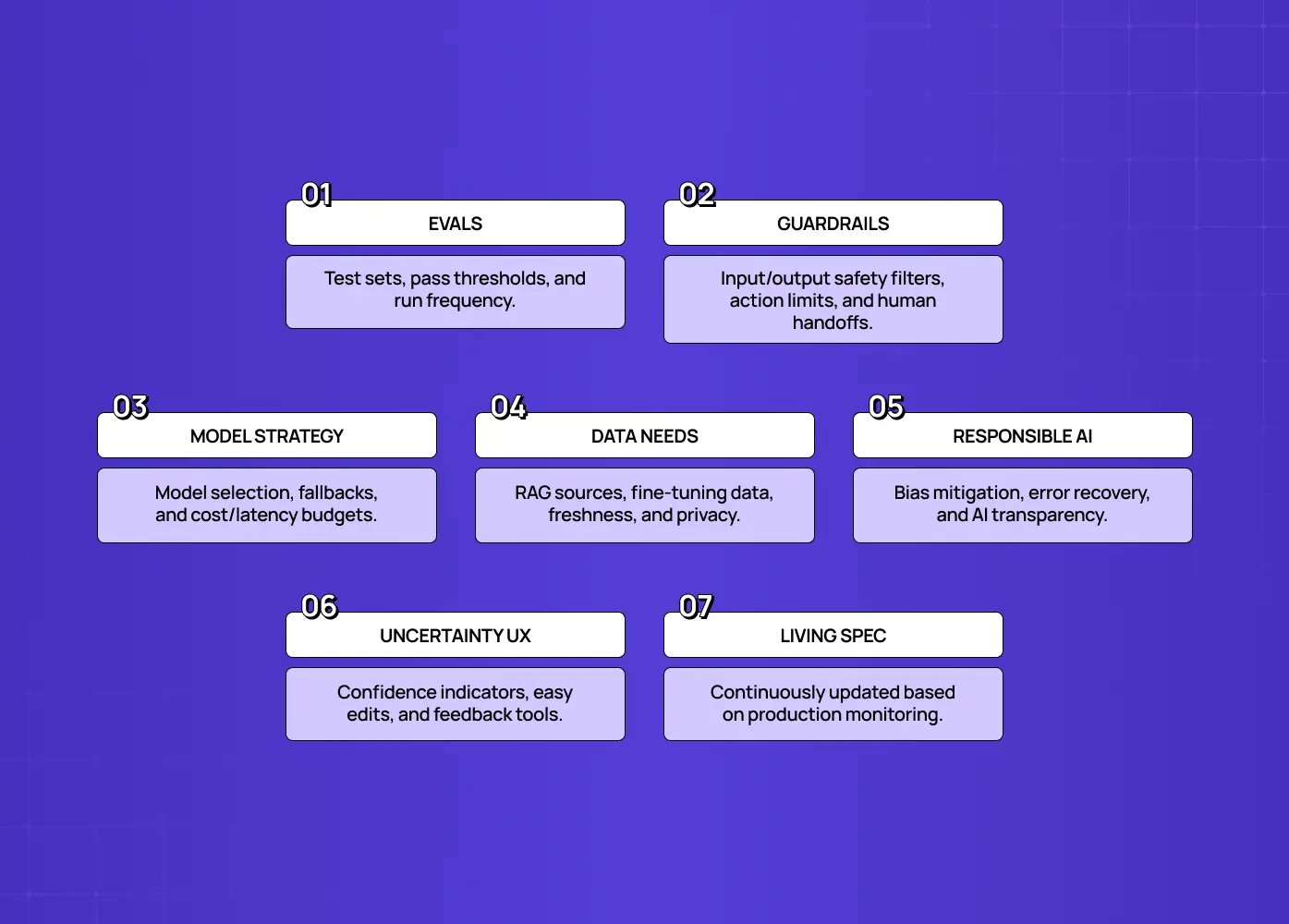
Beyond evals, a PRD for an AI product needs several sections a classic PRD template never had.

1. Eval framework 

Define how you'll measure quality:

  • The eval dataset, and where it comes from.

  • The metrics or graders you're using.

  • The passing threshold you need to hit.

  • How often evals run.

This is the backbone of the whole document, the AI equivalent of acceptance criteria.

2. Guardrails specification 

Non-deterministic systems can produce harmful, off-brand, or unsafe outputs, so you need to specify guardrails across four layers:

  • Input filtering: what to reject or flag before it reaches the model, such as prompt-injection attempts, out-of-scope queries, or PII.

  • Output validation: post-processing checks that block bad responses, like format checks, banned content, or confidence thresholds.

  • Action boundaries: what the AI is and isn't allowed to do. It can draft an email, but not send it. It can suggest, but not delete.

  • Escalation triggers: the conditions under which it hands off to a human.

3. Model strategy and dependencies 

Document:

  • Which model or models you're using, and why.

  • Versioning and fallback plans, since models change and get deprecated.

  • Cost and latency constraints.

Your feature now has an external dependency with its own behavior. Treat it as a first-class part of the spec.

4. Data requirements 

Specify:

  • Retrieval or RAG sources.

  • Any fine-tuning or training data.

  • Freshness and coverage needs.

  • Privacy and compliance constraints.

For most AI features, data quality determines output quality.

5. Responsible AI considerations 

Address:

  • Bias and fairness.

  • Transparency, meaning does the user know it's AI.

  • Safety and how you'll handle mistakes.

These aren't optional add-ons. For AI products, they're core requirements that affect trust and risk.

6. UX for uncertainty 

Because outputs vary, the experience must account for it. Specify:

  • How you'll show uncertainty or confidence where it's useful.

  • How outputs stay easy to edit or undo.

  • Where a human needs to stay in the loop for high-stakes actions.

  • What feedback mechanisms let users flag bad responses.

Designing for non-determinism is a distinct skill. It's the difference between an AI feature that feels trustworthy and one that feels erratic. Encoding those uncertainty patterns into a design system for SaaS is what keeps them consistent as the feature grows.This is a big part of what we focus on when we design AI products at Groto, since the interface often has to do more work to earn trust than the model itself does.

7. Living-document architecture 

A deterministic feature's PRD can be "finished." An AI feature's can't, because behavior evolves as models, data, and usage change. Treat the PRD, and especially its evals and metrics, as a living document tied to production monitoring, not a one-time artifact you archive after launch.

How to Build Your Eval Set

Since the eval framework is the heart of an AI PRD, it's worth knowing how to actually build one.

  • Collect real inputs, not imagined ones. Pull from production traffic if you have it, support tickets, and known failure cases. Real users send messier queries than you'll invent at a desk.

  • Cover both the head and the long tail. The head is the common, high-volume cases. The long tail is the weird edge cases where AI features tend to break. Aim for 100 to 500 examples as a solid starting range.

  • Define how you'll grade each output. Sometimes an exact or rule-based check works. For open-ended outputs, you'll often use a rubric scored by a human or another model, sometimes called LLM-as-judge.

  • Set a threshold that means "good enough to ship," and be honest about it. A 100 percent pass rate is rarely realistic for probabilistic systems, so decide what pass rate fits the stakes involved.

  • Wire the eval to run automatically. Run it on every meaningful change to the prompt, model, or pipeline, so quality gets monitored continuously rather than checked once.

The eval set is a living asset. Grow it every time you discover a new failure, and it becomes your regression safety net. Pair it with UX testing on the interface itself, since a passing eval tells you the output was good, not that the user understood or trusted it.

What Stays the Same

Not everything changes. You still need:

  • A clear problem statement.

  • Target users and their jobs to be done.

  • The value and goals behind the feature.

  • Success metrics.

  • Scope and non-goals.

  • A rollout plan, tied to your SaaS go to market strategy rather than written in isolation.

The foundation of good product thinking is unchanged. You're layering the AI-specific sections on top of a solid classic PRD template, not throwing the old one away. The mistake is doing only the classic PRD for an AI feature. The fix is extending it.

The AI Product PRD Template
Purple-themed illustration showing a person interacting with a large browser interface containing a grid of placeholder cards.

Here's a complete, copy-pasteable structure. Fill in each section. Write each field so it survives the trip into SaaS application development, since this is the document engineering will actually build from. The ones marked [AI] are the additions that make it work for non-deterministic features.

# PRD: [Feature Name]

## 1. Overview

- Problem statement:

- Target users & jobs-to-be-done:

- Why now / opportunity:

## 2. Goals & success metrics

- Business goals:

- User outcomes:

- Success metrics (product + business):

## 3. Scope

- In scope:

- Out of scope / non-goals:

## 4. User stories & flows

- Core user stories (accounting for variable AI outputs):

- Key flows (including uncertainty / error / human-in-the-loop paths):

## 5. [AI] Eval framework  ← replaces classic acceptance criteria

- Eval dataset (size, source — production traffic + failure tickets; head vs long tail):

- Metrics / graders (how output quality is judged):

- Quality threshold to ship (e.g., ≥90% pass rate):

- Eval cadence (on every commit / nightly / pre-release):

## 6. [AI] Guardrails specification

- Input filtering (reject/flag: prompt injection, out-of-scope, PII):

- Output validation (blocked formats/content, confidence thresholds):

- Action boundaries (what the AI can vs cannot execute):

- Escalation triggers (when to hand off to a human):

## 7. [AI] Model strategy & dependencies

- Model(s) selected and rationale:

- Versioning & fallback plan:

- Cost & latency constraints:

## 8. [AI] Data requirements

- Retrieval / RAG sources:

- Training / fine-tuning data (if any):

- Freshness, coverage, privacy/compliance:

## 9. [AI] Responsible AI

- Bias & fairness considerations:

- Transparency (disclosure that it's AI):

- Safety & failure handling:

## 10. [AI] UX for uncertainty

- How variable/imperfect outputs are handled:

- Confidence/uncertainty display (if applicable):

- Edit, undo, and feedback mechanisms:

- Human-in-the-loop for high-stakes actions:

## 11. Rollout & monitoring

- Launch plan (staged / limited release):

- Production monitoring & live metrics:

- Living-document owner & review cadence:

## 12. Open questions & risks

Adapt the depth to your feature. A low-stakes suggestion needs lighter guardrails than an AI that takes actions on a user's behalf, but keep all the AI sections present, even if some are brief. Once it's signed off, the design handoff process is what carries this level of detail into build without it quietly getting lost.

Common Mistakes to Avoid

Teams new to AI PRDs tend to repeat a few errors:

  • Writing deterministic acceptance criteria like "the AI will always return the correct answer," which can never be met by a probabilistic system.

  • Skipping the eval entirely and shipping on vibes, with no repeatable way to know if quality is good or getting worse.

  • Ignoring guardrails until something goes wrong publicly, instead of specifying them up front.

  • Treating the model as an implementation detail instead of a documented dependency with cost, latency, and versioning implications.

  • Designing the happy path only, forgetting that variable and wrong outputs are guaranteed and the UX must handle them.

  • Writing the PRD once and archiving it, missing that AI behavior drifts and requires ongoing measurement.

Avoid these, and your PRD becomes a tool that actually governs a non-deterministic feature.

Who Should Own an AI Product PRD?

AI PRDs are more cross-functional than classic ones. The overlap between product management and UX design gets wider here, not narrower. The PM still owns the document, the problem, the users, the goals, and the overall direction. But the AI-specific sections require close collaboration:

  • Engineering and ML shape the eval framework, model strategy, and data requirements.

  • Design owns the UX-for-uncertainty section, meaning how variable outputs are handled and where humans stay in the loop. That work belongs inside the wider UX design process rather than bolting on after the spec is written.

  • Security, legal, or trust and safety often weigh in on guardrails and responsible AI.

Because the feature's behavior emerges from data and models rather than being fully specified by the PM, writing the PRD becomes a genuinely collaborative act. The PM can't just hand down "given X, return Y" and walk away. Treat the AI PRD as a shared working document across these disciplines, and the quality of both the spec and the shipped feature improves. Treat it as a solo PM artifact, and you'll miss the very details that determine whether a non-deterministic feature works.

In Short

  • A PRD template is a reusable structure for aligning a team on what's being built, for whom, and how success will be measured.

  • At minimum, include an overview, target users, success metrics, scope, requirements, and open questions.

  • Writing a PRD is a process, not a fill-in-the-blank exercise: define the problem, gather input, draft, get feedback, and keep it living.

  • Google Docs, Notion, Word, and GitHub all work as a PRD template format. Pick whichever one your team will actually use.

  • AI features break classic acceptance criteria because the same input can produce different outputs.

  • Replace acceptance criteria with an eval framework, and add sections for guardrails, model strategy, data requirements, responsible AI, and UX for uncertainty.

  • Treat an AI PRD as a living document tied to production monitoring, not a one-time artifact.

If you're building an AI product and want a design partner who knows how to craft experiences for non-deterministic features, the uncertainty states, the human-in-the-loop moments, the trust, book a discovery call with Groto. We design AI products that feel dependable even when the model isn't. Let's turn your AI feature into something users trust.

Staring at a blank PRD template? This guide covers what every product requirements document needs, a step-by-step writing process, free template formats to start from, and the specific sections you need to add once your feature is AI powered and non-deterministic.

Everything you need to write a PRD, plus what changes for AI features.

Purple-themed illustration of a person interacting with a browser window containing a grid of rounded rectangular interface cards.

TL;DR

  • A PRD (product requirements document) is the single reference a team uses to align on what they're building, who it's for, and why. Get the format right and everything downstream gets easier.

  • A good PRD template includes an overview, target users, success metrics, scope, requirements, and open questions, at minimum.

  • Writing one follows a repeatable process: define the problem, gather input, draft, get feedback, and treat the document as living rather than final.

  • You can build a PRD template in Google Docs, Notion, Word, or GitHub, depending on how your team already works. We've listed free starting points for each below.

  • If the feature you're specifying is AI powered, the classic "given X, return Y" format breaks down. We cover exactly what changes, and give you a complete AI PRD template near the end.

If you've typed "prd template" into a search bar, you're probably staring down a blank document and a deadline. Maybe you've written PRDs before and just want a clean starting point. Maybe you're a first-time PM who keeps hearing the term and has no idea what actually goes inside one, or you're trying to work out whether what you need is a PRD at all rather than a design brief. Either way, a PRD template is really just a repeatable shape for a document that answers one question well: what are we building, for whom, and how will we know it worked. Everything else, the sections, the headers, the level of detail, is in service of that one question. We'll walk through what a PRD includes, how to actually write one from a blank page, where to find a template you can start using today, and then get into something most generic templates miss entirely: what changes when the feature you're specifying is an AI feature that doesn't behave the same way twice.

What Is a PRD, and What Should It Include?

Infographic explaining what a Product Requirements Document is, with an essential PRD checklist covering purpose, users, success metrics, scope, requirements, references, and open questions.

A product requirements document is a written guide that captures a product or feature's purpose, its target users, and the behavior it needs to have. It's usually written by a product manager, but it exists to serve everyone downstream of that PM: designers who need to know the constraints they're designing within, engineers who need to know what "done" looks like, and stakeholders who need a single place to check what's actually being built. Where that ownership line actually falls is worth settling early, and product design vs product management covers the split in detail.

A PRD is not a design spec and it's not an engineering ticket. It sits above both. Think of it as the contract everyone agrees to before the detailed work starts.

At minimum, a solid PRD template includes:

  • Title and context, so anyone opening the doc knows what project it belongs to and when it was last touched.

  • Overview, a short paragraph on what this is and why it matters right now.

  • Target users and use cases, who this is for and the specific situations they'll use it in. UX persona examples are a useful gauge of how specific to get here.

  • Success metrics, how you'll know the feature actually worked once it ships.

  • Scope and non-goals, what you're building and, just as importantly, what you've decided not to build.

  • Requirements, the specific features or behaviors, usually prioritized.

  • Design references, links to mockups, flows, or low fidelity wireframes once they exist.

  • Open questions, the things you genuinely don't know yet.

That's the skeleton. Some teams add stakeholder sign-off sections, some pull timelines straight from the product design roadmap, some fold in competitive research. The right amount of detail depends on the size of the bet you're making. A one-week feature tweak doesn't need the same PRD as a new product line.

The UX playbook that takes you from MVP traction to Series A growth

Identify the UX mistakes silently killing your activation rate and the exact fixes to improve conversions without a full product redesign.

No Spam. Free Lifetime

How to Write a PRD: Step-by-Step Guide for Beginners

Infographic presenting six product-development principles: lead with the problem, ground in research, define success early, prioritize scope, gather early feedback, and keep documentation current.

Writing a PRD isn't about filling in a template top to bottom in order. It's a sequence of decisions, and the template is just where you record them. Here's the process we'd recommend if you're starting from scratch.

  • Start with the problem, not the solution. Write one or two sentences describing what's broken or missing today, and for whom. If you can't state the problem without describing your solution, you probably haven't found the real problem yet.

  • Talk to the people who'll be affected. Pull in a few conversations with actual users or support tickets before you draft anything. Even lightweight UX research at this stage beats a confident guess, and it's the input that stops requirements being invented at a desk. A PRD built entirely from assumptions tends to fall apart the moment it hits engineering.

  • Define what success looks like before you define the feature. Decide on your success metrics early. If you need a shortlist to choose from, the standard UX metrics for SaaS are the place to start. It's much easier to scope a feature correctly when you know what you're optimizing for.

  • Draft the requirements and prioritize them. List what the feature needs to do, then separate "must have" from "nice to have." That split is the same call you make in MVP UX design, and it's where most scope creep gets stopped before it starts. Leave placeholders like TBD where you genuinely don't know yet.. A PRD in progress is allowed to have gaps.

  • Get feedback before you consider it final. Share the draft with design and engineering leads before it goes wider. Their early input often changes scope in ways that are much cheaper to absorb now than after a sprint has started.

  • Treat it as a living document. Requirements shift as you learn more. Update the PRD rather than letting it drift out of sync with what's actually being built.

We see this play out in our own process at Groto. When we're scoping a redesign or a new product surface for a client, the requirements we start with rarely match what we ship exactly. What keeps a project on track isn't a perfect first draft, it's a PRD that gets revisited every time an assumption turns out to be wrong. On AI-driven projects like Camb.ai, that habit matters even more, since the requirements themselves often shift once you see how the model actually behaves in front of real users.

PRD Templates: Free Resources to Get Started Quickly

Infographic comparing Google Docs, Notion, Microsoft Word, and GitHub as PRD documentation tools, with their ideal use cases and strengths.

You don't need to build a PRD template from scratch. What matters more is picking a format that fits how your team already works, since a template nobody opens is worse than no template at all.

  • Google Docs: the most common starting point for small and mid-size teams. Easy to comment on, easy to share, and nearly everyone already has an account. Good default if you're not sure what else to use.

  • Notion: works well if your team already lives in Notion for wikis, product roadmaps, or specs.You can link a PRD directly to related database entries, tickets, or design docs, which cuts down on duplicate information scattered across tools.

  • Word: still common in larger, more traditional organizations, especially where documents need to be versioned, tracked, or distributed offline. If your company standardizes on Microsoft 365, a Word-based PRD template will fit existing review workflows better than anything else.

  • GitHub: a good fit for engineering-heavy teams that want the PRD to live alongside the codebase, get reviewed through pull requests, and stay versioned with the same history as the code it describes.

Whichever format you pick, the free template is really just the header structure from the section above (overview, users, success metrics, scope, requirements, open questions) turned into a reusable file. The same logic applies to every recurring document your team writes, including the UX design proposal. The value isn't in the tool, it's in having the same shape every time so reviewers know exactly where to look for what they need.

Why Classic PRD Templates Break for AI Products

Everything above works well for traditional, deterministic features. Then you try to apply it to an AI feature and it quietly falls apart. Anyone who has shipped an AI powered SaaS product has hit this at least once, usually in the sprint after the spec was signed off.

Every classic PRD template rests on a hidden assumption: the system is deterministic. Feed it the same input and you get the same output, every time, so you can write a requirement, test it once, and call it done. AI features violate that assumption at the core. A large language model, even with the same prompt, can return different responses on different runs. Wrap it in retrieval, tools, and guardrails, and the range of possible outputs grows further. There's no single "correct" output to assert against. There's a range of acceptable ones, and a quality level measured across many examples.

This breaks three things in a classic PRD template:

  • Acceptance criteria stop mapping to reality. "Given X, return Y" assumes a fixed answer, and AI features don't have one.

  • User stories that assume a fixed response miss the point. They don't account for variable outputs or the ways a response can be wrong. The user flows need branches for uncertain and incorrect outputs, not just the happy path.

  • "Done" stops being a one-time check. Model behavior can drift, so quality has to be measured continuously, not verified once and archived.

Writing a PRD for an AI product means replacing these deterministic assumptions with tools built for probability.

The Big Shift: From Acceptance Criteria to Evaluation Criteria

Here's the single most important change: for AI features, acceptance criteria become evaluation criteria. Instead of "given X, return Y," you define how you'll measure whether the AI's behavior is good enough, across many inputs. This is why practitioners now say evals are the new PRD, and why the blunt rule of thumb is, if you can't write the eval, you can't ship the AI feature.

An eval is a repeatable test of your AI's behavior. It's built from three things you can write down, version, and run on demand:

  • A curated dataset of representative inputs, typically 100 to 500 examples, covering both the common "head" cases and the messy long tail, ideally drawn from real production traffic and real failure tickets.

  • A set of metrics or graders that judge output quality.

  • A quality threshold you must hit to ship, for example, at least 90 percent of the eval set passes the grader.

Unlike a static acceptance criterion, an eval runs automatically, continuously, and on every change, so it specifies desired behavior, defines acceptance, tracks progress, and catches regressions. In an AI PRD, the eval framework does much of the job that acceptance criteria used to.

What Changes in an AI Product PRD: The New Sections

Two-column AI product specification framework covering overview, goals, scope, user stories, evaluation, guardrails, model strategy, data requirements, responsible AI, uncertainty UX, rollout monitoring, and open questions.

Beyond evals, a PRD for an AI product needs several sections a classic PRD template never had.

1. Eval framework 

Define how you'll measure quality:

  • The eval dataset, and where it comes from.

  • The metrics or graders you're using.

  • The passing threshold you need to hit.

  • How often evals run.

This is the backbone of the whole document, the AI equivalent of acceptance criteria.

2. Guardrails specification 

Non-deterministic systems can produce harmful, off-brand, or unsafe outputs, so you need to specify guardrails across four layers:

  • Input filtering: what to reject or flag before it reaches the model, such as prompt-injection attempts, out-of-scope queries, or PII.

  • Output validation: post-processing checks that block bad responses, like format checks, banned content, or confidence thresholds.

  • Action boundaries: what the AI is and isn't allowed to do. It can draft an email, but not send it. It can suggest, but not delete.

  • Escalation triggers: the conditions under which it hands off to a human.

3. Model strategy and dependencies 

Document:

  • Which model or models you're using, and why.

  • Versioning and fallback plans, since models change and get deprecated.

  • Cost and latency constraints.

Your feature now has an external dependency with its own behavior. Treat it as a first-class part of the spec.

4. Data requirements 

Specify:

  • Retrieval or RAG sources.

  • Any fine-tuning or training data.

  • Freshness and coverage needs.

  • Privacy and compliance constraints.

For most AI features, data quality determines output quality.

5. Responsible AI considerations 

Address:

  • Bias and fairness.

  • Transparency, meaning does the user know it's AI.

  • Safety and how you'll handle mistakes.

These aren't optional add-ons. For AI products, they're core requirements that affect trust and risk.

6. UX for uncertainty 

Because outputs vary, the experience must account for it. Specify:

  • How you'll show uncertainty or confidence where it's useful.

  • How outputs stay easy to edit or undo.

  • Where a human needs to stay in the loop for high-stakes actions.

  • What feedback mechanisms let users flag bad responses.

Designing for non-determinism is a distinct skill. It's the difference between an AI feature that feels trustworthy and one that feels erratic. Encoding those uncertainty patterns into a design system for SaaS is what keeps them consistent as the feature grows.This is a big part of what we focus on when we design AI products at Groto, since the interface often has to do more work to earn trust than the model itself does.

7. Living-document architecture 

A deterministic feature's PRD can be "finished." An AI feature's can't, because behavior evolves as models, data, and usage change. Treat the PRD, and especially its evals and metrics, as a living document tied to production monitoring, not a one-time artifact you archive after launch.

How to Build Your Eval Set

Since the eval framework is the heart of an AI PRD, it's worth knowing how to actually build one.

  • Collect real inputs, not imagined ones. Pull from production traffic if you have it, support tickets, and known failure cases. Real users send messier queries than you'll invent at a desk.

  • Cover both the head and the long tail. The head is the common, high-volume cases. The long tail is the weird edge cases where AI features tend to break. Aim for 100 to 500 examples as a solid starting range.

  • Define how you'll grade each output. Sometimes an exact or rule-based check works. For open-ended outputs, you'll often use a rubric scored by a human or another model, sometimes called LLM-as-judge.

  • Set a threshold that means "good enough to ship," and be honest about it. A 100 percent pass rate is rarely realistic for probabilistic systems, so decide what pass rate fits the stakes involved.

  • Wire the eval to run automatically. Run it on every meaningful change to the prompt, model, or pipeline, so quality gets monitored continuously rather than checked once.

The eval set is a living asset. Grow it every time you discover a new failure, and it becomes your regression safety net. Pair it with UX testing on the interface itself, since a passing eval tells you the output was good, not that the user understood or trusted it.

What Stays the Same

Not everything changes. You still need:

  • A clear problem statement.

  • Target users and their jobs to be done.

  • The value and goals behind the feature.

  • Success metrics.

  • Scope and non-goals.

  • A rollout plan, tied to your SaaS go to market strategy rather than written in isolation.

The foundation of good product thinking is unchanged. You're layering the AI-specific sections on top of a solid classic PRD template, not throwing the old one away. The mistake is doing only the classic PRD for an AI feature. The fix is extending it.

The AI Product PRD Template

Purple-themed illustration showing a person interacting with a large browser interface containing a grid of placeholder cards.

Here's a complete, copy-pasteable structure. Fill in each section. Write each field so it survives the trip into SaaS application development, since this is the document engineering will actually build from. The ones marked [AI] are the additions that make it work for non-deterministic features.

# PRD: [Feature Name]

## 1. Overview

- Problem statement:

- Target users & jobs-to-be-done:

- Why now / opportunity:

## 2. Goals & success metrics

- Business goals:

- User outcomes:

- Success metrics (product + business):

## 3. Scope

- In scope:

- Out of scope / non-goals:

## 4. User stories & flows

- Core user stories (accounting for variable AI outputs):

- Key flows (including uncertainty / error / human-in-the-loop paths):

## 5. [AI] Eval framework  ← replaces classic acceptance criteria

- Eval dataset (size, source — production traffic + failure tickets; head vs long tail):

- Metrics / graders (how output quality is judged):

- Quality threshold to ship (e.g., ≥90% pass rate):

- Eval cadence (on every commit / nightly / pre-release):

## 6. [AI] Guardrails specification

- Input filtering (reject/flag: prompt injection, out-of-scope, PII):

- Output validation (blocked formats/content, confidence thresholds):

- Action boundaries (what the AI can vs cannot execute):

- Escalation triggers (when to hand off to a human):

## 7. [AI] Model strategy & dependencies

- Model(s) selected and rationale:

- Versioning & fallback plan:

- Cost & latency constraints:

## 8. [AI] Data requirements

- Retrieval / RAG sources:

- Training / fine-tuning data (if any):

- Freshness, coverage, privacy/compliance:

## 9. [AI] Responsible AI

- Bias & fairness considerations:

- Transparency (disclosure that it's AI):

- Safety & failure handling:

## 10. [AI] UX for uncertainty

- How variable/imperfect outputs are handled:

- Confidence/uncertainty display (if applicable):

- Edit, undo, and feedback mechanisms:

- Human-in-the-loop for high-stakes actions:

## 11. Rollout & monitoring

- Launch plan (staged / limited release):

- Production monitoring & live metrics:

- Living-document owner & review cadence:

## 12. Open questions & risks

Adapt the depth to your feature. A low-stakes suggestion needs lighter guardrails than an AI that takes actions on a user's behalf, but keep all the AI sections present, even if some are brief. Once it's signed off, the design handoff process is what carries this level of detail into build without it quietly getting lost.

Common Mistakes to Avoid

Teams new to AI PRDs tend to repeat a few errors:

  • Writing deterministic acceptance criteria like "the AI will always return the correct answer," which can never be met by a probabilistic system.

  • Skipping the eval entirely and shipping on vibes, with no repeatable way to know if quality is good or getting worse.

  • Ignoring guardrails until something goes wrong publicly, instead of specifying them up front.

  • Treating the model as an implementation detail instead of a documented dependency with cost, latency, and versioning implications.

  • Designing the happy path only, forgetting that variable and wrong outputs are guaranteed and the UX must handle them.

  • Writing the PRD once and archiving it, missing that AI behavior drifts and requires ongoing measurement.

Avoid these, and your PRD becomes a tool that actually governs a non-deterministic feature.

Who Should Own an AI Product PRD?

AI PRDs are more cross-functional than classic ones. The overlap between product management and UX design gets wider here, not narrower. The PM still owns the document, the problem, the users, the goals, and the overall direction. But the AI-specific sections require close collaboration:

  • Engineering and ML shape the eval framework, model strategy, and data requirements.

  • Design owns the UX-for-uncertainty section, meaning how variable outputs are handled and where humans stay in the loop. That work belongs inside the wider UX design process rather than bolting on after the spec is written.

  • Security, legal, or trust and safety often weigh in on guardrails and responsible AI.

Because the feature's behavior emerges from data and models rather than being fully specified by the PM, writing the PRD becomes a genuinely collaborative act. The PM can't just hand down "given X, return Y" and walk away. Treat the AI PRD as a shared working document across these disciplines, and the quality of both the spec and the shipped feature improves. Treat it as a solo PM artifact, and you'll miss the very details that determine whether a non-deterministic feature works.

In Short

  • A PRD template is a reusable structure for aligning a team on what's being built, for whom, and how success will be measured.

  • At minimum, include an overview, target users, success metrics, scope, requirements, and open questions.

  • Writing a PRD is a process, not a fill-in-the-blank exercise: define the problem, gather input, draft, get feedback, and keep it living.

  • Google Docs, Notion, Word, and GitHub all work as a PRD template format. Pick whichever one your team will actually use.

  • AI features break classic acceptance criteria because the same input can produce different outputs.

  • Replace acceptance criteria with an eval framework, and add sections for guardrails, model strategy, data requirements, responsible AI, and UX for uncertainty.

  • Treat an AI PRD as a living document tied to production monitoring, not a one-time artifact.

If you're building an AI product and want a design partner who knows how to craft experiences for non-deterministic features, the uncertainty states, the human-in-the-loop moments, the trust, book a discovery call with Groto. We design AI products that feel dependable even when the model isn't. Let's turn your AI feature into something users trust.

Have a project in mind?

Let’s talk through your idea and see what makes sense.

Harpreet Singh

Founder at Groto

Have a project in mind?

Let’s talk through your idea and see what makes sense.

Harpreet Singh

Founder at Groto

FAQ

Everything you were going to ask (and a few things you didn’t know to)

What does "PRD" stand for?

PRD stands for product requirements document. It's the document a product manager writes to define what a product or feature should do, who it's for, and how success will be measured.
What is the format of a PRD?

Most PRDs follow a similar shape: overview, target users, success metrics, scope, requirements, and open questions. The file format itself varies by team, common choices are Google Docs, Notion, Word, or GitHub markdown files.

Who usually writes the PRD?

A product manager typically writes and owns the PRD, but it's rarely a solo effort. Design and engineering leads usually shape the requirements before the document is finalized, and for AI features, ML engineers and legal or trust-and-safety teams often contribute directly.
How long should a PRD be?

There's no fixed length. Most effective PRDs stay detailed enough to guide the team without becoming a document nobody reads in full. A small feature might need a single page, while a new product line can reasonably run several pages once you include user scenarios and open questions.

What are some good examples of PRDs?

Several well-known companies have published their internal PRD formats publicly, including Google, Uber, Asana, and Figma, each with a different level of structure depending on how their teams work. Reviewing a handful of these side by side is a good way to see how the same core sections get adapted to different team sizes and processes.

What is a PRD document template, versus a finished PRD?

A PRD template is the blank structure, the section headers and prompts you fill in. A finished PRD is that same structure populated with the actual problem statement, users, requirements, and metrics for a specific feature. The template is reusable across projects, the finished document is specific to one.

What does "PRD" stand for?

PRD stands for product requirements document. It's the document a product manager writes to define what a product or feature should do, who it's for, and how success will be measured.

What is the format of a PRD?

Most PRDs follow a similar shape: overview, target users, success metrics, scope, requirements, and open questions. The file format itself varies by team, common choices are Google Docs, Notion, Word, or GitHub markdown files.

Who usually writes the PRD?

A product manager typically writes and owns the PRD, but it's rarely a solo effort. Design and engineering leads usually shape the requirements before the document is finalized, and for AI features, ML engineers and legal or trust-and-safety teams often contribute directly.

How long should a PRD be?

There's no fixed length. Most effective PRDs stay detailed enough to guide the team without becoming a document nobody reads in full. A small feature might need a single page, while a new product line can reasonably run several pages once you include user scenarios and open questions.

What are some good examples of PRDs?

Several well-known companies have published their internal PRD formats publicly, including Google, Uber, Asana, and Figma, each with a different level of structure depending on how their teams work. Reviewing a handful of these side by side is a good way to see how the same core sections get adapted to different team sizes and processes.

What is a PRD document template, versus a finished PRD?

A PRD template is the blank structure, the section headers and prompts you fill in. A finished PRD is that same structure populated with the actual problem statement, users, requirements, and metrics for a specific feature. The template is reusable across projects, the finished document is specific to one.

More Articles

Extreme close-up black and white photograph of a human eye

Let’s bring your vision to life

Tell us what's on your mind? We'll hit you back in 24 hours. No fluff, no delays - just a solid vision to bring your idea to life.

Profile portrait of a man in a white shirt against a light background

Harpreet Singh

Founder and Creative Director

Get in Touch

Extreme close-up black and white photograph of a human eye

Let’s bring your vision to life

Tell us what's on your mind? We'll hit you back in 24 hours. No fluff, no delays - just a solid vision to bring your idea to life.

Profile portrait of a man in a white shirt against a light background

Harpreet Singh

Founder and Creative Director

Get in Touch

Extreme close-up black and white photograph of a human eye

Let’s bring your vision to life

Tell us what's on your mind? We'll hit you back in 24 hours. No fluff, no delays - just a solid vision to bring your idea to life.

Profile portrait of a man in a white shirt against a light background

Harpreet Singh

Founder and Creative Director

Get in Touch