AI Product Evaluation: How to Know If Your AI Feature Is Actually Working

AI Product Evaluation: How to Know If Your AI Feature Is Actually Working

Usage graphs don't prove your AI feature works. Learn how to properly evaluate AI products through quality, task success, trust signals, and real outcomes.

AI Product Evaluation: How to Know If Your AI Feature Is Actually Working

AI Product Evaluation: How to Know If Your AI Feature Is Actually Working

Usage graphs don't prove your AI feature works. Learn how to properly evaluate AI products through quality, task success, trust signals, and real outcomes.

A rising usage graph feels like proof your AI feature works, but it only measures clicks. This guide breaks down how to properly evaluate an AI product: output quality, task success, trust, robustness, and real business outcomes.

our usage graph is climbing. Here's how to know if it actually means anything.
Your usage graph is climbing. Here's how to know if it actually means anything.

TL;DR

  • Usage graphs measure clicks, not quality. An AI feature can get heavy usage and still be wrong most of the time.

  • "Working" means the output is accurate, users actually complete their task, users trust it enough to rely on it, it holds up on messy real inputs, and it moves a real business metric.

  • Evals are structured, repeatable tests that score AI output against defined criteria, so you can catch regressions before users do.

  • A reliable evaluation setup combines offline evals, production monitoring, user-signal analysis, and outcome measurement, layered together rather than used in isolation.

  • Real teams, including several we've built AI-first products for, treat evaluation as a design and product discipline, not an engineering afterthought.

  • If you're building or scaling an AI feature and want it designed and evaluated to actually work, we can help you set that foundation early.

AI product evaluation is the discipline of measuring whether an AI feature actually does what it's supposed to do, building on the same evidence base as AI UX vs. traditional UX for SaaS products: producing accurate output, helping users finish their task, earning their trust, and moving the metrics it was built to move. It's what separates "people are using this" from "this is genuinely working," and for AI features specifically, that distinction is where most teams get caught off guard.

Your AI feature's usage graph is climbing, and everyone on the call nods approvingly. But here's an uncomfortable question: does that line tell you the feature is working, or just that people are touching it? Those are completely different things. Usage measures whether someone clicked; it says nothing about whether the AI gave them a correct answer, whether they trusted it, whether it actually solved their problem, or whether they're clicking again because it failed the first time. For AI products specifically, usage graphs are one of the most misleading metrics you can rely on.

This guide is about proper AI product evaluation: how to know whether your AI feature is genuinely working, beyond the vanity of usage. We'll cover why usage graphs mislead for AI, what "working" actually means for an AI feature, the dimensions you should measure instead, what an eval is and how to run one, the layered evaluation stack that gives you a true read, and real examples of where this plays out in production products. If you're a PM or CTO who wants to know whether your AI investment is paying off, not just being poked, this is the framework.

Why usage graphs lie about AI features
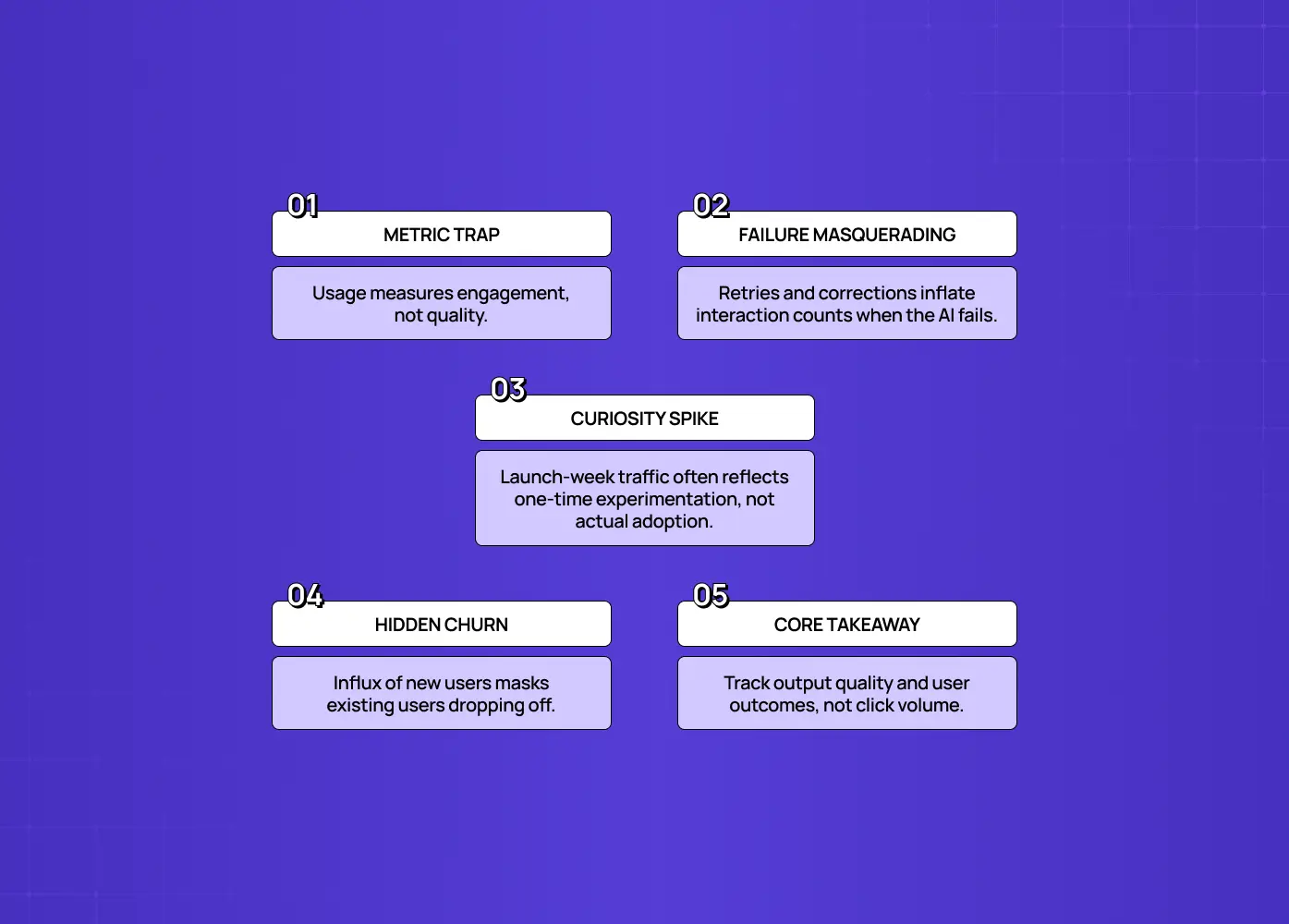
Five measurement pitfalls in AI products, including metric traps, failure masking, launch-week curiosity spikes, hidden churn, and focusing on output quality over click volume.

Usage graphs measure engagement, not quality, and for AI, high engagement can actively hide a failing feature. In a deterministic product, usage is a decent proxy for value: if people keep using a feature, it's probably helping them. AI breaks that assumption, because AI output varies in quality in a way a normal feature's doesn't.

Here's what a rising usage graph can actually be hiding:

  • A user retrying because the first output was useless. That retry registers as more usage, not less.

  • A user correcting the AI repeatedly because it keeps missing the point. Each correction still counts as an interaction.

  • A launch-week spike that's curiosity, not adoption. People try the feature once, get a mediocre result, and never come back, but the graph for that week looks great.

  • A flat repeat-usage curve disguised by strong total volume. If new users keep trickling in while old users quietly stop returning, the top-line number can still climb.

By the time the truth shows up, in churn, or in a flat repeat-usage curve once new-user growth slows, you've spent months believing a metric that was measuring the wrong thing. We saw a version of this with Gini, an AI-powered health platform we redesigned: an AI food-logging feature can get logged constantly, but if a meaningful share of those logs are corrections because the AI misread a meal, the usage number and the actual quality number are telling two very different stories. To actually know if your AI feature works, you have to measure the quality and outcomes of what it produces, not how often it's touched.

The AI onboarding playbook top teams use to boost activation.

Reduce first-session confusion, speed up time-to-value, and build user trust, built from real onboarding audits of AI products.

No Spam. Free Lifetime

The AI onboarding playbook top teams use to boost activation.

Reduce first-session confusion, speed up time-to-value, and build user trust, built from real onboarding audits of AI products.

No Spam. Free Lifetime

What "working" actually means for an AI feature

Seven standards for evaluating AI product quality, covering reliable outcomes, accuracy, task success, earned trust, resilience, business impact, and the limitations of activity dashboards.

An AI feature is "working" when it reliably produces correct, trustworthy output that helps users accomplish their goal, measured by quality, task success, trust, and outcomes, not clicks. Break that down into what you're really asking:

  • Is the output correct and grounded? Does it give accurate, faithful answers, not hallucinated ones?

  • Does it help users succeed? Do users actually complete their task with it, a real outcome, not just an interaction?

  • Do users trust it? Are they relying on the output, or constantly verifying, correcting, or ignoring it?

  • Does it hold up on real inputs? Does it work on the messy, varied things real users send, not just the clean demo cases?

  • Does it produce the intended business outcome? Retention, time saved, conversion: the reason you built it in the first place.

Take PathwaysX, an AI-powered B2B hiring platform we built the personality-based assessment engine for. "Working" there doesn't just mean the assessment runs without errors. It means recruiters trust the output enough to actually act on it instead of second-guessing every score, candidates get assessed consistently regardless of how they phrase their answers, and the platform measurably cuts down the guesswork that used to sit in a recruiter's head. None of that shows up on a usage dashboard.

Notice that none of the five questions above are visible on a usage dashboard either, and an AI dashboard built to surface them has its own distinct failure modes compared to a static one. 'Working' is a quality-and-outcome question, and answering it requires a different kind of measurement, which is what the rest of this guide is about.

What to measure instead of (just) usage

Eight core AI product success metrics: output accuracy, task success rate, trust signals, real-world robustness, safety and compliance, operational efficiency, agent execution, and business outcomes.

To evaluate whether an AI feature works, measure it across several quality and outcome dimensions, the things usage graphs can't see, especially once a feature renders a fully generative UI rather than a fixed layout.The dimensions that matter:

  • Output quality: accuracy and faithfulness. Is the output correct, and is it grounded in real information rather than hallucinated? This is the foundation. Everything else is moot if the answers are wrong.

  • Task success rate. Did the user actually accomplish their goal using the feature? Completion of the real job, not the click, is the truest signal.

  • Trust signals from users. Track corrections, thumbs-down, retries, and abandonment right after an AI response. High rates of these are failure hiding inside your usage numbers.

  • Robustness on real-world inputs. Does quality hold up on messy, varied, real user inputs, or only on clean cases? An AI that shines in demos and collapses in production erodes trust fast.

  • Safety and compliance. How often does it do something it shouldn't: produce unsafe, off-brand, or non-compliant output?

  • Efficiency: latency and cost per successful task. Slow or expensive-per-success features can be "working" and still not be viable.

  • For agents specifically, since copilot vs. agent UX calls for different evaluation criteria: tool correctness, step efficiency, plan quality, reasoning quality, and how often a human has to intervene.

  • The real outcome. Ultimately, did the feature drive the same UX metrics for SaaS it was built to move: retention, activation, time saved, conversion?

Together these tell you what usage never can: not whether people touched it, but whether it worked when they did.

Evals: the repeatable way to measure AI quality
Short description A SaaS go-to-market strategy is four decisions, not a launch checklist. Learn the six steps to build one, how to pick your GTM motion, and what to measure first.  Intro huge Most SaaS launches fail on strategy, not execution. This guide covers what a go-to-market strategy actually decides, the six steps to build one, how to choose between product-led and sales-led motions, and the signals that tell you it's working before revenue does.  Intro small Your SaaS GTM strategy is six decisions. Most teams rush three of them.

The core tool for AI product evaluation is the eval, a structured, repeatable test suite that scores your AI's output against defined criteria, so you can measure quality objectively and catch regressions. Concretely, an eval gives the AI a set of representative inputs, scores each output on the dimensions you care about (usually as a 0 to 1 score), and tracks the results across changes. It turns "the AI seems fine" into "the AI scores 0.87 on faithfulness and 0.79 on task success, up from last week." Unlike a usage graph, an eval measures quality, runs repeatedly, and tells you whether a change made the feature better or worse.

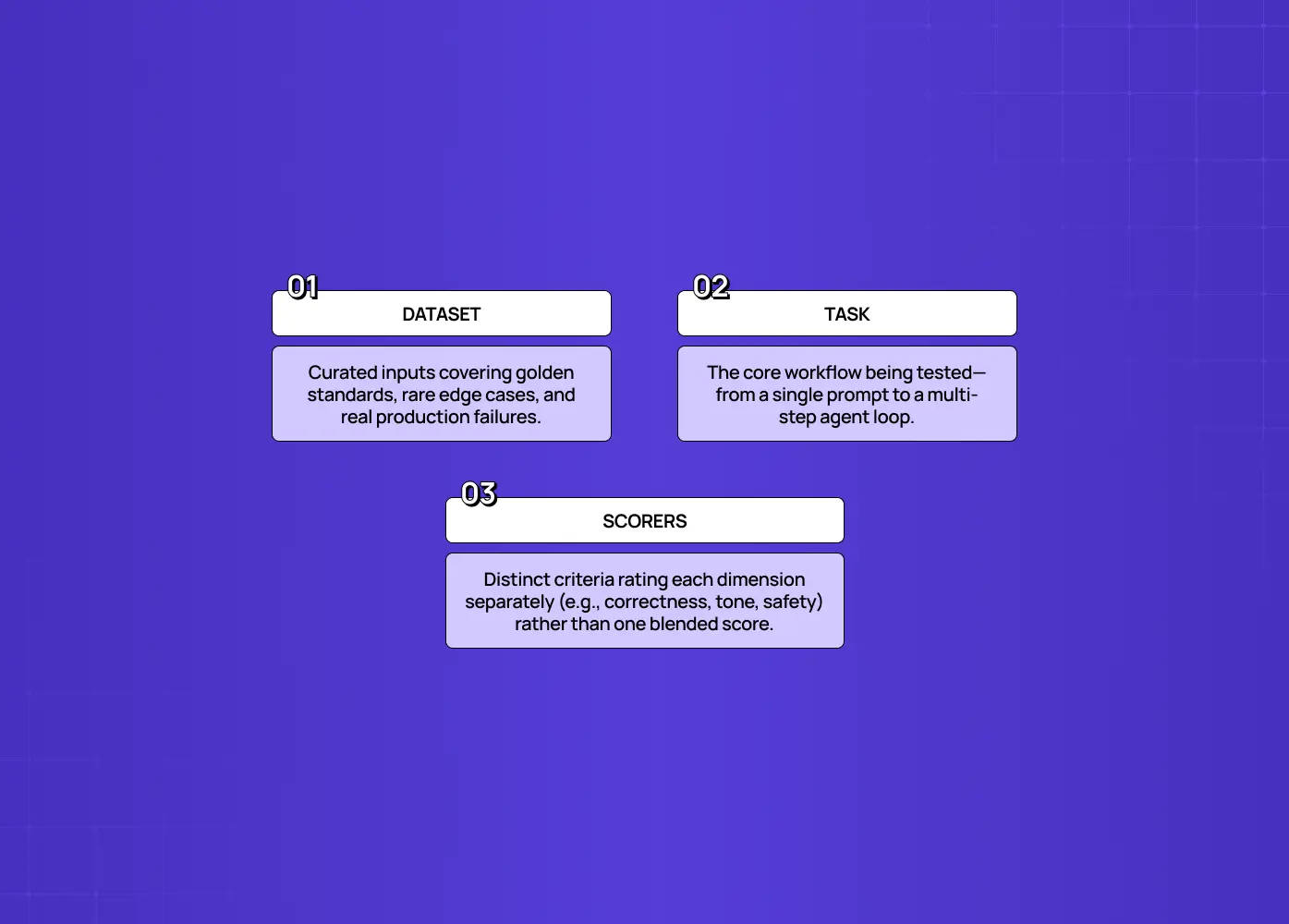
An eval is really made up of three simple parts:

  • A dataset. A collection of real or representative inputs that includes golden-standard cases you must get right, edge cases that are rare but important, and failure modes you've already seen in production.

  • A task. The thing being tested: a single prompt, a chain of prompts, or a full agent workflow that turns an input into an output.

  • Scorers. The criteria that judge quality, broken into individual dimensions rather than one blended score. A support response might need to be scored separately on correctness, tone, and policy compliance, because lumping them together means you can improve one while quietly letting another slide.

Evals matter because AI behavior drifts. A prompt tweak, a model update, or new user inputs can quietly degrade quality, and without a repeatable test, you won't notice until users do. Build your eval set from representative and real-world inputs, including the messy edge cases and past failures, score on the quality dimensions above, set a bar for "good enough to ship," and run it on every meaningful change. Evals are, in effect, the unit tests of AI quality, and the single biggest upgrade most teams can make over relying on usage graphs.

How AI evals are actually run
How AI evals are actually run

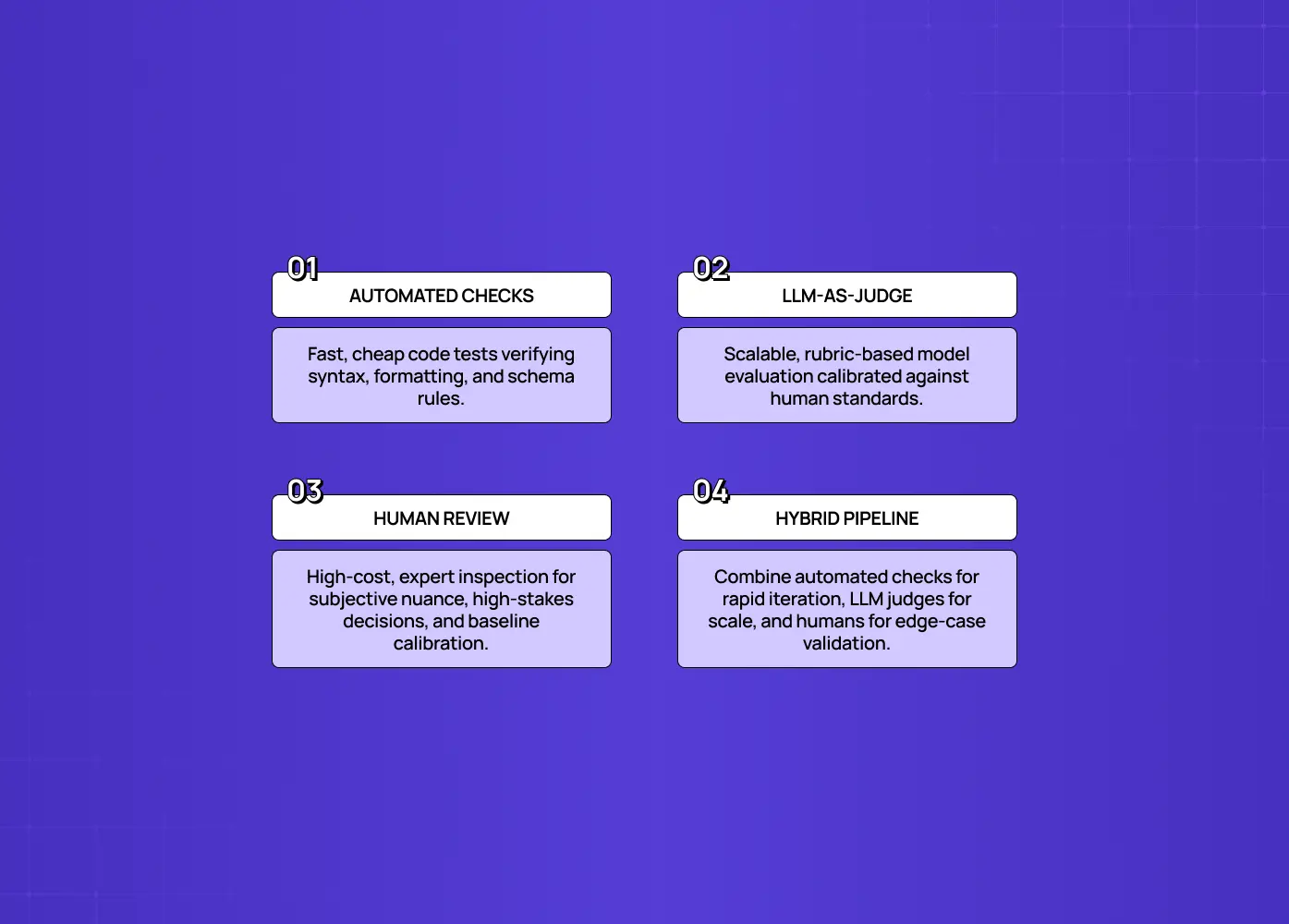
There isn't one single method for running these evaluations, and controlled comparison via A/B testing for SaaS companies is often layered on top. Most teams combine three approaches, each suited to a different kind of check:

  • Automated checks. Code-based tests that verify things like format, required fields, valid output structure, or whether a generated query is syntactically correct. These run fast and cheap on every prompt or model change, similar to unit tests, but they can't judge subjective quality like tone or helpfulness.

  • LLM-as-judge. One model scores another model's output against a rubric. This scales far better than human review and produces more consistent scoring across thousands of outputs, but it only works reliably after you calibrate it against human judgments and lock the judge model's version.

  • Human review. For high-stakes, novel, or nuanced outputs, a person with real domain context reviews the result. This is slower and more expensive, but it's the standard everything else gets calibrated against, and it's often the only credible check for genuinely subjective quality.

Most production teams blend all three, leaning more heavily on automated checks for routine changes and reserving human review for higher-risk outputs or the cases used to calibrate the LLM judge in the first place.

The AI evaluation stack: four layers
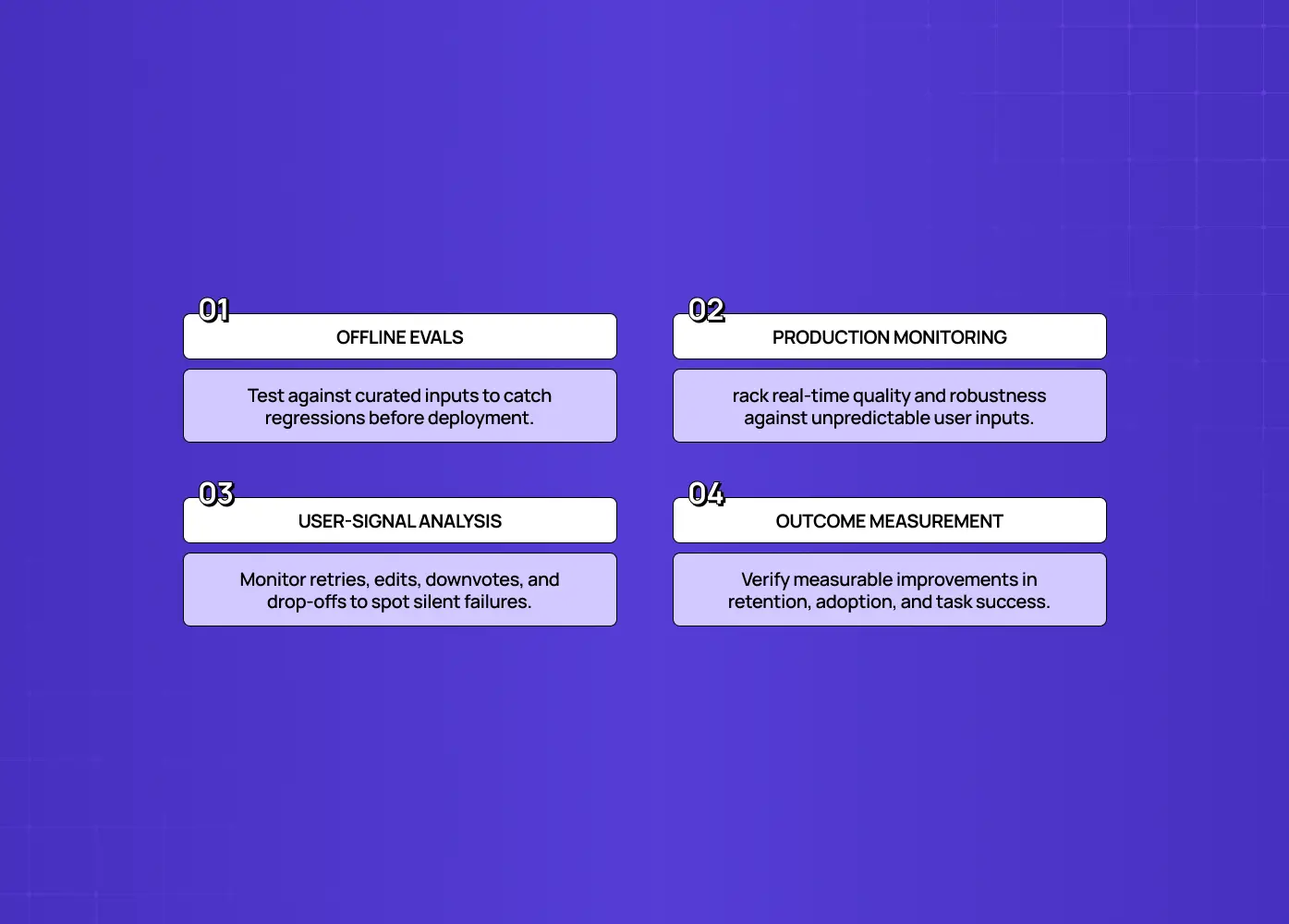
Robust AI evaluation is layered, combining offline evals, production monitoring, user-signal analysis, and outcome measurement, because no single layer tells the whole story. Use all four:

Robust AI evaluation is layered, combining offline evals, production monitoring, user-signal analysis, and outcome measurement, because no single layer tells the whole story. Use all four:

  • Offline evals (before you ship). Run your eval suite against curated inputs to check quality before it reaches users. This is your first gate and your regression safety net.

  • Production monitoring (on real traffic). Track quality metrics, not just usage, on live inputs, since real users send things your test set never anticipated. This is where robustness gets tested for real.

  • User-signal analysis. Watch corrections, thumbs, retries, and post-response abandonment as continuous quality signals from the people actually using it.

  • Outcome measurement. Tie it back to the business: did the feature drive real AI feature adoption, improve retention, task completion, or whatever it was built to move? This is the ultimate "is it working?" answer.

Usage graphs, if they belong anywhere, are a small input to layer three: a hint to investigate, never a verdict. The four layers together turn evaluation from "the line is going up" into "we know this feature produces quality output that helps users and moves our metrics."

Who owns AI product evaluation?

Who owns AI product evaluation?

AI evaluation is cross-functional, not an engineering-only task, because "quality" spans behavior, requirements, edge cases, and outcomes that no single team sees fully.

  • Engineering builds and runs the evals, and owns the testing infrastructure that connects production data back into the eval loop.

  • PMs validate the AI's behavior against product requirements, does it do what we actually promised, and does it match what customers care about, work that sits squarely at the intersection of product management and UX design.

  • QA runs regression tests so quality doesn't silently degrade with every model or prompt change.

  • Domain experts flag edge cases and judge whether outputs are genuinely correct in context, which technical teams alone often can't do.

  • Design and UX strategy define what "good" looks like from the user's side: what a trustworthy interaction feels like, where friction breaks trust, and how evaluation criteria should map to the actual user journey, not just the model's output. This is a conversation we have early with clients through our UX strategy work, because evaluation criteria set at the design stage save a lot of rework later.

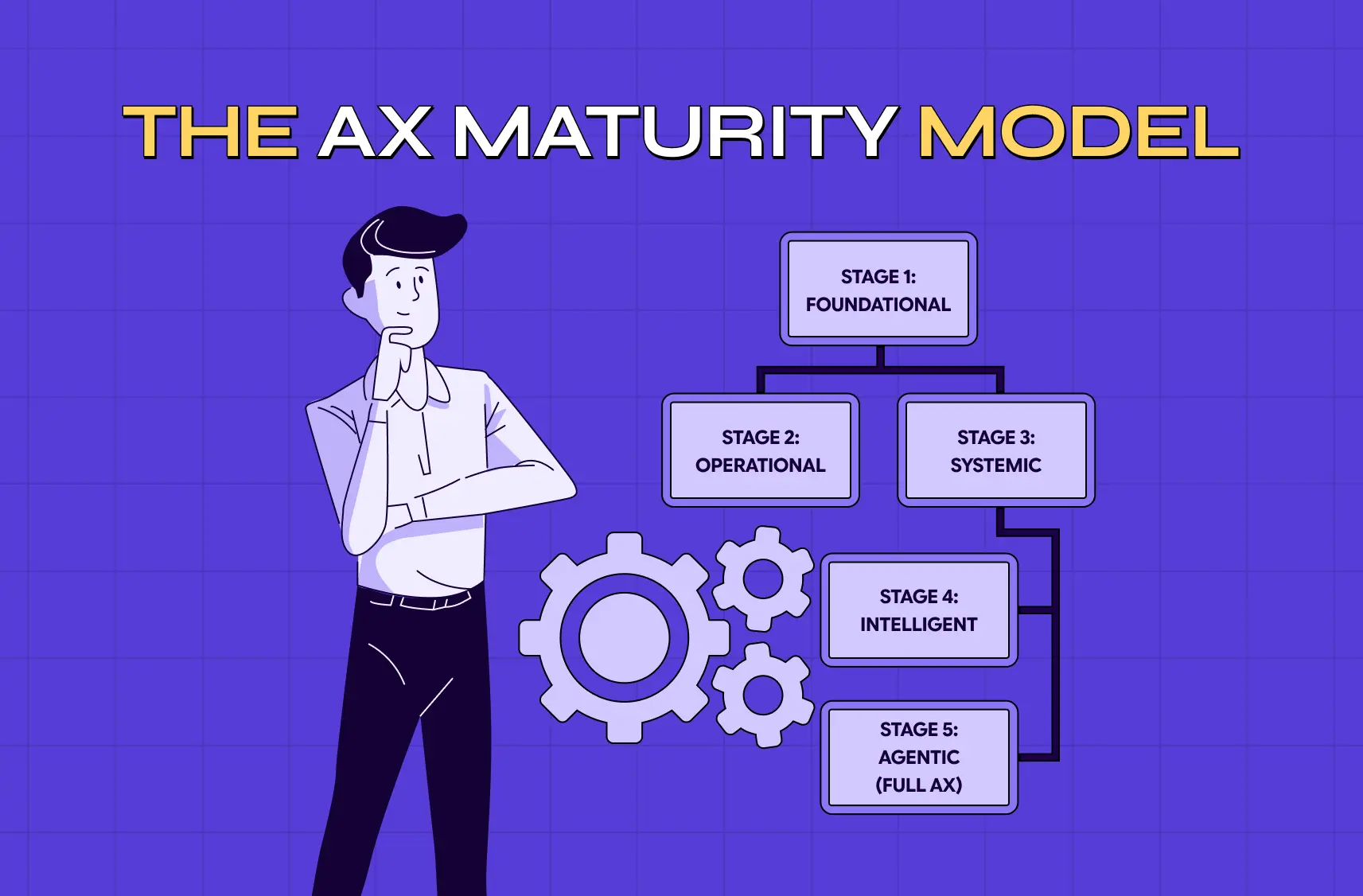
Leaving evaluation entirely to engineering means quality gets measured only on technical dimensions, missing whether the feature actually serves the user and the business.The teams that get AI evaluation right treat it as a shared discipline with clear ownership across product, engineering, QA, design, and domain expertise, with someone accountable for the overall 'is this working?' answer, a real marker of AX maturity.

How to start evaluating your AI feature

How to start evaluating your AI feature

You don't need a mature ML platform to start, and evaluation checkpoints belong inside how you develop an AI-powered SaaS product from day one, not bolted on after launch. You need to define what 'good output' means and test against it repeatedly. A practical path:

  • Define success for this feature. Write down what a correct, helpful output looks like and what user outcome it should produce. If you can't articulate "good," you can't evaluate it, and this step alone surfaces a lot.

  • Build a small eval set. Gather 50 to 200 representative inputs, including the messy edge cases and any past failures. Real inputs beat imagined ones.

  • Score on a few dimensions that matter. Start with accuracy and faithfulness and task success; add trust and safety as you go. Use human review or an LLM-as-judge for open-ended outputs.

  • Set a bar and run it on every change. Decide what score is "good enough to ship," and run the eval whenever you change the prompt, model, or pipeline, so you catch regressions.

  • Add production signals. Instrument corrections, retries, and post-response abandonment, and watch quality on real traffic, not just usage.

  • Tie it to an outcome. Connect the feature to a real metric (task completion, retention) so you can see whether "working" translates to value.

Start small and iterate. Even a lightweight eval beats a beautiful usage dashboard that can't tell you if the feature works.

Common AI evaluation mistakes

Most evaluation failures come from measuring the easy thing instead of the true thing, the same root causes behind most AI UX design mistakes:

  • Treating usage as success. Celebrating a rising graph that says nothing about quality.

  • Evaluating only on clean data. The feature looks great in testing and collapses on real, messy inputs.

  • Measuring a single dimension. Checking whether it "finished" without checking whether it finished correctly, safely, and helpfully.

  • Evaluating once at launch and never again. This misses the quality drift that comes from model updates and new inputs.

  • Leaving evaluation entirely to engineering. It never checks whether the feature actually serves the user and the business.

  • Never defining "good" up front. This makes every evaluation subjective and every conversation about quality circular.

Avoid these, and evaluation becomes the honest early-warning system that a usage graph can never be.

Signs your AI feature is failing despite good usage numbers

Watch for the tells that an AI feature is failing even while its usage graph looks healthy:

  • High correction or thumbs-down rates mean users are getting bad output and fixing it themselves.

  • Lots of retries or rephrasing mean the feature isn't understanding them the first time.

  • Sharp drop-off right after an AI response means the output didn't help.

  • Strong trial numbers with weak repeat usage mean people tried it once and left.

  • Rising support tickets referencing the AI feature mean it's confusing or wrong.

  • Flat or declining retention among users who "adopted" the feature means the usage isn't translating into value.

This is exactly what agent-style AI products need to watch for, the same failure pattern behind why your copilot UX feels broken even when usage looks fine. With Barista, a PR-first AI platform we designed to work like a teammate rather than a generic assistant, the risk wasn't just wrong answers, it was the agent taking the wrong sequence of steps: pulling the wrong context, drafting from the wrong brief, or missing a step a human PR lead would never skip. For agent-style features, a single misstep early in a workflow can compound into a completely unusable result even though every individual "step" technically ran. Watching step-level behavior, not just the final output, is what actually catches this. If your product involves this kind of AI-driven workflow, it's worth designing the evaluation criteria alongside the interface itself. This is part of how we approach AI-first UX design for copilots and agents: building the interface and the trust signals users need at the same time, not bolting evaluation on after launch.

Any of these signals can coexist with a rising usage line, which is exactly why usage alone can't tell you whether your AI is working. If you see these signals, your evaluation is telling you something your dashboard is hiding.

Conclusion

  • Usage graphs answer "did people touch it," a question that's nearly useless on its own for AI features and often actively misleading.

  • The question that matters is "is it working," and answering it requires real AI product evaluation: output quality and faithfulness, task success, user trust signals, robustness on real inputs, safety, and actual outcomes.

  • Anchor all of it with repeatable evals, run across a layered stack of offline testing, production monitoring, user signals, and outcome measurement.

  • Real products, from AI hiring assessments to AI health logging to AI PR copilots, all show the same pattern: usage numbers and quality numbers can diverge, and only proper evaluation catches it.

  • Do this well, and you'll know whether your AI investment is paying off long before churn tells you the hard way.

If you're building AI features and want them designed and evaluated to actually work, trusted, effective, and tied to real outcomes, book a discovery call with Groto. We design AI products for adoption and help teams measure what actually matters, beyond the usage graph. Let's make sure your AI is working, not just being clicked.
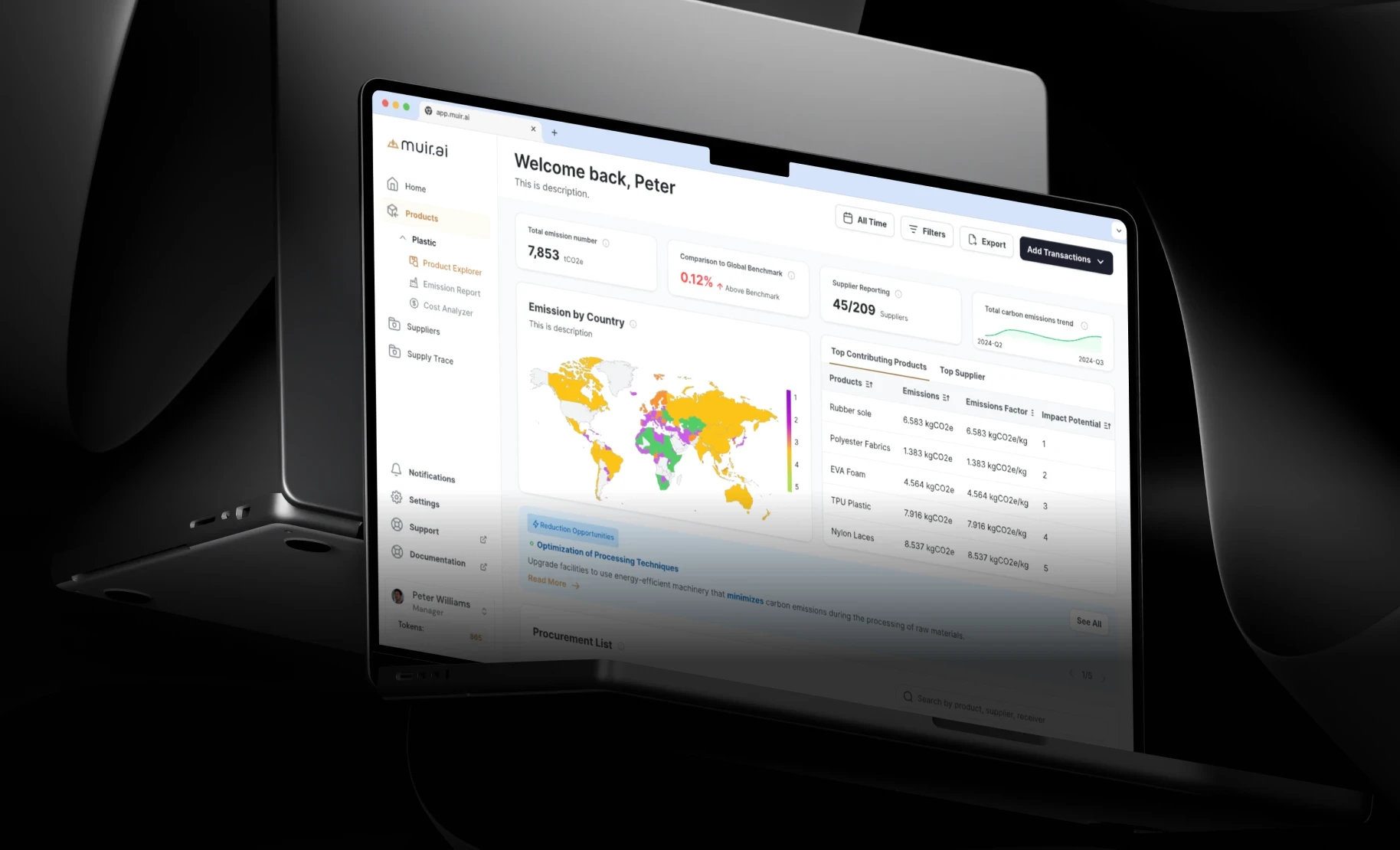

A rising usage graph feels like proof your AI feature works, but it only measures clicks. This guide breaks down how to properly evaluate an AI product: output quality, task success, trust, robustness, and real business outcomes.

our usage graph is climbing. Here's how to know if it actually means anything.

Your usage graph is climbing. Here's how to know if it actually means anything.

TL;DR

  • Usage graphs measure clicks, not quality. An AI feature can get heavy usage and still be wrong most of the time.

  • "Working" means the output is accurate, users actually complete their task, users trust it enough to rely on it, it holds up on messy real inputs, and it moves a real business metric.

  • Evals are structured, repeatable tests that score AI output against defined criteria, so you can catch regressions before users do.

  • A reliable evaluation setup combines offline evals, production monitoring, user-signal analysis, and outcome measurement, layered together rather than used in isolation.

  • Real teams, including several we've built AI-first products for, treat evaluation as a design and product discipline, not an engineering afterthought.

  • If you're building or scaling an AI feature and want it designed and evaluated to actually work, we can help you set that foundation early.

AI product evaluation is the discipline of measuring whether an AI feature actually does what it's supposed to do, building on the same evidence base as AI UX vs. traditional UX for SaaS products: producing accurate output, helping users finish their task, earning their trust, and moving the metrics it was built to move. It's what separates "people are using this" from "this is genuinely working," and for AI features specifically, that distinction is where most teams get caught off guard.

Your AI feature's usage graph is climbing, and everyone on the call nods approvingly. But here's an uncomfortable question: does that line tell you the feature is working, or just that people are touching it? Those are completely different things. Usage measures whether someone clicked; it says nothing about whether the AI gave them a correct answer, whether they trusted it, whether it actually solved their problem, or whether they're clicking again because it failed the first time. For AI products specifically, usage graphs are one of the most misleading metrics you can rely on.

This guide is about proper AI product evaluation: how to know whether your AI feature is genuinely working, beyond the vanity of usage. We'll cover why usage graphs mislead for AI, what "working" actually means for an AI feature, the dimensions you should measure instead, what an eval is and how to run one, the layered evaluation stack that gives you a true read, and real examples of where this plays out in production products. If you're a PM or CTO who wants to know whether your AI investment is paying off, not just being poked, this is the framework.

Why usage graphs lie about AI features

Five measurement pitfalls in AI products, including metric traps, failure masking, launch-week curiosity spikes, hidden churn, and focusing on output quality over click volume.

Usage graphs measure engagement, not quality, and for AI, high engagement can actively hide a failing feature. In a deterministic product, usage is a decent proxy for value: if people keep using a feature, it's probably helping them. AI breaks that assumption, because AI output varies in quality in a way a normal feature's doesn't.

Here's what a rising usage graph can actually be hiding:

  • A user retrying because the first output was useless. That retry registers as more usage, not less.

  • A user correcting the AI repeatedly because it keeps missing the point. Each correction still counts as an interaction.

  • A launch-week spike that's curiosity, not adoption. People try the feature once, get a mediocre result, and never come back, but the graph for that week looks great.

  • A flat repeat-usage curve disguised by strong total volume. If new users keep trickling in while old users quietly stop returning, the top-line number can still climb.

By the time the truth shows up, in churn, or in a flat repeat-usage curve once new-user growth slows, you've spent months believing a metric that was measuring the wrong thing. We saw a version of this with Gini, an AI-powered health platform we redesigned: an AI food-logging feature can get logged constantly, but if a meaningful share of those logs are corrections because the AI misread a meal, the usage number and the actual quality number are telling two very different stories. To actually know if your AI feature works, you have to measure the quality and outcomes of what it produces, not how often it's touched.

The AI onboarding playbook top teams use to boost activation.

Reduce first-session confusion, speed up time-to-value, and build user trust, built from real onboarding audits of AI products.

No Spam. Free Lifetime

What "working" actually means for an AI feature

Seven standards for evaluating AI product quality, covering reliable outcomes, accuracy, task success, earned trust, resilience, business impact, and the limitations of activity dashboards.

An AI feature is "working" when it reliably produces correct, trustworthy output that helps users accomplish their goal, measured by quality, task success, trust, and outcomes, not clicks. Break that down into what you're really asking:

  • Is the output correct and grounded? Does it give accurate, faithful answers, not hallucinated ones?

  • Does it help users succeed? Do users actually complete their task with it, a real outcome, not just an interaction?

  • Do users trust it? Are they relying on the output, or constantly verifying, correcting, or ignoring it?

  • Does it hold up on real inputs? Does it work on the messy, varied things real users send, not just the clean demo cases?

  • Does it produce the intended business outcome? Retention, time saved, conversion: the reason you built it in the first place.

Take PathwaysX, an AI-powered B2B hiring platform we built the personality-based assessment engine for. "Working" there doesn't just mean the assessment runs without errors. It means recruiters trust the output enough to actually act on it instead of second-guessing every score, candidates get assessed consistently regardless of how they phrase their answers, and the platform measurably cuts down the guesswork that used to sit in a recruiter's head. None of that shows up on a usage dashboard.

Notice that none of the five questions above are visible on a usage dashboard either, and an AI dashboard built to surface them has its own distinct failure modes compared to a static one. 'Working' is a quality-and-outcome question, and answering it requires a different kind of measurement, which is what the rest of this guide is about.

What to measure instead of (just) usage

Eight core AI product success metrics: output accuracy, task success rate, trust signals, real-world robustness, safety and compliance, operational efficiency, agent execution, and business outcomes.

To evaluate whether an AI feature works, measure it across several quality and outcome dimensions, the things usage graphs can't see, especially once a feature renders a fully generative UI rather than a fixed layout.The dimensions that matter:

  • Output quality: accuracy and faithfulness. Is the output correct, and is it grounded in real information rather than hallucinated? This is the foundation. Everything else is moot if the answers are wrong.

  • Task success rate. Did the user actually accomplish their goal using the feature? Completion of the real job, not the click, is the truest signal.

  • Trust signals from users. Track corrections, thumbs-down, retries, and abandonment right after an AI response. High rates of these are failure hiding inside your usage numbers.

  • Robustness on real-world inputs. Does quality hold up on messy, varied, real user inputs, or only on clean cases? An AI that shines in demos and collapses in production erodes trust fast.

  • Safety and compliance. How often does it do something it shouldn't: produce unsafe, off-brand, or non-compliant output?

  • Efficiency: latency and cost per successful task. Slow or expensive-per-success features can be "working" and still not be viable.

  • For agents specifically, since copilot vs. agent UX calls for different evaluation criteria: tool correctness, step efficiency, plan quality, reasoning quality, and how often a human has to intervene.

  • The real outcome. Ultimately, did the feature drive the same UX metrics for SaaS it was built to move: retention, activation, time saved, conversion?

Together these tell you what usage never can: not whether people touched it, but whether it worked when they did.

Evals: the repeatable way to measure AI quality

Short description A SaaS go-to-market strategy is four decisions, not a launch checklist. Learn the six steps to build one, how to pick your GTM motion, and what to measure first.  Intro huge Most SaaS launches fail on strategy, not execution. This guide covers what a go-to-market strategy actually decides, the six steps to build one, how to choose between product-led and sales-led motions, and the signals that tell you it's working before revenue does.  Intro small Your SaaS GTM strategy is six decisions. Most teams rush three of them.

The core tool for AI product evaluation is the eval, a structured, repeatable test suite that scores your AI's output against defined criteria, so you can measure quality objectively and catch regressions. Concretely, an eval gives the AI a set of representative inputs, scores each output on the dimensions you care about (usually as a 0 to 1 score), and tracks the results across changes. It turns "the AI seems fine" into "the AI scores 0.87 on faithfulness and 0.79 on task success, up from last week." Unlike a usage graph, an eval measures quality, runs repeatedly, and tells you whether a change made the feature better or worse.

An eval is really made up of three simple parts:

  • A dataset. A collection of real or representative inputs that includes golden-standard cases you must get right, edge cases that are rare but important, and failure modes you've already seen in production.

  • A task. The thing being tested: a single prompt, a chain of prompts, or a full agent workflow that turns an input into an output.

  • Scorers. The criteria that judge quality, broken into individual dimensions rather than one blended score. A support response might need to be scored separately on correctness, tone, and policy compliance, because lumping them together means you can improve one while quietly letting another slide.

Evals matter because AI behavior drifts. A prompt tweak, a model update, or new user inputs can quietly degrade quality, and without a repeatable test, you won't notice until users do. Build your eval set from representative and real-world inputs, including the messy edge cases and past failures, score on the quality dimensions above, set a bar for "good enough to ship," and run it on every meaningful change. Evals are, in effect, the unit tests of AI quality, and the single biggest upgrade most teams can make over relying on usage graphs.

How AI evals are actually run

How AI evals are actually run

There isn't one single method for running these evaluations, and controlled comparison via A/B testing for SaaS companies is often layered on top. Most teams combine three approaches, each suited to a different kind of check:

  • Automated checks. Code-based tests that verify things like format, required fields, valid output structure, or whether a generated query is syntactically correct. These run fast and cheap on every prompt or model change, similar to unit tests, but they can't judge subjective quality like tone or helpfulness.

  • LLM-as-judge. One model scores another model's output against a rubric. This scales far better than human review and produces more consistent scoring across thousands of outputs, but it only works reliably after you calibrate it against human judgments and lock the judge model's version.

  • Human review. For high-stakes, novel, or nuanced outputs, a person with real domain context reviews the result. This is slower and more expensive, but it's the standard everything else gets calibrated against, and it's often the only credible check for genuinely subjective quality.

Most production teams blend all three, leaning more heavily on automated checks for routine changes and reserving human review for higher-risk outputs or the cases used to calibrate the LLM judge in the first place.

The AI evaluation stack: four layers

Robust AI evaluation is layered, combining offline evals, production monitoring, user-signal analysis, and outcome measurement, because no single layer tells the whole story. Use all four:

Robust AI evaluation is layered, combining offline evals, production monitoring, user-signal analysis, and outcome measurement, because no single layer tells the whole story. Use all four:

  • Offline evals (before you ship). Run your eval suite against curated inputs to check quality before it reaches users. This is your first gate and your regression safety net.

  • Production monitoring (on real traffic). Track quality metrics, not just usage, on live inputs, since real users send things your test set never anticipated. This is where robustness gets tested for real.

  • User-signal analysis. Watch corrections, thumbs, retries, and post-response abandonment as continuous quality signals from the people actually using it.

  • Outcome measurement. Tie it back to the business: did the feature drive real AI feature adoption, improve retention, task completion, or whatever it was built to move? This is the ultimate "is it working?" answer.

Usage graphs, if they belong anywhere, are a small input to layer three: a hint to investigate, never a verdict. The four layers together turn evaluation from "the line is going up" into "we know this feature produces quality output that helps users and moves our metrics."

Who owns AI product evaluation?

Who owns AI product evaluation?

AI evaluation is cross-functional, not an engineering-only task, because "quality" spans behavior, requirements, edge cases, and outcomes that no single team sees fully.

  • Engineering builds and runs the evals, and owns the testing infrastructure that connects production data back into the eval loop.

  • PMs validate the AI's behavior against product requirements, does it do what we actually promised, and does it match what customers care about, work that sits squarely at the intersection of product management and UX design.

  • QA runs regression tests so quality doesn't silently degrade with every model or prompt change.

  • Domain experts flag edge cases and judge whether outputs are genuinely correct in context, which technical teams alone often can't do.

  • Design and UX strategy define what "good" looks like from the user's side: what a trustworthy interaction feels like, where friction breaks trust, and how evaluation criteria should map to the actual user journey, not just the model's output. This is a conversation we have early with clients through our UX strategy work, because evaluation criteria set at the design stage save a lot of rework later.

Leaving evaluation entirely to engineering means quality gets measured only on technical dimensions, missing whether the feature actually serves the user and the business.The teams that get AI evaluation right treat it as a shared discipline with clear ownership across product, engineering, QA, design, and domain expertise, with someone accountable for the overall 'is this working?' answer, a real marker of AX maturity.

How to start evaluating your AI feature

How to start evaluating your AI feature

You don't need a mature ML platform to start, and evaluation checkpoints belong inside how you develop an AI-powered SaaS product from day one, not bolted on after launch. You need to define what 'good output' means and test against it repeatedly. A practical path:

  • Define success for this feature. Write down what a correct, helpful output looks like and what user outcome it should produce. If you can't articulate "good," you can't evaluate it, and this step alone surfaces a lot.

  • Build a small eval set. Gather 50 to 200 representative inputs, including the messy edge cases and any past failures. Real inputs beat imagined ones.

  • Score on a few dimensions that matter. Start with accuracy and faithfulness and task success; add trust and safety as you go. Use human review or an LLM-as-judge for open-ended outputs.

  • Set a bar and run it on every change. Decide what score is "good enough to ship," and run the eval whenever you change the prompt, model, or pipeline, so you catch regressions.

  • Add production signals. Instrument corrections, retries, and post-response abandonment, and watch quality on real traffic, not just usage.

  • Tie it to an outcome. Connect the feature to a real metric (task completion, retention) so you can see whether "working" translates to value.

Start small and iterate. Even a lightweight eval beats a beautiful usage dashboard that can't tell you if the feature works.

Common AI evaluation mistakes

Most evaluation failures come from measuring the easy thing instead of the true thing, the same root causes behind most AI UX design mistakes:

  • Treating usage as success. Celebrating a rising graph that says nothing about quality.

  • Evaluating only on clean data. The feature looks great in testing and collapses on real, messy inputs.

  • Measuring a single dimension. Checking whether it "finished" without checking whether it finished correctly, safely, and helpfully.

  • Evaluating once at launch and never again. This misses the quality drift that comes from model updates and new inputs.

  • Leaving evaluation entirely to engineering. It never checks whether the feature actually serves the user and the business.

  • Never defining "good" up front. This makes every evaluation subjective and every conversation about quality circular.

Avoid these, and evaluation becomes the honest early-warning system that a usage graph can never be.

Signs your AI feature is failing despite good usage numbers

Watch for the tells that an AI feature is failing even while its usage graph looks healthy:

  • High correction or thumbs-down rates mean users are getting bad output and fixing it themselves.

  • Lots of retries or rephrasing mean the feature isn't understanding them the first time.

  • Sharp drop-off right after an AI response means the output didn't help.

  • Strong trial numbers with weak repeat usage mean people tried it once and left.

  • Rising support tickets referencing the AI feature mean it's confusing or wrong.

  • Flat or declining retention among users who "adopted" the feature means the usage isn't translating into value.

This is exactly what agent-style AI products need to watch for, the same failure pattern behind why your copilot UX feels broken even when usage looks fine. With Barista, a PR-first AI platform we designed to work like a teammate rather than a generic assistant, the risk wasn't just wrong answers, it was the agent taking the wrong sequence of steps: pulling the wrong context, drafting from the wrong brief, or missing a step a human PR lead would never skip. For agent-style features, a single misstep early in a workflow can compound into a completely unusable result even though every individual "step" technically ran. Watching step-level behavior, not just the final output, is what actually catches this. If your product involves this kind of AI-driven workflow, it's worth designing the evaluation criteria alongside the interface itself. This is part of how we approach AI-first UX design for copilots and agents: building the interface and the trust signals users need at the same time, not bolting evaluation on after launch.

Any of these signals can coexist with a rising usage line, which is exactly why usage alone can't tell you whether your AI is working. If you see these signals, your evaluation is telling you something your dashboard is hiding.

Conclusion

  • Usage graphs answer "did people touch it," a question that's nearly useless on its own for AI features and often actively misleading.

  • The question that matters is "is it working," and answering it requires real AI product evaluation: output quality and faithfulness, task success, user trust signals, robustness on real inputs, safety, and actual outcomes.

  • Anchor all of it with repeatable evals, run across a layered stack of offline testing, production monitoring, user signals, and outcome measurement.

  • Real products, from AI hiring assessments to AI health logging to AI PR copilots, all show the same pattern: usage numbers and quality numbers can diverge, and only proper evaluation catches it.

  • Do this well, and you'll know whether your AI investment is paying off long before churn tells you the hard way.

If you're building AI features and want them designed and evaluated to actually work, trusted, effective, and tied to real outcomes, book a discovery call with Groto. We design AI products for adoption and help teams measure what actually matters, beyond the usage graph. Let's make sure your AI is working, not just being clicked.

Have a project in mind?

Let’s talk through your idea and see what makes sense.

Harpreet Singh

Founder at Groto

Have a project in mind?

Let’s talk through your idea and see what makes sense.

Harpreet Singh

Founder at Groto

FAQ

Everything you were going to ask (and a few things you didn’t know to)

What tools are commonly used for evaluating AI products?

Teams typically combine a few categories: observability and monitoring tools like Arize, LangSmith, and Braintrust for tracking production quality; open-source frameworks like OpenAI Evals for general LLM testing, Ragas for retrieval-augmented generation pipelines, and DeepEval for unit-test-style checks with CI/CD integration; and platform-native tools if you're already inside an ecosystem like Databricks or Bedrock. No single tool covers every dimension, so most teams use two or three together depending on what they're testing.

How is evaluating an AI agent different from evaluating a single AI feature?

A single AI feature usually produces one output you can score directly. An agent takes multiple steps, calls tools, and maintains state across a workflow, so a mistake early on can invalidate everything that follows. Evaluating an agent means scoring the sequence of decisions, not just the final answer, including whether it picked the right tools, followed an efficient plan, and recovered when something went wrong.

How often should AI evals be run?

Automated evals should run on every meaningful prompt, model, or pipeline change, similar to unit tests in traditional software. Human review works well on a weekly cadence against production samples, with a more comprehensive review before major releases. The goal is catching issues before users do, then continuously monitoring afterward, since AI behavior can drift even without any change on your end.

What's the difference between an eval and production monitoring?

An eval tests your AI system before it ships, using a curated set of inputs to check quality against defined criteria, similar to a unit test. Production monitoring tracks how the system actually behaves with real users after deployment, catching drift, edge cases your test set didn't anticipate, and quality regressions that only show up at scale. You need both: evals catch issues early, monitoring makes sure they don't creep back in.
How many test cases do you need to start an AI eval?

You don't need hundreds to begin. Five to ten examples covering your main use case is enough to run a first eval and start surfacing real weaknesses. From there, grow the set to somewhere between 50 and 200 examples by pulling in real production inputs, edge cases, and any failures you've already seen, rather than trying to imagine every scenario upfront.

Can user feedback alone replace a structured AI evaluation process?

No. User feedback, like thumbs-down ratings or complaints, is a valuable signal but it's reactive and incomplete. It only tells you about problems users noticed and bothered to report, and it says nothing about issues that are silently degrading trust or quality before they show up as complaints. Structured evaluation, run before and after shipping, catches problems proactively instead of waiting for users to find them first.

What tools are commonly used for evaluating AI products?

Teams typically combine a few categories: observability and monitoring tools like Arize, LangSmith, and Braintrust for tracking production quality; open-source frameworks like OpenAI Evals for general LLM testing, Ragas for retrieval-augmented generation pipelines, and DeepEval for unit-test-style checks with CI/CD integration; and platform-native tools if you're already inside an ecosystem like Databricks or Bedrock. No single tool covers every dimension, so most teams use two or three together depending on what they're testing.

How is evaluating an AI agent different from evaluating a single AI feature?

A single AI feature usually produces one output you can score directly. An agent takes multiple steps, calls tools, and maintains state across a workflow, so a mistake early on can invalidate everything that follows. Evaluating an agent means scoring the sequence of decisions, not just the final answer, including whether it picked the right tools, followed an efficient plan, and recovered when something went wrong.

How often should AI evals be run?

Automated evals should run on every meaningful prompt, model, or pipeline change, similar to unit tests in traditional software. Human review works well on a weekly cadence against production samples, with a more comprehensive review before major releases. The goal is catching issues before users do, then continuously monitoring afterward, since AI behavior can drift even without any change on your end.

What's the difference between an eval and production monitoring?

An eval tests your AI system before it ships, using a curated set of inputs to check quality against defined criteria, similar to a unit test. Production monitoring tracks how the system actually behaves with real users after deployment, catching drift, edge cases your test set didn't anticipate, and quality regressions that only show up at scale. You need both: evals catch issues early, monitoring makes sure they don't creep back in.

How many test cases do you need to start an AI eval?

You don't need hundreds to begin. Five to ten examples covering your main use case is enough to run a first eval and start surfacing real weaknesses. From there, grow the set to somewhere between 50 and 200 examples by pulling in real production inputs, edge cases, and any failures you've already seen, rather than trying to imagine every scenario upfront.

Can user feedback alone replace a structured AI evaluation process?

No. User feedback, like thumbs-down ratings or complaints, is a valuable signal but it's reactive and incomplete. It only tells you about problems users noticed and bothered to report, and it says nothing about issues that are silently degrading trust or quality before they show up as complaints. Structured evaluation, run before and after shipping, catches problems proactively instead of waiting for users to find them first.

More Articles

Extreme close-up black and white photograph of a human eye

Let’s bring your vision to life

Tell us what's on your mind? We'll hit you back in 24 hours. No fluff, no delays - just a solid vision to bring your idea to life.

Profile portrait of a man in a white shirt against a light background

Harpreet Singh

Founder and Creative Director

Get in Touch

Extreme close-up black and white photograph of a human eye

Let’s bring your vision to life

Tell us what's on your mind? We'll hit you back in 24 hours. No fluff, no delays - just a solid vision to bring your idea to life.

Profile portrait of a man in a white shirt against a light background

Harpreet Singh

Founder and Creative Director

Get in Touch

Extreme close-up black and white photograph of a human eye

Let’s bring your vision to life

Tell us what's on your mind? We'll hit you back in 24 hours. No fluff, no delays - just a solid vision to bring your idea to life.

Profile portrait of a man in a white shirt against a light background

Harpreet Singh

Founder and Creative Director

Get in Touch