Figma to Claude Code: How Designers Can Turn Designs Into Working Code

10 min read

10 min read

Tools & Resources

Figma to Claude Code: How Designers Can Turn Designs Into Working Code

Learn how the Figma and Claude Code connection works, from MCP setup to design to code and code to design workflows, plus best practices and limitations for design teams

Figma to Claude Code: How Designers Can Turn Designs Into Working Code

10 min read

10 min read

Tools & Resources

Figma to Claude Code: How Designers Can Turn Designs Into Working Code

Learn how the Figma and Claude Code connection works, from MCP setup to design to code and code to design workflows, plus best practices and limitations for design teams

Connecting Figma with Claude Code is changing how design and development teams collaborate. This guide breaks down how the MCP connection works, how to set it up, where it genuinely helps designers, and where human review still matters most.

A designer's guide to connecting Figma and Claude Code through MCP.
A visual representation showing how design workflows can move seamlessly from Figma into Claude Code for faster implementation and development.

TL;DR

Figma to Claude Code refers to the workflow that connects Figma's design files with Claude Code through the Model Context Protocol, or MCP. This lets Claude Code read a Figma file directly and generate front end code from it, and it also lets Claude Code push production code back into Figma as an editable design. For designers, this means faster handoff, fewer misread specs, and a shorter gap between what we design and what actually ships. Below, we break down how the connection works, how to set it up, where it helps most, and where it still needs a human eye.

For product teams, it's less about a new AI trick and more about closing the gap between design intent and what actually ships, and a signal of where AI in web design is heading.

What Is Figma to Claude Code?

This is the practice of linking a Figma design file to Claude Code so the two tools can exchange information directly.Instead of a designer manually writing specs or a developer eyeballing a Figma frame and guessing at spacing, colors, and component structure, Claude Code can query the Figma file itself.

It does this through an MCP server, a small piece of infrastructure that lets AI web design tools like Claude Code talk to external platforms in a structured way. Figma has its own official MCP server, and Claude Code can connect to it as a client. Once connected, Claude Code can pull layer names, styles, spacing tokens, component variants, and even exported assets straight from the design file, then use that information to generate working code.

This isn't limited to converting static screens into HTML. It also runs in reverse. Claude Code can take an existing codebase and turn it into an editable Figma design, which is useful when a product has outgrown its original design file or when there was never a proper design file to begin with.

How the Integration Actually Works

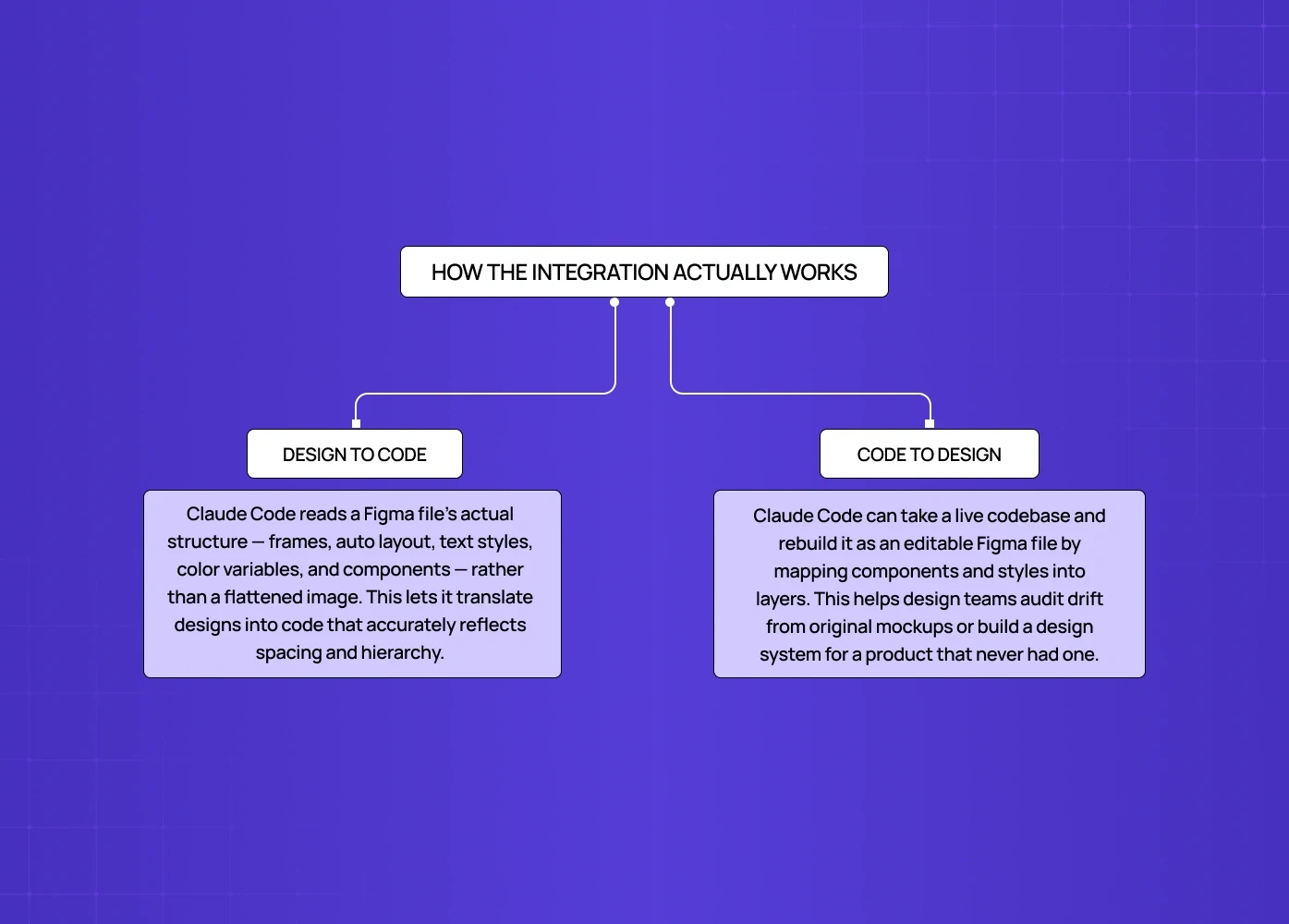
A flowchart explaining the two-way relationship between Figma and Claude Code, covering both design-to-code and code-to-design workflows.

The connection between Figma and Claude Code works in two directions, and it helps to think of them separately since they solve different problems.

Design to Code

This is the direction most designers think of first. Claude Code reads the structure of a Figma file, including frames, auto layout settings, text styles, color variables, and component instances, and translates that into code. Because it reads actual design tokens rather than a flattened image, the output tends to respect spacing and hierarchy far more accurately than older "screenshot to code" tools ever did. Other design-to-code tools, such as Google Stitch and Galileo AI, tackle the same problem from a more prompt-first angle. Other design-to-code tools, such as Google Stitch and Galileo AI, tackle the same problem from a more prompt-first angle.

Code to Design

The second direction takes a live codebase and rebuilds it as an editable Figma file. This is particularly useful for design teams inheriting a product with no design system, or for auditing how a shipped product has drifted from its original mockups over time. Instead of manually recreating every screen, Claude Code maps components and styles from the code and reconstructs them as Figma layers designers can actually edit.

How to Connect Figma to Claude Code
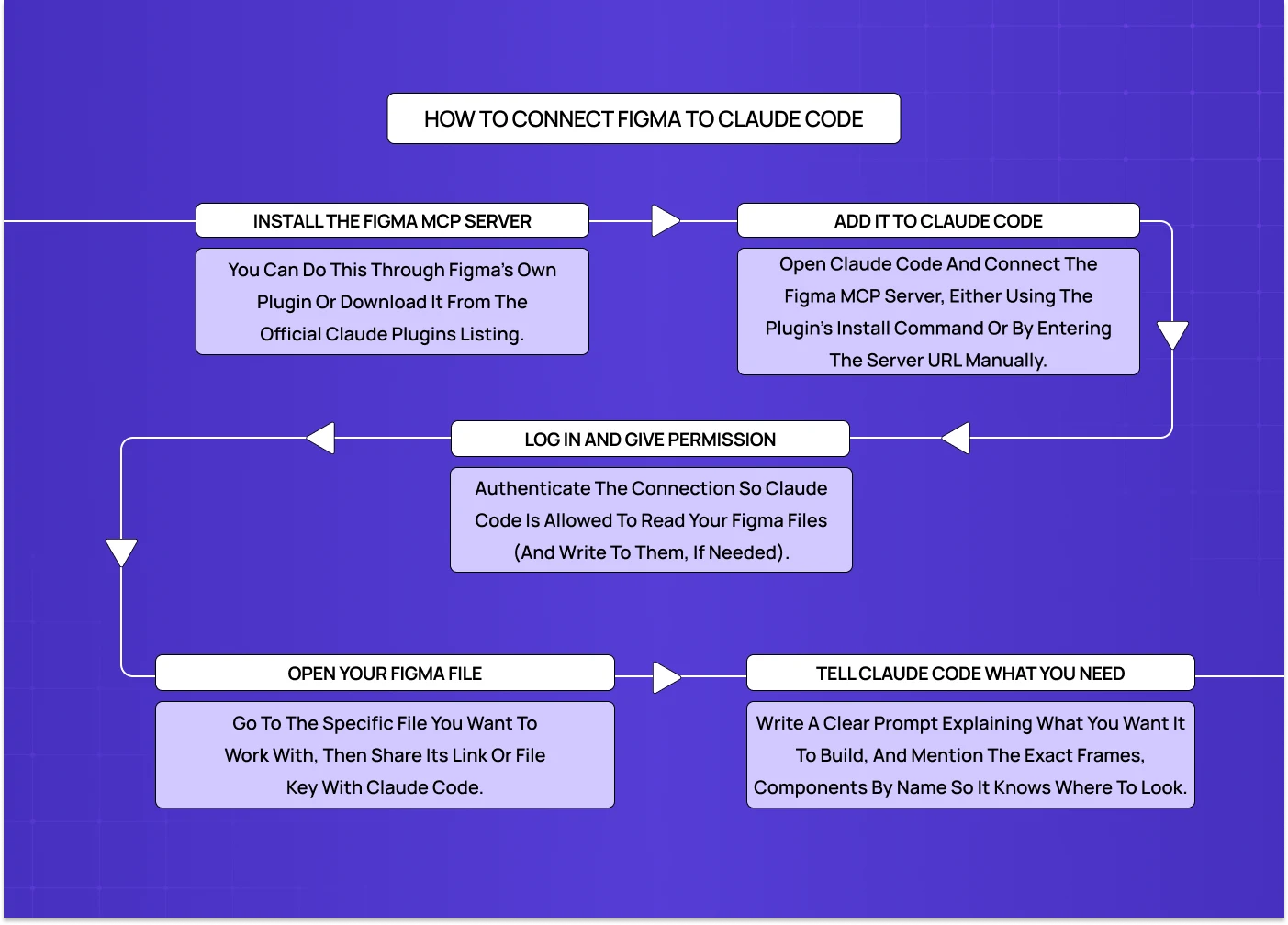
A step-by-step guide showing how to install the Figma MCP server, authenticate permissions, and connect your design files to Claude Code.

Setting up the integration is mostly a one-time configuration step. Here is the general flow:

  • Install the Figma MCP server, either through Figma's own plugin or the official listing under claude-plugins-official

  • Open Claude Code and add the Figma MCP server as a connected tool, using the plugin install command or manual server URL depending on your setup

  • Authenticate the connection so Claude Code has permission to read (and in some cases write to) your Figma files

  • Open the specific Figma file you want Claude Code to reference, and share the file link or file key with Claude Code

  • Give Claude Code a clear prompt describing what you want built, referencing specific frames, components, or pages by name

Once the Figma MCP server is installed and authenticated, most designers do not need to touch the setup again. The connection persists across sessions, and connecting a new file is usually just a matter of sharing a new link.

A few setup notes worth flagging:

  • You will need edit or view access to the Figma file for the MCP server to read it properly

  • Complex files with nested components or nonstandard naming can slow down how accurately Claude Code interprets structure, so clean layer naming pays off here

  • The integration is currently free to use as part of Claude Code, though usage limits depend on which Claude plan you are on

Want to know where your users are dropping off?

We’ll break down the exact moments users lose interest, and why.

Want to know where your users are dropping off?

We’ll break down the exact moments users lose interest, and why.

A Practical Example

Consider a product team preparing to launch a new feature. Traditionally, the designer finishes a Figma file, having worked from wireframe to prototype, writes up a spec, and waits for a developer to interpret it, often followed by a few rounds of "this isn't quite right" before the build matches intent. With Figma to Claude Code in the loop, that gap shrinks. The designer's file becomes the source of truth Claude Code reads from directly, so the first build is already much closer to what was designed. The team spends less time on translation and more time on the product decisions that actually move things forward.

This is the kind of shift we care about at Groto: not the mechanics of the tool, but what it frees a team up to focus on.

What This Means for Designers
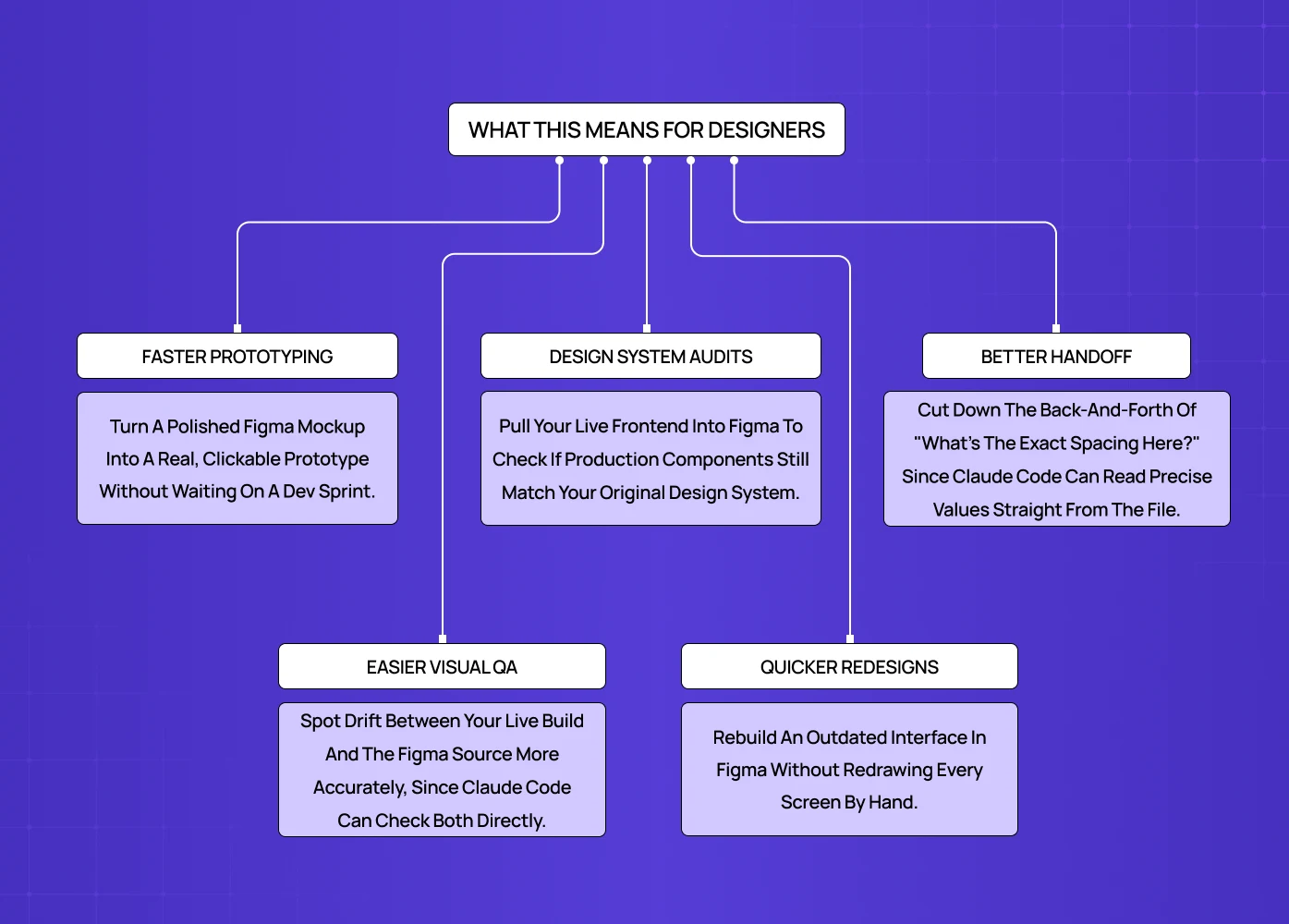
A benefits overview highlighting faster prototyping, improved design system audits, easier visual QA, and smoother developer handoff using Claude Code.

For product teams, the real value isn't the novelty of AI generating code, it's what happens to speed and alignment once design and development stop working from two separate versions of the truth. A few places this shows up in practice: 

  • Faster prototyping: turn a high fidelity Figma mockup into a clickable, real code prototype without waiting on a developer sprint, one of many AI tools that save designers hours

  • Design system audits: pull an existing frontend into Figma to check whether components in production still match the source design system

  • Handoff accuracy: reduce the back and forth of developers asking what the exact spacing is, by letting Claude Code read precise values from the file

  • Faster QA on visual drift: compare a live build against its Figma source more precisely, since Claude Code can reference both directly

  • Lightweight redesigns: rebuild an outdated interface in Figma without manually redrawing every screen from scratch

Best Practices for Designers Using Claude Code with Figma

A clean Figma file, and the right set of UX design tools around it, makes a significant difference in output quality. Some habits worth building in:

  • Name layers and components clearly and consistently, since Claude Code relies on this structure to interpret intent

  • Use Figma's auto layout, grids, and variables instead of manual positioning, so spacing and colqor translate accurately into code

  • Keep component variants organized rather than duplicating similar frames with slightly different names

  • Give Claude Code specific prompts tied to actual frame or component names instead of vague instructions

  • Review generated code against the original design before shipping, especially for responsive behavior and interaction states

  • Start with a single page or component before running the workflow across an entire file, a low-risk approach for anyone newer to these tools to catch structural issues early

Limitations to Know Before You Start
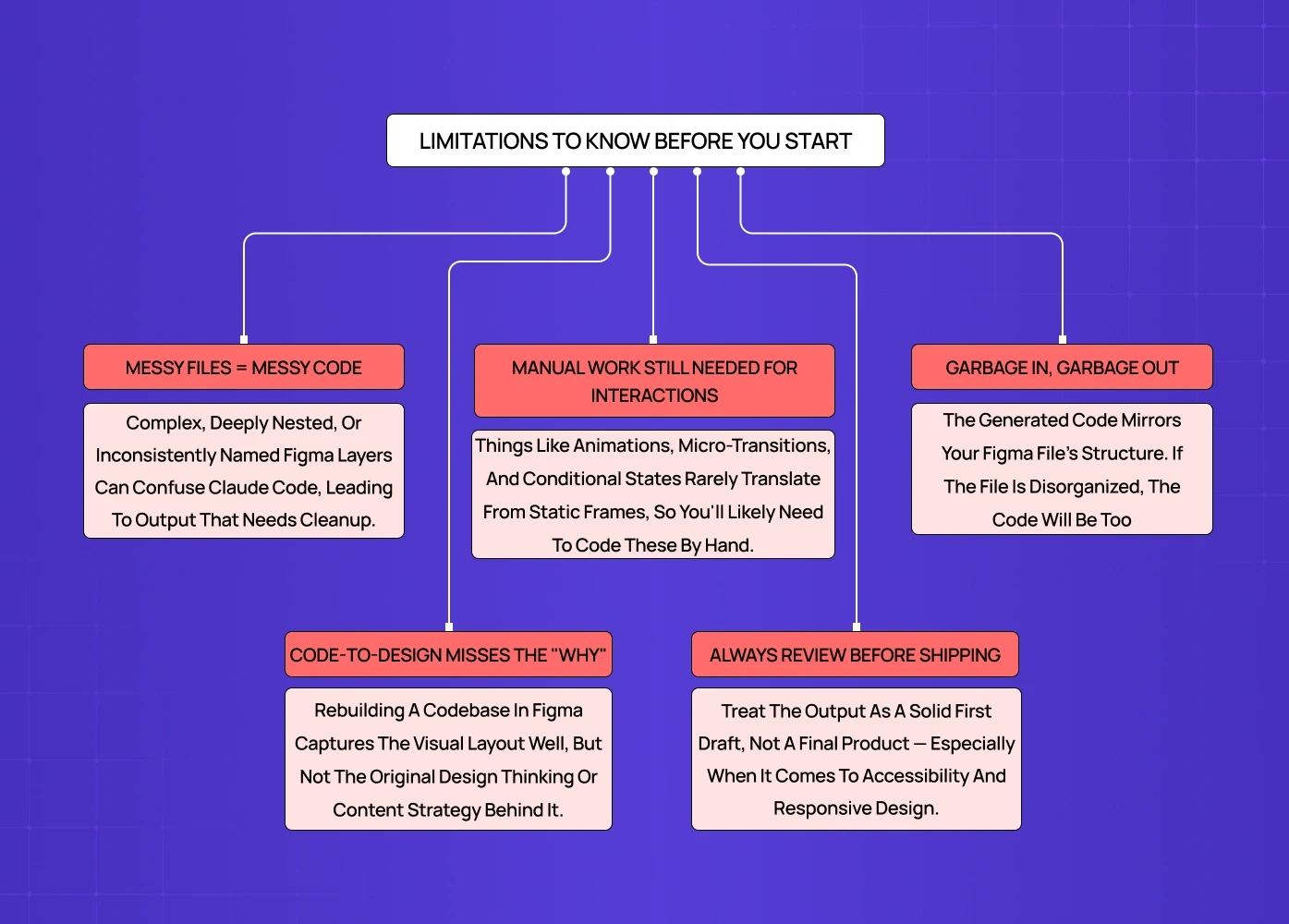
A diagram outlining important constraints of the Figma × Claude Code workflow, including messy files, interaction limitations, and the need for manual review before shipping.

This workflow is genuinely useful, but it is not a full replacement for a design to development process, and for some sites a builder-first route like Framer or Webflow may fit better. A few honest limitations:

  • Claude Code can misinterpret complex, deeply nested, or inconsistently named Figma structures, which leads to messier output that needs manual cleanup

  • Interaction details like custom animations, micro-transitions, and complex conditional states usually still need manual coding, since these rarely translate cleanly from static frames

  • Generated code reflects the structure of the Figma file, so a disorganized file will produce disorganized code no matter how capable the tool is

  • The code to design direction reconstructs visual structure well, but it does not always capture original design rationale, content strategy, or the reasoning behind specific decisions

  • Design review is still necessary. Treat the output as a strong first draft, not a final, ship ready build, especially for accessibility and responsive behavior

Our Take

At Groto, we work with AI-first and SaaS product teams who need design and development to move at the same speed, not in sequence. When we built Pathways' AI-powered hiring platform from scratch, or redesigned Barista into a PR-first tool with clearer workflows, the biggest wins came from tightening the loop between what's designed and what gets shipped, not from any single tool. Workflows like Figma to Claude Code are part of a broader shift toward agentic AI in product design: fewer handoff delays, fewer misread specs, and more time spent on product decisions instead of translation. We see this as one more lever in a wider move toward AI-driven design that product teams can use to move faster without losing design quality.

Conclusion

  • Figma to Claude Code connects Figma and Claude Code through an MCP server, allowing design to code and code to design translation

  • Setup involves installing the Figma MCP server, authenticating Claude Code, and sharing the relevant Figma file

  • The workflow speeds up prototyping, design system audits, and handoff accuracy for design teams

  • Clean, well-named Figma files produce noticeably better code output

  • Complex interactions, animations, and design rationale still require manual review

  • Used well, it shortens the distance between design intent and what actually ships, without removing the need for design judgment. For teams that would rather skip code entirely, a no-code build route is the other path.

Connecting Figma with Claude Code is changing how design and development teams collaborate. This guide breaks down how the MCP connection works, how to set it up, where it genuinely helps designers, and where human review still matters most.

A designer's guide to connecting Figma and Claude Code through MCP.

A visual representation showing how design workflows can move seamlessly from Figma into Claude Code for faster implementation and development.

TL;DR

Figma to Claude Code refers to the workflow that connects Figma's design files with Claude Code through the Model Context Protocol, or MCP. This lets Claude Code read a Figma file directly and generate front end code from it, and it also lets Claude Code push production code back into Figma as an editable design. For designers, this means faster handoff, fewer misread specs, and a shorter gap between what we design and what actually ships. Below, we break down how the connection works, how to set it up, where it helps most, and where it still needs a human eye.

For product teams, it's less about a new AI trick and more about closing the gap between design intent and what actually ships, and a signal of where AI in web design is heading.

What Is Figma to Claude Code?

This is the practice of linking a Figma design file to Claude Code so the two tools can exchange information directly.Instead of a designer manually writing specs or a developer eyeballing a Figma frame and guessing at spacing, colors, and component structure, Claude Code can query the Figma file itself.

It does this through an MCP server, a small piece of infrastructure that lets AI web design tools like Claude Code talk to external platforms in a structured way. Figma has its own official MCP server, and Claude Code can connect to it as a client. Once connected, Claude Code can pull layer names, styles, spacing tokens, component variants, and even exported assets straight from the design file, then use that information to generate working code.

This isn't limited to converting static screens into HTML. It also runs in reverse. Claude Code can take an existing codebase and turn it into an editable Figma design, which is useful when a product has outgrown its original design file or when there was never a proper design file to begin with.

How the Integration Actually Works

A flowchart explaining the two-way relationship between Figma and Claude Code, covering both design-to-code and code-to-design workflows.

The connection between Figma and Claude Code works in two directions, and it helps to think of them separately since they solve different problems.

Design to Code

This is the direction most designers think of first. Claude Code reads the structure of a Figma file, including frames, auto layout settings, text styles, color variables, and component instances, and translates that into code. Because it reads actual design tokens rather than a flattened image, the output tends to respect spacing and hierarchy far more accurately than older "screenshot to code" tools ever did. Other design-to-code tools, such as Google Stitch and Galileo AI, tackle the same problem from a more prompt-first angle. Other design-to-code tools, such as Google Stitch and Galileo AI, tackle the same problem from a more prompt-first angle.

Code to Design

The second direction takes a live codebase and rebuilds it as an editable Figma file. This is particularly useful for design teams inheriting a product with no design system, or for auditing how a shipped product has drifted from its original mockups over time. Instead of manually recreating every screen, Claude Code maps components and styles from the code and reconstructs them as Figma layers designers can actually edit.

How to Connect Figma to Claude Code

A step-by-step guide showing how to install the Figma MCP server, authenticate permissions, and connect your design files to Claude Code.

Setting up the integration is mostly a one-time configuration step. Here is the general flow:

  • Install the Figma MCP server, either through Figma's own plugin or the official listing under claude-plugins-official

  • Open Claude Code and add the Figma MCP server as a connected tool, using the plugin install command or manual server URL depending on your setup

  • Authenticate the connection so Claude Code has permission to read (and in some cases write to) your Figma files

  • Open the specific Figma file you want Claude Code to reference, and share the file link or file key with Claude Code

  • Give Claude Code a clear prompt describing what you want built, referencing specific frames, components, or pages by name

Once the Figma MCP server is installed and authenticated, most designers do not need to touch the setup again. The connection persists across sessions, and connecting a new file is usually just a matter of sharing a new link.

A few setup notes worth flagging:

  • You will need edit or view access to the Figma file for the MCP server to read it properly

  • Complex files with nested components or nonstandard naming can slow down how accurately Claude Code interprets structure, so clean layer naming pays off here

  • The integration is currently free to use as part of Claude Code, though usage limits depend on which Claude plan you are on

Want to know where your users are dropping off?

We’ll break down the exact moments users lose interest, and why.

A Practical Example

Consider a product team preparing to launch a new feature. Traditionally, the designer finishes a Figma file, having worked from wireframe to prototype, writes up a spec, and waits for a developer to interpret it, often followed by a few rounds of "this isn't quite right" before the build matches intent. With Figma to Claude Code in the loop, that gap shrinks. The designer's file becomes the source of truth Claude Code reads from directly, so the first build is already much closer to what was designed. The team spends less time on translation and more time on the product decisions that actually move things forward.

This is the kind of shift we care about at Groto: not the mechanics of the tool, but what it frees a team up to focus on.

What This Means for Designers

A benefits overview highlighting faster prototyping, improved design system audits, easier visual QA, and smoother developer handoff using Claude Code.

For product teams, the real value isn't the novelty of AI generating code, it's what happens to speed and alignment once design and development stop working from two separate versions of the truth. A few places this shows up in practice: 

  • Faster prototyping: turn a high fidelity Figma mockup into a clickable, real code prototype without waiting on a developer sprint, one of many AI tools that save designers hours

  • Design system audits: pull an existing frontend into Figma to check whether components in production still match the source design system

  • Handoff accuracy: reduce the back and forth of developers asking what the exact spacing is, by letting Claude Code read precise values from the file

  • Faster QA on visual drift: compare a live build against its Figma source more precisely, since Claude Code can reference both directly

  • Lightweight redesigns: rebuild an outdated interface in Figma without manually redrawing every screen from scratch

Best Practices for Designers Using Claude Code with Figma

A clean Figma file, and the right set of UX design tools around it, makes a significant difference in output quality. Some habits worth building in:

  • Name layers and components clearly and consistently, since Claude Code relies on this structure to interpret intent

  • Use Figma's auto layout, grids, and variables instead of manual positioning, so spacing and colqor translate accurately into code

  • Keep component variants organized rather than duplicating similar frames with slightly different names

  • Give Claude Code specific prompts tied to actual frame or component names instead of vague instructions

  • Review generated code against the original design before shipping, especially for responsive behavior and interaction states

  • Start with a single page or component before running the workflow across an entire file, a low-risk approach for anyone newer to these tools to catch structural issues early

Limitations to Know Before You Start

A diagram outlining important constraints of the Figma × Claude Code workflow, including messy files, interaction limitations, and the need for manual review before shipping.

This workflow is genuinely useful, but it is not a full replacement for a design to development process, and for some sites a builder-first route like Framer or Webflow may fit better. A few honest limitations:

  • Claude Code can misinterpret complex, deeply nested, or inconsistently named Figma structures, which leads to messier output that needs manual cleanup

  • Interaction details like custom animations, micro-transitions, and complex conditional states usually still need manual coding, since these rarely translate cleanly from static frames

  • Generated code reflects the structure of the Figma file, so a disorganized file will produce disorganized code no matter how capable the tool is

  • The code to design direction reconstructs visual structure well, but it does not always capture original design rationale, content strategy, or the reasoning behind specific decisions

  • Design review is still necessary. Treat the output as a strong first draft, not a final, ship ready build, especially for accessibility and responsive behavior

Our Take

At Groto, we work with AI-first and SaaS product teams who need design and development to move at the same speed, not in sequence. When we built Pathways' AI-powered hiring platform from scratch, or redesigned Barista into a PR-first tool with clearer workflows, the biggest wins came from tightening the loop between what's designed and what gets shipped, not from any single tool. Workflows like Figma to Claude Code are part of a broader shift toward agentic AI in product design: fewer handoff delays, fewer misread specs, and more time spent on product decisions instead of translation. We see this as one more lever in a wider move toward AI-driven design that product teams can use to move faster without losing design quality.

Conclusion

  • Figma to Claude Code connects Figma and Claude Code through an MCP server, allowing design to code and code to design translation

  • Setup involves installing the Figma MCP server, authenticating Claude Code, and sharing the relevant Figma file

  • The workflow speeds up prototyping, design system audits, and handoff accuracy for design teams

  • Clean, well-named Figma files produce noticeably better code output

  • Complex interactions, animations, and design rationale still require manual review

  • Used well, it shortens the distance between design intent and what actually ships, without removing the need for design judgment. For teams that would rather skip code entirely, a no-code build route is the other path.

Have a project in mind?

Let’s talk through your idea and see what makes sense.

Harpreet Singh

Founder at Groto

Have a project in mind?

Let’s talk through your idea and see what makes sense.

Harpreet Singh

Founder at Groto

FAQ

Everything you were going to ask (and a few things you didn’t know to)

Can ChatGPT convert Figma designs to code?

ChatGPT can generate code based on descriptions or screenshots of a Figma design, but it does not have a direct, structured connection to a live Figma file the way Claude Code does through the Figma MCP server. This means ChatGPT is working from an approximation of the design rather than reading the actual layer structure, spacing tokens, and component data.

Is Claude Code better than Figma Make?

The two tools solve different problems. Figma Make is built for generating quick prototypes from a prompt inside Figma itself, while Claude Code is a broader coding tool that connects to Figma through MCP to produce production ready code. Teams needing fast, disposable prototypes may lean on Figma Make, while teams needing code that integrates into an existing codebase tend to prefer Claude Code.

Is Claude replacing Figma?

No. Claude Code and Figma serve different functions in the workflow. Figma remains the design environment where visual decisions, prototyping, and design systems live, while Claude Code acts as a bridge that translates those decisions into code or reconstructs code back into a design file. The two are complementary rather than competing.

What is the cost of Figma to code tools?

Costs vary depending on the tool. The integration covered here does not carry an additional fee beyond your existing Claude Code plan, since it runs through Figma's official MCP server. Other third party design to code tools range from free tiers with limited exports to paid plans billed monthly based on usage.

How good is Claude with Figma design work?

Claude Code performs well when reading structured Figma files with clear layer names, defined variables, and consistent components. Its output quality drops noticeably on messy or inconsistently organized files, which makes file hygiene one of the biggest factors in how usable the generated code actually is.

Can Figma be used for coding directly, without switching tools?

Figma itself is a design tool, not a code editor, so it does not support writing or running application code natively. Features like Figma Make allow some in-app prototyping, but for production grade development, designs still need to move into a proper coding environment like Claude Code or a connected IDE.

Can ChatGPT convert Figma designs to code?

ChatGPT can generate code based on descriptions or screenshots of a Figma design, but it does not have a direct, structured connection to a live Figma file the way Claude Code does through the Figma MCP server. This means ChatGPT is working from an approximation of the design rather than reading the actual layer structure, spacing tokens, and component data.

Is Claude Code better than Figma Make?

The two tools solve different problems. Figma Make is built for generating quick prototypes from a prompt inside Figma itself, while Claude Code is a broader coding tool that connects to Figma through MCP to produce production ready code. Teams needing fast, disposable prototypes may lean on Figma Make, while teams needing code that integrates into an existing codebase tend to prefer Claude Code.

Is Claude replacing Figma?

No. Claude Code and Figma serve different functions in the workflow. Figma remains the design environment where visual decisions, prototyping, and design systems live, while Claude Code acts as a bridge that translates those decisions into code or reconstructs code back into a design file. The two are complementary rather than competing.

What is the cost of Figma to code tools?

Costs vary depending on the tool. The integration covered here does not carry an additional fee beyond your existing Claude Code plan, since it runs through Figma's official MCP server. Other third party design to code tools range from free tiers with limited exports to paid plans billed monthly based on usage.

How good is Claude with Figma design work?

Claude Code performs well when reading structured Figma files with clear layer names, defined variables, and consistent components. Its output quality drops noticeably on messy or inconsistently organized files, which makes file hygiene one of the biggest factors in how usable the generated code actually is.

Can Figma be used for coding directly, without switching tools?

Figma itself is a design tool, not a code editor, so it does not support writing or running application code natively. Features like Figma Make allow some in-app prototyping, but for production grade development, designs still need to move into a proper coding environment like Claude Code or a connected IDE.

More Articles

Extreme close-up black and white photograph of a human eye

Let’s bring your vision to life

Tell us what's on your mind? We'll hit you back in 24 hours. No fluff, no delays - just a solid vision to bring your idea to life.

Profile portrait of a man in a white shirt against a light background

Harpreet Singh

Founder and Creative Director

Get in Touch

Extreme close-up black and white photograph of a human eye

Let’s bring your vision to life

Tell us what's on your mind? We'll hit you back in 24 hours. No fluff, no delays - just a solid vision to bring your idea to life.

Profile portrait of a man in a white shirt against a light background

Harpreet Singh

Founder and Creative Director

Get in Touch

Extreme close-up black and white photograph of a human eye

Let’s bring your vision to life

Tell us what's on your mind? We'll hit you back in 24 hours. No fluff, no delays - just a solid vision to bring your idea to life.

Profile portrait of a man in a white shirt against a light background

Harpreet Singh

Founder and Creative Director

Get in Touch