

How to Design AI Dashboards That Users Actually Trust — 6 Principles from Groto

How to Design AI Dashboards That Users Actually Trust — 6 Principles from Groto

AI dashboards have design requirements that standard data visualization doesn't address. The 6 principles that separate dashboards that build AI trust from ones that quietly erode it.

How to Design AI Dashboards That Users Actually Trust — 6 Principles from Groto

How to Design AI Dashboards That Users Actually Trust — 6 Principles from Groto

AI dashboards have design requirements that standard data visualization doesn't address. The 6 principles that separate dashboards that build AI trust from ones that quietly erode it.

Most AI dashboard designs fail for the same reason: the team designed a standard data dashboard and added an AI layer on top. The result shows AI outputs the same way it shows static KPIs — with no indication of certainty, no explanation of reasoning, no path to recovery when the AI is wrong, and no design language for when the user should trust the AI and when they shouldn't.

An AI dashboard is not a data dashboard with an AI feature. The design requirements are completely different.

Illustration of a user interacting with an AI-powered analytics dashboard featuring automation, monitoring, and workflow management tools.

Most conversations about AI dashboard design focus on tools: which platform to use, how to connect your data, what prompts to type. That is useful, but it skips the harder question. Even a well-generated AI dashboard can fail its users if the design layer has not accounted for what makes AI outputs fundamentally different from standard data. This piece covers the design principles that determine whether an AI dashboard builds user trust over time or quietly erodes it. It extends the foundation laid in our guide to designing SaaS dashboards users actually understand — these principles begin where that post ends. If you are evaluating tools or building a dashboard from scratch, they apply regardless of which platform you use. 

TL;DR

  • Standard data dashboards show facts. AI dashboards show inferences, and that difference changes everything about how they should be designed.

  • Most AI dashboard failures are not model problems. They are design problems: outputs presented without confidence indicators, reasoning, or failure-state handling.

  • The six principles that separate trusted AI dashboards from trust-eroding ones are Confidence Visibility, Decision Transparency, Appropriate Reliance Design, Failure State Dignity, Data Provenance, and Override Accessibility.

  • These are not visual guidelines. They are structural requirements for any product where AI informs user decisions.

What Is AI Dashboard Design?

AI dashboard design is the practice of designing interfaces where AI — predictive models, recommendation engines, anomaly detectors, classification systems — generates some or all of the information users act on. It is a specialized application within the broader field of what AI UX design is and how it shapes modern products — one with distinct requirements that general AI UX principles alone do not cover. 

It is not the same as standard dashboard design. The information type is different, the failure modes are different, and the design requirements that follow from both are different — a distinction explored in depth in our analysis of what actually works in AI UX versus traditional UX for SaaS products, where the behavioral differences between users of each surface consistently at the metric level. 

The AI onboarding playbook top teams use to boost activation.

Reduce first-session confusion, speed up time-to-value, and build user trust, built from real onboarding audits of AI products.

No Spam. Free Lifetime

The AI onboarding playbook top teams use to boost activation.

Reduce first-session confusion, speed up time-to-value, and build user trust, built from real onboarding audits of AI products.

No Spam. Free Lifetime

Standard Dashboard vs. AI Dashboard

Aspects

Standard Dashboard

AI Dashboard

Information type

Facts the system knows with certainty

Inferences the model has generated

Example

Monthly revenue: $1.2M

Churn risk score: 78%

Certainty

Deterministic

Probabilistic

Failure mode

Data pipeline error

Wrong inference, silent or visible

Design job

Organize and clarify

Organize, clarify, AND communicate uncertainty

Why the Distinction Matters for Design

A standard dashboard has one design job: present known information clearly. An AI dashboard has several additional jobs that standard design systems are not built to handle — each requiring the 13 principles of design to be applied to a problem set those principles were not originally written to address: 

  • Communicate how certain the AI is about each output

  • Surface what data and reasoning produced the output

  • Guide users toward the right level of trust, not maximum trust

  • Handle AI-specific failures with information, not blank states

  • Show users where the AI's data came from and when it was last refreshed

  • Give users a frictionless path to apply their own judgment instead

Nielsen Norman Group's research on AI reliance documents that users given no uncertainty information about AI outputs either over-rely or under-rely. Both outcomes destroy the value of the AI feature. The design solution is calibration — and it is the central challenge at the heart of what agentic experience design is: where the system has agency, the interface must mediate between user confidence and system capability. 

Why Most AI Dashboards Fail Users
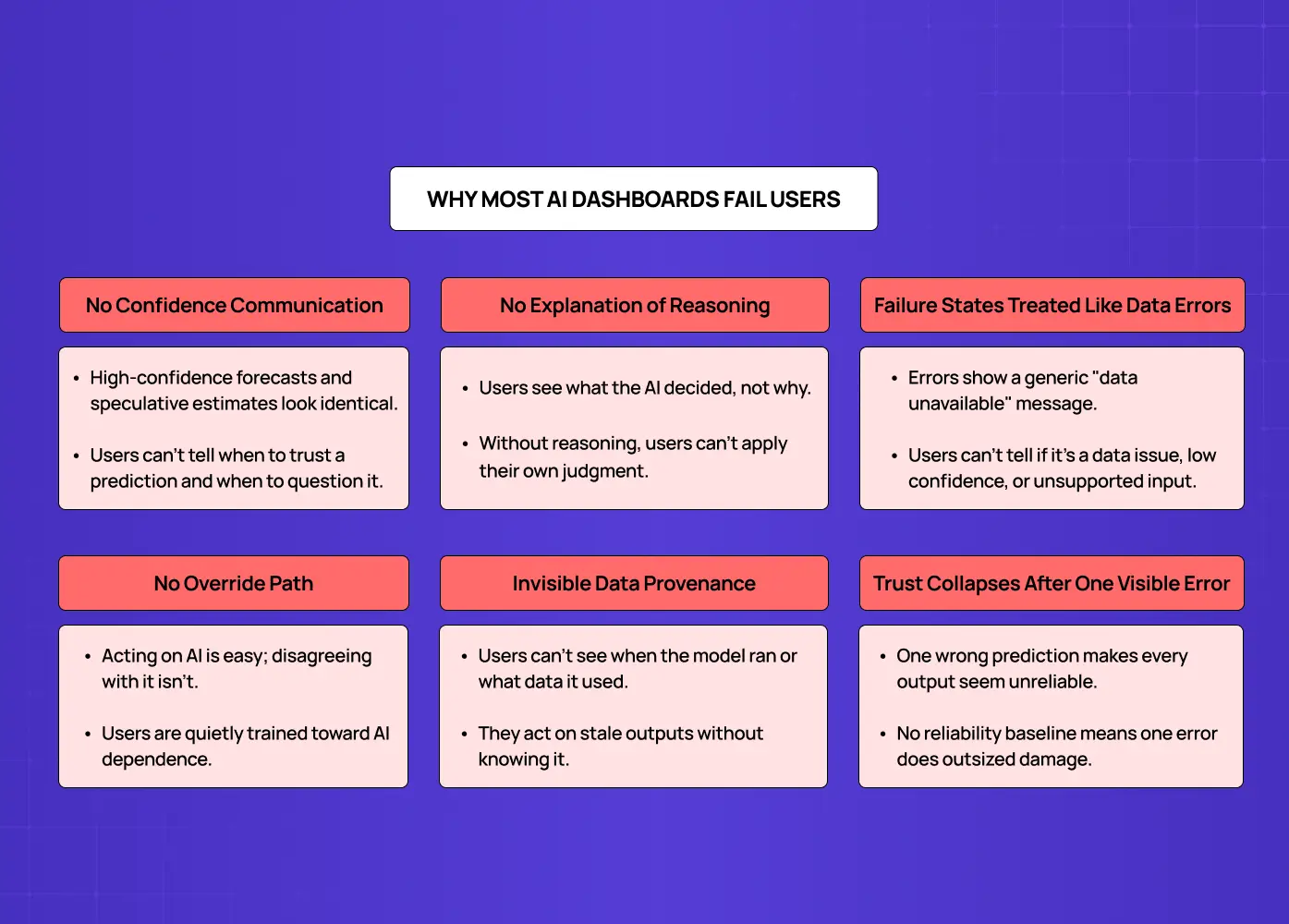
Diagram highlighting major AI dashboard usability issues, including poor transparency, weak error handling, lack of overrides, and hidden data sources.

The failures below are not model failures. They are design failures. They show up across products regardless of how sophisticated the underlying AI is.

No Confidence Communication

AI outputs are displayed at the same visual weight as deterministic data. A high-confidence forecast and a speculative estimate look identical. Users have no basis for knowing when to trust a prediction and when to question it.

No Explanation of Reasoning

Users see what the AI decided but not why. A churn risk score with no attribution is a black-box number users can only accept or dismiss. Without visibility into what data drove the output, users cannot apply their own judgment alongside the AI.

Failure States Treated Like Data Errors

When an AI output is unavailable or unreliable, most dashboards show a generic "data unavailable" state. Users have no way to understand whether the model hit a data quality issue, fell below its confidence threshold, or encountered an input type it was not trained on.

No Override Path

Dashboards make it easy to act on AI recommendations but difficult to formally disagree. Users who want to apply their own judgment have no accessible route to do so, and the product quietly trains them toward AI dependence.

Invisible Data Provenance

Users cannot see when the model last ran, what data it used, or whether there are quality issues in the inputs. This creates silent failure: users act on AI outputs based on stale or incomplete data without realizing it.

Trust Collapses After One Visible Error

When all AI outputs carry identical visual certainty, a single wrong prediction suggests every output might be wrong at the same rate. Nothing in the interface has established a reliability baseline, so one error does disproportionate damage. It is one of the most consistent patterns across the AI-driven UX practices every business needs to address in 2026 — trust fragility after a single visible error is among the most common reasons AI features are disabled rather than improved. 

Each of these failure modes has a corresponding design solution. The six principles below define what those solutions look like in practice.

The Groto AI Dashboard Design Stack: 6 Principles for Building User Trust
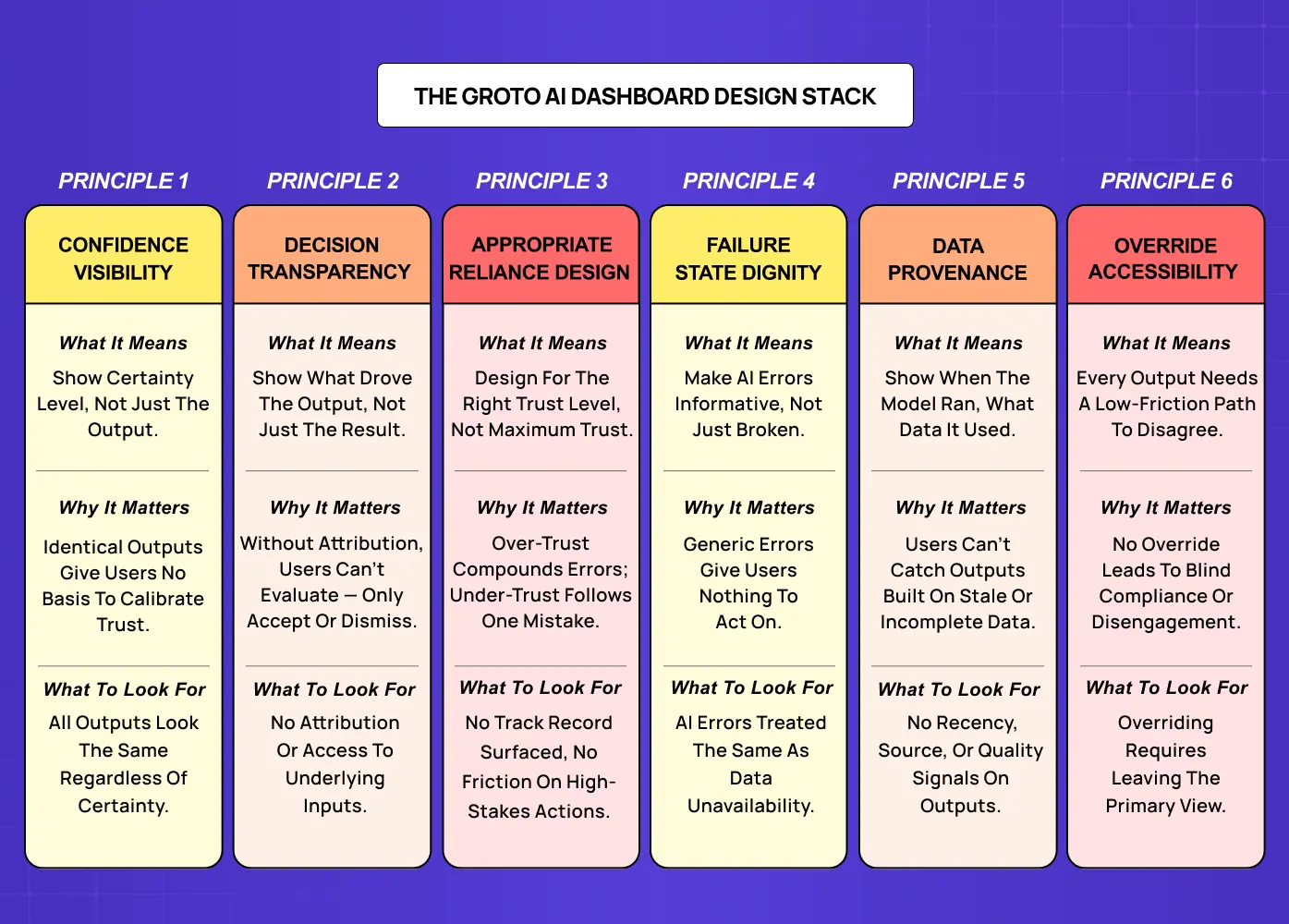
Framework presenting six core principles for designing trustworthy AI dashboards, including confidence visibility, transparency, provenance, and override controls.

These principles are structural requirements, not visual guidelines. A design system for SaaS products built for deterministic data visualization has no token for AI confidence states, no component for explainability UI, and no documented pattern for AI failure states. The six principles below define what needs to be built, and why.

The six principles at a glance:

  • Principle 1: Confidence Visibility

  • Principle 2: Decision Transparency

  • Principle 3: Appropriate Reliance Design

  • Principle 4: Failure State Dignity

  • Principle 5: Data Provenance

  • Principle 6: Override Accessibility

Principle 1: Confidence Visibility

Show how certain the AI is, not just what it says.

What It Means

Every AI output carries a confidence level by definition. The model produced that output with some degree of certainty, and that certainty varies across outputs, time, and data quality conditions. Confidence visibility means surfacing that certainty as a first-class interface element, present in the primary display of any AI output, not buried in a tooltip or an admin panel. The underlying rules are those of any well-designed information surface — the digital product design principles of hierarchy, emphasis, and progressive disclosure — applied here to the specific challenge of communicating probabilistic certainty. 

Why It Matters

When a high-confidence prediction and a low-confidence estimate look identical, users have no basis for calibrating their reliance. They either treat all outputs as equally reliable, or they learn through experience that some outputs are wrong and begin discounting all of them. Neither outcome is what the product intends.

In Practice

  • Add confidence bands around forecast lines instead of displaying single-point estimates

  • Use color or opacity gradations — grounded in visual design principles of contrast and opacity — to distinguish high-confidence from low-confidence outputs 

  • Display explicit confidence percentages adjacent to AI outputs where relevant

  • Apply linguistic qualifiers such as "high confidence," "uncertain," or "insufficient data" on recommendation cards

  • Visually recede low-confidence outputs relative to high-confidence ones so the hierarchy is immediate

From the Field

Google Maps (travel time estimates) Google Maps surfaces confidence implicitly through ranges rather than single-point estimates. When traffic data is uncertain, it shows "35-55 min" instead of "42 min." That range is a confidence signal baked into the primary display, not a tooltip. Users calibrate their planning accordingly without needing to understand the model behind it. This is exactly what confidence visibility looks like in a consumer-facing AI interface. 

What to Look For

If all AI outputs carry identical visual treatment regardless of model certainty, confidence visibility has not been designed. Ask engineering whether confidence scores exist in the underlying model output. If they do and the interface does not surface them, the design is actively hiding information users need.

Principle 2: Decision Transparency

Make AI reasoning visible and auditable.

What It Means

Decision transparency means surfacing the primary inputs and logic behind an AI output in a way users can inspect, even if they cannot fully audit the model. The minimum viable implementation answers one question: what data did the AI use to generate this output?

Why It Matters

A churn risk score that surfaces "based on login frequency, feature adoption rate, and support ticket volume over the past 30 days" gives a user something to evaluate. They can assess whether those inputs are reliable, whether they have context the model lacks, and whether the output makes sense. A score with no attribution is a black-box number users can only accept or dismiss. Research on explainable AI interfaces consistently shows that "Why this recommendation?" access beside AI outputs increases user trust scores and reduces support tickets.

In Practice

  • Surface the primary data signals that contributed to each AI output

  • Indicate which factors carried the highest weight in the model's decision

  • Flag when the AI is operating on data it has not seen frequently

  • Make the explanation accessible from the output itself, not from a separate documentation page

  • Use progressive disclosure: a one-line summary with an expandable detail view for users who want more — one of the micro UX design patterns that improve user experience instantly and the most practical way to surface AI reasoning without overloading the primary view 

From the Field

When we redesigned Barista, a PR-first AI platform, PR teams needed to understand why the AI flagged a particular angle or recommended a specific content approach for a client. Without visible reasoning, account managers were either following AI suggestions blindly or ignoring them entirely. Making the primary contributing signals visible in the workflow was the design change that made AI recommendations usable rather than decorative.

What to Look For

If AI outputs appear with no attribution and no access to underlying inputs, decision transparency has not been addressed. The starting point is a consistently accessible, lightweight explanation of primary data sources and factors behind each AI output.

Principle 3: Appropriate Reliance Design

Build for the right level of trust, not maximum trust.

What It Means

The goal of AI dashboard design is not to maximize user trust in the AI. It is to align user confidence with actual AI capability. That means designing for both over-trust prevention and under-trust correction simultaneously.

Why It Matters

Over-reliance is the more common failure. A dashboard that presents AI outputs confidently with no uncertainty information trains users to act on recommendations without applying their own judgment. This works when the AI is right and creates compounding errors when it is wrong in cases where domain knowledge would have caught the mistake. Under-reliance follows visible AI errors: one wrong recommendation causes users to discount subsequent correct ones, sometimes permanently.

In Practice

For over-reliance prevention:

  • Require explicit confirmation before high-stakes AI-driven actions execute

  • Surface confidence indicators before the user acts on a recommendation, not after

  • Show the key inputs behind an AI decision at the moment the user is about to act on it

For under-reliance correction:

  • Surface how often the AI has been correct in the user's specific context

  • Display AI track record on similar historical cases

  • Show the cost of ignoring a correct recommendation over time

From the Field

When we designed the AI-powered hiring platform for Pathways, appropriate reliance was a central design concern. Hiring decisions carry real consequences for candidates and organizations alike. The solution was confirmation patterns that surfaced key inputs behind an AI assessment at the moment a recruiter was about to act, creating proportional friction on high-stakes actions without making the tool feel adversarial.

What to Look For

If the product has no mechanism for surfacing AI track record, no confirmation friction for high-stakes AI actions, and no design response to a state where a user has been ignoring AI outputs for a sustained period, appropriate reliance design has not been addressed.

Principle 4: Failure State Dignity

Design AI errors as information, not as breakdowns.

What It Means

Standard dashboard errors are operational: a pipeline failed, a metric is unavailable, a connection timed out. AI dashboard errors are categorically different: the model produced a wrong output, or produced one with insufficient data to be reliable, or encountered an input distribution it was not trained on. AI-specific failure modes require AI-specific design responses.

Why It Matters

The most common design failure is treating AI errors like data errors: displaying a generic "data unavailable" state or showing nothing. A blank cell or generic error leaves users without the information they need to decide whether to wait, investigate, or proceed without the AI's input. A dashboard that surfaces "forecast unavailable — model confidence below threshold for current data volume" gives the user something to work with. Blank gives them nothing and damages trust disproportionately.

In Practice

  • Distinguish between data-quality failures, model-confidence failures, and out-of-distribution inputs in error copy

  • Always indicate what the user should do next: wait for more data, consult an alternative source, or proceed with manual estimation

  • Distinguish between a temporary failure (the model will recover when data conditions improve) and a fundamental limitation (the model cannot reliably handle this input type)

  • Avoid using the same visual component for AI errors and standard data unavailability states

  • Write error copy from the user's next action, not from the system's technical state

From the Field

When we worked on LearnSphere's AI-powered edtech platform, failure state design was non-trivial because the product serves three distinct roles: admins, teachers, and students. An AI recommendation failing for a student requires a different error state than the same failure for a teacher. Designing role-aware failure states starts with clearly documented UX persona examples — the role definitions that make "what does this user type need from a failure message?" a design question rather than an assumption. Different detail levels and next-action prompts per role were the difference between an error that confused users and one that gave them a path forward. 

What to Look For

If AI error states use the same visual and copy treatment as standard data unavailability, failure state dignity has not been designed. AI failures require a distinct design language that communicates cause, context, and next action.

Principle 5: Data Provenance

Surface where the AI's inputs came from.

What It Means

AI models are only as reliable as the data they were trained on and the inputs they receive at inference. Data provenance means making the data sources, recency, and quality of AI inputs accessible from the AI output itself, at the moment the user is deciding whether to act on it. Not buried in documentation. Not in an admin settings panel.

Why It Matters

Users who understand the data behind an AI output can identify cases where inputs are stale, incomplete, or unrepresentative of the current situation, and adjust their reliance accordingly. This is especially consequential in high-stakes applications — banking app design, for instance, where a data recency gap in an AI risk model carries direct financial and compliance implications beyond a missed user action. Users who cannot see data provenance have no mechanism to catch those cases. Its absence only becomes visible after a user discovers that an AI recommendation was based on a data gap they would have caught if they had known about it.

In Practice

Every AI output should carry three provenance indicators, accessible without leaving the primary view:

  • Data recency: when was the last model inference and what period does it cover

  • Primary sources: which signals informed this output

  • Quality warnings: missing sources, degraded coverage, or reduced input quality that may affect reliability

From the Field

When we built Gini's health tracking platform, which combines DNA insights with AI-powered food logging and personalized recommendations, data provenance was a core design requirement. Users needed to know whether a dietary recommendation was based on their most recent logged data or on older baseline inputs. An AI recommendation that surfaces "based on your last 14 days of activity" is one users can contextualize. One that offers no provenance signal is one users eventually stop trusting.

What to Look For

If AI outputs have no accessible indication of when they were generated, what data they are based on, and whether data quality issues exist in the model's inputs, data provenance has not been addressed.

Principle 6: Override Accessibility

Every AI output needs a clear, unburied path to disagree.

What It Means

An AI dashboard that makes AI outputs easy to act on but difficult to override has, by design, pushed users toward AI dependence. Override accessibility means every AI output in a decision-making context has an accessible, low-friction path for the user to apply their own judgment instead. It must be in the primary UI, labeled in terms of the user's action, and require no more steps than accepting the AI recommendation.

Why It Matters

Users who cannot easily express disagreement with an AI output will either follow it against their judgment (over-reliance) or stop engaging with the AI entirely (disengagement). Both outcomes remove the AI feature's value. There is a secondary benefit too: every override is a training signal, a case where the user's judgment diverged from the model's output. Dashboards that make overrides frictionless generate the feedback data that improves the model over time. Dashboards that bury overrides lose that signal and the user's trust simultaneously.

In Practice

  • An AI-recommended workflow has an "I'll decide this manually" option at the same visual level as "Accept recommendation"

  • A risk classification has an "Override to [category]" affordance accessible from the primary view, not from a settings panel three levels deep

  • A forecast has an "Adjust this forecast" entry point in the primary view, not in an admin interface

  • Override actions are labeled in terms of the user's choice, not in terms of the model's failure

  • Overrides are logged and surfaced back to the model team as training signal data

From the Field

Gmail Smart Reply / Smart Compose Gmail's AI suggestion layer is built entirely around frictionless override. Suggested replies appear as light, dismissible chips. Smart Compose completions appear as greyed-out ghost text that disappears the moment you type your own word. The AI is present but never in the way. Disagreeing with the AI requires zero additional steps beyond simply continuing to type. This is the gold standard for override accessibility in a high-frequency, low-stakes AI context — and the clearest consumer-facing illustration of how AI copilot design works at a patterns level: present, useful, and never in the way of the user's own judgment.  

What to Look For

If overriding an AI output requires navigating away from the primary view, submitting a support request, or any action that feels like a workaround, override accessibility has not been designed.

Where These Principles Apply in Practice
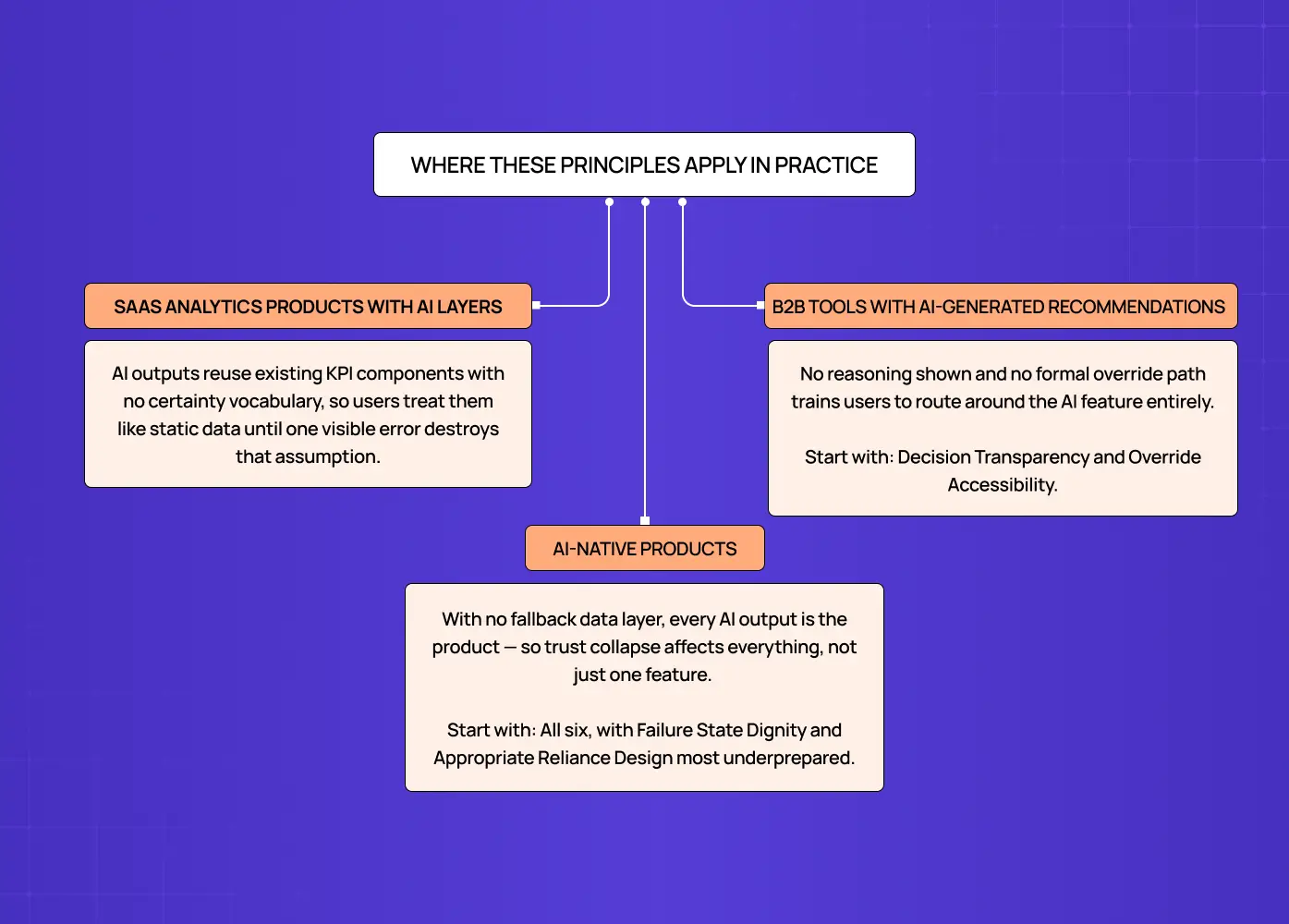
Diagram showing how AI dashboard design principles apply across SaaS analytics tools, AI-native products, and recommendation-driven platforms.

The six principles map directly to specific product contexts. The failure modes differ by product type, and so does the starting priority.

SaaS Analytics Products with AI Layers

These products most commonly fail on Confidence Visibility and Data Provenance. The AI model was added after the data product was already built — which is the sequencing problem documented in our guide to best practices for integrating AI into SaaS UX, where planning the design system extension before the AI feature ships prevents precisely these gaps. 

The compounding result: 

  • The design system has no vocabulary for expressing model certainty

  • Existing KPI components get reused for AI outputs without modification

  • Users interact with AI outputs exactly as they would with static data, until the first visible error destroys that assumption

  • Data freshness indicators exist for the data pipeline but not for the model inference layer

Starting priority: Confidence Visibility and Data Provenance.

B2B Tools with AI-Generated Recommendations

Hiring platforms, CRM intelligence tools, and content platforms most commonly fail on Decision Transparency and Override Accessibility. Users in professional contexts are accountable for their decisions, which means:

  • They need to understand why the AI recommended something before they can act on it professionally

  • They need a formal path to disagree that does not feel like using the product incorrectly

  • Burying the override path trains them to route around the AI feature entirely

Starting priority: Decision Transparency and Override Accessibility.

AI-Native Products

Products where AI is the primary interface rather than a feature layer need all six principles from the start:

  • There is no prior deterministic data layer users can fall back on

  • Every AI output is the product, not a supplement to it

  • Trust collapse affects the entire product, not just one feature

  • The design system must be built from the beginning with AI-specific components

Starting priority: All six, with Failure State Dignity and Appropriate Reliance Design as the most commonly underprepared.

What Most AI Dashboard Designs Get Wrong

The reason these six principles are absent from most AI dashboards is not disagreement with them in principle. It is a sequencing problem.

AI features are typically designed by teams that were originally building a data product. Intelligence was added later, but the design system was never updated to accommodate the new requirements. The result:

  • Standard data display components get reused for AI outputs they were never designed to handle

  • The design system has no token for confidence states, no component for explainability UI, no pattern for AI-specific failure states. Closing those gaps means building explicitly from the agentic UI patterns that define trust-first interface behaviour — the design vocabulary AI products cannot scale without. 

  • The product looks like the data product it started as and fails users in all the ways a data product is never asked to fail

At Groto, we build the AI design system layer as a prerequisite to shipping AI features, not as a follow-up. That process begins with high-fidelity wireframes for each AI output type — they are how AI-specific states (confidence bands, reasoning panels, failure states) get pressure-tested before development begins. The Groto AI Dashboard Design Stack is the evaluation lens we apply to every AI product audit. If any one of the six principles is absent from the primary interface, the AI feature is operating below its potential and eroding user trust in direct proportion to how often the model is right but users cannot tell, and how often it is wrong but users have no path to recover from it.

Conclusion

A standard data dashboard and an AI dashboard are not the same design problem. The six principles that separate AI dashboards that build user trust from those that quietly erode it:

  • Confidence Visibility — surface model certainty as a first-class interface element, not a tooltip

  • Decision Transparency — make the primary inputs and reasoning behind AI outputs accessible at the point of use

  • Appropriate Reliance Design — calibrate user confidence to actual AI capability, preventing both over-trust and under-trust

  • Failure State Dignity — treat AI errors as informative events with cause, context, and a next action

  • Data Provenance — surface data recency, sources, and quality warnings alongside every AI output

  • Override Accessibility — make human judgment an equal-weight option at the same level as AI recommendation acceptance

If your product's AI features are generating outputs users ignore, outputs users follow without questioning, or loss of confidence across the product after a single visible error, the design system is not equipped for the product it is serving. For teams making the business case for this investment, our breakdown of how to calculate the ROI of UX design translates those failure modes into quantifiable costs. 

Groto works with SaaS and AI-native companies to build the design infrastructure AI features need to perform. If your product has AI outputs and a dashboard that was not built to support them, talk to our team.

Most AI dashboard designs fail for the same reason: the team designed a standard data dashboard and added an AI layer on top. The result shows AI outputs the same way it shows static KPIs — with no indication of certainty, no explanation of reasoning, no path to recovery when the AI is wrong, and no design language for when the user should trust the AI and when they shouldn't.

An AI dashboard is not a data dashboard with an AI feature. The design requirements are completely different.

Illustration of a user interacting with an AI-powered analytics dashboard featuring automation, monitoring, and workflow management tools.

Most conversations about AI dashboard design focus on tools: which platform to use, how to connect your data, what prompts to type. That is useful, but it skips the harder question. Even a well-generated AI dashboard can fail its users if the design layer has not accounted for what makes AI outputs fundamentally different from standard data. This piece covers the design principles that determine whether an AI dashboard builds user trust over time or quietly erodes it. It extends the foundation laid in our guide to designing SaaS dashboards users actually understand — these principles begin where that post ends. If you are evaluating tools or building a dashboard from scratch, they apply regardless of which platform you use. 

TL;DR

  • Standard data dashboards show facts. AI dashboards show inferences, and that difference changes everything about how they should be designed.

  • Most AI dashboard failures are not model problems. They are design problems: outputs presented without confidence indicators, reasoning, or failure-state handling.

  • The six principles that separate trusted AI dashboards from trust-eroding ones are Confidence Visibility, Decision Transparency, Appropriate Reliance Design, Failure State Dignity, Data Provenance, and Override Accessibility.

  • These are not visual guidelines. They are structural requirements for any product where AI informs user decisions.

What Is AI Dashboard Design?

AI dashboard design is the practice of designing interfaces where AI — predictive models, recommendation engines, anomaly detectors, classification systems — generates some or all of the information users act on. It is a specialized application within the broader field of what AI UX design is and how it shapes modern products — one with distinct requirements that general AI UX principles alone do not cover. 

It is not the same as standard dashboard design. The information type is different, the failure modes are different, and the design requirements that follow from both are different — a distinction explored in depth in our analysis of what actually works in AI UX versus traditional UX for SaaS products, where the behavioral differences between users of each surface consistently at the metric level. 

The AI onboarding playbook top teams use to boost activation.

Reduce first-session confusion, speed up time-to-value, and build user trust, built from real onboarding audits of AI products.

No Spam. Free Lifetime

Standard Dashboard vs. AI Dashboard

Aspects

Standard Dashboard

AI Dashboard

Information type

Facts the system knows with certainty

Inferences the model has generated

Example

Monthly revenue: $1.2M

Churn risk score: 78%

Certainty

Deterministic

Probabilistic

Failure mode

Data pipeline error

Wrong inference, silent or visible

Design job

Organize and clarify

Organize, clarify, AND communicate uncertainty

Why the Distinction Matters for Design

A standard dashboard has one design job: present known information clearly. An AI dashboard has several additional jobs that standard design systems are not built to handle — each requiring the 13 principles of design to be applied to a problem set those principles were not originally written to address: 

  • Communicate how certain the AI is about each output

  • Surface what data and reasoning produced the output

  • Guide users toward the right level of trust, not maximum trust

  • Handle AI-specific failures with information, not blank states

  • Show users where the AI's data came from and when it was last refreshed

  • Give users a frictionless path to apply their own judgment instead

Nielsen Norman Group's research on AI reliance documents that users given no uncertainty information about AI outputs either over-rely or under-rely. Both outcomes destroy the value of the AI feature. The design solution is calibration — and it is the central challenge at the heart of what agentic experience design is: where the system has agency, the interface must mediate between user confidence and system capability. 

Why Most AI Dashboards Fail Users

Diagram highlighting major AI dashboard usability issues, including poor transparency, weak error handling, lack of overrides, and hidden data sources.

The failures below are not model failures. They are design failures. They show up across products regardless of how sophisticated the underlying AI is.

No Confidence Communication

AI outputs are displayed at the same visual weight as deterministic data. A high-confidence forecast and a speculative estimate look identical. Users have no basis for knowing when to trust a prediction and when to question it.

No Explanation of Reasoning

Users see what the AI decided but not why. A churn risk score with no attribution is a black-box number users can only accept or dismiss. Without visibility into what data drove the output, users cannot apply their own judgment alongside the AI.

Failure States Treated Like Data Errors

When an AI output is unavailable or unreliable, most dashboards show a generic "data unavailable" state. Users have no way to understand whether the model hit a data quality issue, fell below its confidence threshold, or encountered an input type it was not trained on.

No Override Path

Dashboards make it easy to act on AI recommendations but difficult to formally disagree. Users who want to apply their own judgment have no accessible route to do so, and the product quietly trains them toward AI dependence.

Invisible Data Provenance

Users cannot see when the model last ran, what data it used, or whether there are quality issues in the inputs. This creates silent failure: users act on AI outputs based on stale or incomplete data without realizing it.

Trust Collapses After One Visible Error

When all AI outputs carry identical visual certainty, a single wrong prediction suggests every output might be wrong at the same rate. Nothing in the interface has established a reliability baseline, so one error does disproportionate damage. It is one of the most consistent patterns across the AI-driven UX practices every business needs to address in 2026 — trust fragility after a single visible error is among the most common reasons AI features are disabled rather than improved. 

Each of these failure modes has a corresponding design solution. The six principles below define what those solutions look like in practice.

The Groto AI Dashboard Design Stack: 6 Principles for Building User Trust

Framework presenting six core principles for designing trustworthy AI dashboards, including confidence visibility, transparency, provenance, and override controls.

These principles are structural requirements, not visual guidelines. A design system for SaaS products built for deterministic data visualization has no token for AI confidence states, no component for explainability UI, and no documented pattern for AI failure states. The six principles below define what needs to be built, and why.

The six principles at a glance:

  • Principle 1: Confidence Visibility

  • Principle 2: Decision Transparency

  • Principle 3: Appropriate Reliance Design

  • Principle 4: Failure State Dignity

  • Principle 5: Data Provenance

  • Principle 6: Override Accessibility

Principle 1: Confidence Visibility

Show how certain the AI is, not just what it says.

What It Means

Every AI output carries a confidence level by definition. The model produced that output with some degree of certainty, and that certainty varies across outputs, time, and data quality conditions. Confidence visibility means surfacing that certainty as a first-class interface element, present in the primary display of any AI output, not buried in a tooltip or an admin panel. The underlying rules are those of any well-designed information surface — the digital product design principles of hierarchy, emphasis, and progressive disclosure — applied here to the specific challenge of communicating probabilistic certainty. 

Why It Matters

When a high-confidence prediction and a low-confidence estimate look identical, users have no basis for calibrating their reliance. They either treat all outputs as equally reliable, or they learn through experience that some outputs are wrong and begin discounting all of them. Neither outcome is what the product intends.

In Practice

  • Add confidence bands around forecast lines instead of displaying single-point estimates

  • Use color or opacity gradations — grounded in visual design principles of contrast and opacity — to distinguish high-confidence from low-confidence outputs 

  • Display explicit confidence percentages adjacent to AI outputs where relevant

  • Apply linguistic qualifiers such as "high confidence," "uncertain," or "insufficient data" on recommendation cards

  • Visually recede low-confidence outputs relative to high-confidence ones so the hierarchy is immediate

From the Field

Google Maps (travel time estimates) Google Maps surfaces confidence implicitly through ranges rather than single-point estimates. When traffic data is uncertain, it shows "35-55 min" instead of "42 min." That range is a confidence signal baked into the primary display, not a tooltip. Users calibrate their planning accordingly without needing to understand the model behind it. This is exactly what confidence visibility looks like in a consumer-facing AI interface. 

What to Look For

If all AI outputs carry identical visual treatment regardless of model certainty, confidence visibility has not been designed. Ask engineering whether confidence scores exist in the underlying model output. If they do and the interface does not surface them, the design is actively hiding information users need.

Principle 2: Decision Transparency

Make AI reasoning visible and auditable.

What It Means

Decision transparency means surfacing the primary inputs and logic behind an AI output in a way users can inspect, even if they cannot fully audit the model. The minimum viable implementation answers one question: what data did the AI use to generate this output?

Why It Matters

A churn risk score that surfaces "based on login frequency, feature adoption rate, and support ticket volume over the past 30 days" gives a user something to evaluate. They can assess whether those inputs are reliable, whether they have context the model lacks, and whether the output makes sense. A score with no attribution is a black-box number users can only accept or dismiss. Research on explainable AI interfaces consistently shows that "Why this recommendation?" access beside AI outputs increases user trust scores and reduces support tickets.

In Practice

  • Surface the primary data signals that contributed to each AI output

  • Indicate which factors carried the highest weight in the model's decision

  • Flag when the AI is operating on data it has not seen frequently

  • Make the explanation accessible from the output itself, not from a separate documentation page

  • Use progressive disclosure: a one-line summary with an expandable detail view for users who want more — one of the micro UX design patterns that improve user experience instantly and the most practical way to surface AI reasoning without overloading the primary view 

From the Field

When we redesigned Barista, a PR-first AI platform, PR teams needed to understand why the AI flagged a particular angle or recommended a specific content approach for a client. Without visible reasoning, account managers were either following AI suggestions blindly or ignoring them entirely. Making the primary contributing signals visible in the workflow was the design change that made AI recommendations usable rather than decorative.

What to Look For

If AI outputs appear with no attribution and no access to underlying inputs, decision transparency has not been addressed. The starting point is a consistently accessible, lightweight explanation of primary data sources and factors behind each AI output.

Principle 3: Appropriate Reliance Design

Build for the right level of trust, not maximum trust.

What It Means

The goal of AI dashboard design is not to maximize user trust in the AI. It is to align user confidence with actual AI capability. That means designing for both over-trust prevention and under-trust correction simultaneously.

Why It Matters

Over-reliance is the more common failure. A dashboard that presents AI outputs confidently with no uncertainty information trains users to act on recommendations without applying their own judgment. This works when the AI is right and creates compounding errors when it is wrong in cases where domain knowledge would have caught the mistake. Under-reliance follows visible AI errors: one wrong recommendation causes users to discount subsequent correct ones, sometimes permanently.

In Practice

For over-reliance prevention:

  • Require explicit confirmation before high-stakes AI-driven actions execute

  • Surface confidence indicators before the user acts on a recommendation, not after

  • Show the key inputs behind an AI decision at the moment the user is about to act on it

For under-reliance correction:

  • Surface how often the AI has been correct in the user's specific context

  • Display AI track record on similar historical cases

  • Show the cost of ignoring a correct recommendation over time

From the Field

When we designed the AI-powered hiring platform for Pathways, appropriate reliance was a central design concern. Hiring decisions carry real consequences for candidates and organizations alike. The solution was confirmation patterns that surfaced key inputs behind an AI assessment at the moment a recruiter was about to act, creating proportional friction on high-stakes actions without making the tool feel adversarial.

What to Look For

If the product has no mechanism for surfacing AI track record, no confirmation friction for high-stakes AI actions, and no design response to a state where a user has been ignoring AI outputs for a sustained period, appropriate reliance design has not been addressed.

Principle 4: Failure State Dignity

Design AI errors as information, not as breakdowns.

What It Means

Standard dashboard errors are operational: a pipeline failed, a metric is unavailable, a connection timed out. AI dashboard errors are categorically different: the model produced a wrong output, or produced one with insufficient data to be reliable, or encountered an input distribution it was not trained on. AI-specific failure modes require AI-specific design responses.

Why It Matters

The most common design failure is treating AI errors like data errors: displaying a generic "data unavailable" state or showing nothing. A blank cell or generic error leaves users without the information they need to decide whether to wait, investigate, or proceed without the AI's input. A dashboard that surfaces "forecast unavailable — model confidence below threshold for current data volume" gives the user something to work with. Blank gives them nothing and damages trust disproportionately.

In Practice

  • Distinguish between data-quality failures, model-confidence failures, and out-of-distribution inputs in error copy

  • Always indicate what the user should do next: wait for more data, consult an alternative source, or proceed with manual estimation

  • Distinguish between a temporary failure (the model will recover when data conditions improve) and a fundamental limitation (the model cannot reliably handle this input type)

  • Avoid using the same visual component for AI errors and standard data unavailability states

  • Write error copy from the user's next action, not from the system's technical state

From the Field

When we worked on LearnSphere's AI-powered edtech platform, failure state design was non-trivial because the product serves three distinct roles: admins, teachers, and students. An AI recommendation failing for a student requires a different error state than the same failure for a teacher. Designing role-aware failure states starts with clearly documented UX persona examples — the role definitions that make "what does this user type need from a failure message?" a design question rather than an assumption. Different detail levels and next-action prompts per role were the difference between an error that confused users and one that gave them a path forward. 

What to Look For

If AI error states use the same visual and copy treatment as standard data unavailability, failure state dignity has not been designed. AI failures require a distinct design language that communicates cause, context, and next action.

Principle 5: Data Provenance

Surface where the AI's inputs came from.

What It Means

AI models are only as reliable as the data they were trained on and the inputs they receive at inference. Data provenance means making the data sources, recency, and quality of AI inputs accessible from the AI output itself, at the moment the user is deciding whether to act on it. Not buried in documentation. Not in an admin settings panel.

Why It Matters

Users who understand the data behind an AI output can identify cases where inputs are stale, incomplete, or unrepresentative of the current situation, and adjust their reliance accordingly. This is especially consequential in high-stakes applications — banking app design, for instance, where a data recency gap in an AI risk model carries direct financial and compliance implications beyond a missed user action. Users who cannot see data provenance have no mechanism to catch those cases. Its absence only becomes visible after a user discovers that an AI recommendation was based on a data gap they would have caught if they had known about it.

In Practice

Every AI output should carry three provenance indicators, accessible without leaving the primary view:

  • Data recency: when was the last model inference and what period does it cover

  • Primary sources: which signals informed this output

  • Quality warnings: missing sources, degraded coverage, or reduced input quality that may affect reliability

From the Field

When we built Gini's health tracking platform, which combines DNA insights with AI-powered food logging and personalized recommendations, data provenance was a core design requirement. Users needed to know whether a dietary recommendation was based on their most recent logged data or on older baseline inputs. An AI recommendation that surfaces "based on your last 14 days of activity" is one users can contextualize. One that offers no provenance signal is one users eventually stop trusting.

What to Look For

If AI outputs have no accessible indication of when they were generated, what data they are based on, and whether data quality issues exist in the model's inputs, data provenance has not been addressed.

Principle 6: Override Accessibility

Every AI output needs a clear, unburied path to disagree.

What It Means

An AI dashboard that makes AI outputs easy to act on but difficult to override has, by design, pushed users toward AI dependence. Override accessibility means every AI output in a decision-making context has an accessible, low-friction path for the user to apply their own judgment instead. It must be in the primary UI, labeled in terms of the user's action, and require no more steps than accepting the AI recommendation.

Why It Matters

Users who cannot easily express disagreement with an AI output will either follow it against their judgment (over-reliance) or stop engaging with the AI entirely (disengagement). Both outcomes remove the AI feature's value. There is a secondary benefit too: every override is a training signal, a case where the user's judgment diverged from the model's output. Dashboards that make overrides frictionless generate the feedback data that improves the model over time. Dashboards that bury overrides lose that signal and the user's trust simultaneously.

In Practice

  • An AI-recommended workflow has an "I'll decide this manually" option at the same visual level as "Accept recommendation"

  • A risk classification has an "Override to [category]" affordance accessible from the primary view, not from a settings panel three levels deep

  • A forecast has an "Adjust this forecast" entry point in the primary view, not in an admin interface

  • Override actions are labeled in terms of the user's choice, not in terms of the model's failure

  • Overrides are logged and surfaced back to the model team as training signal data

From the Field

Gmail Smart Reply / Smart Compose Gmail's AI suggestion layer is built entirely around frictionless override. Suggested replies appear as light, dismissible chips. Smart Compose completions appear as greyed-out ghost text that disappears the moment you type your own word. The AI is present but never in the way. Disagreeing with the AI requires zero additional steps beyond simply continuing to type. This is the gold standard for override accessibility in a high-frequency, low-stakes AI context — and the clearest consumer-facing illustration of how AI copilot design works at a patterns level: present, useful, and never in the way of the user's own judgment.  

What to Look For

If overriding an AI output requires navigating away from the primary view, submitting a support request, or any action that feels like a workaround, override accessibility has not been designed.

Where These Principles Apply in Practice

Diagram showing how AI dashboard design principles apply across SaaS analytics tools, AI-native products, and recommendation-driven platforms.

The six principles map directly to specific product contexts. The failure modes differ by product type, and so does the starting priority.

SaaS Analytics Products with AI Layers

These products most commonly fail on Confidence Visibility and Data Provenance. The AI model was added after the data product was already built — which is the sequencing problem documented in our guide to best practices for integrating AI into SaaS UX, where planning the design system extension before the AI feature ships prevents precisely these gaps. 

The compounding result: 

  • The design system has no vocabulary for expressing model certainty

  • Existing KPI components get reused for AI outputs without modification

  • Users interact with AI outputs exactly as they would with static data, until the first visible error destroys that assumption

  • Data freshness indicators exist for the data pipeline but not for the model inference layer

Starting priority: Confidence Visibility and Data Provenance.

B2B Tools with AI-Generated Recommendations

Hiring platforms, CRM intelligence tools, and content platforms most commonly fail on Decision Transparency and Override Accessibility. Users in professional contexts are accountable for their decisions, which means:

  • They need to understand why the AI recommended something before they can act on it professionally

  • They need a formal path to disagree that does not feel like using the product incorrectly

  • Burying the override path trains them to route around the AI feature entirely

Starting priority: Decision Transparency and Override Accessibility.

AI-Native Products

Products where AI is the primary interface rather than a feature layer need all six principles from the start:

  • There is no prior deterministic data layer users can fall back on

  • Every AI output is the product, not a supplement to it

  • Trust collapse affects the entire product, not just one feature

  • The design system must be built from the beginning with AI-specific components

Starting priority: All six, with Failure State Dignity and Appropriate Reliance Design as the most commonly underprepared.

What Most AI Dashboard Designs Get Wrong

The reason these six principles are absent from most AI dashboards is not disagreement with them in principle. It is a sequencing problem.

AI features are typically designed by teams that were originally building a data product. Intelligence was added later, but the design system was never updated to accommodate the new requirements. The result:

  • Standard data display components get reused for AI outputs they were never designed to handle

  • The design system has no token for confidence states, no component for explainability UI, no pattern for AI-specific failure states. Closing those gaps means building explicitly from the agentic UI patterns that define trust-first interface behaviour — the design vocabulary AI products cannot scale without. 

  • The product looks like the data product it started as and fails users in all the ways a data product is never asked to fail

At Groto, we build the AI design system layer as a prerequisite to shipping AI features, not as a follow-up. That process begins with high-fidelity wireframes for each AI output type — they are how AI-specific states (confidence bands, reasoning panels, failure states) get pressure-tested before development begins. The Groto AI Dashboard Design Stack is the evaluation lens we apply to every AI product audit. If any one of the six principles is absent from the primary interface, the AI feature is operating below its potential and eroding user trust in direct proportion to how often the model is right but users cannot tell, and how often it is wrong but users have no path to recover from it.

Conclusion

A standard data dashboard and an AI dashboard are not the same design problem. The six principles that separate AI dashboards that build user trust from those that quietly erode it:

  • Confidence Visibility — surface model certainty as a first-class interface element, not a tooltip

  • Decision Transparency — make the primary inputs and reasoning behind AI outputs accessible at the point of use

  • Appropriate Reliance Design — calibrate user confidence to actual AI capability, preventing both over-trust and under-trust

  • Failure State Dignity — treat AI errors as informative events with cause, context, and a next action

  • Data Provenance — surface data recency, sources, and quality warnings alongside every AI output

  • Override Accessibility — make human judgment an equal-weight option at the same level as AI recommendation acceptance

If your product's AI features are generating outputs users ignore, outputs users follow without questioning, or loss of confidence across the product after a single visible error, the design system is not equipped for the product it is serving. For teams making the business case for this investment, our breakdown of how to calculate the ROI of UX design translates those failure modes into quantifiable costs. 

Groto works with SaaS and AI-native companies to build the design infrastructure AI features need to perform. If your product has AI outputs and a dashboard that was not built to support them, talk to our team.

Have a project in mind?

Let’s talk through your idea and see what makes sense.

Harpreet Singh

Founder at Groto

Have a project in mind?

Let’s talk through your idea and see what makes sense.

Harpreet Singh

Founder at Groto

FAQ

Everything you were going to ask (and a few things you didn’t know to)

What does an AI confidence indicator look like in a dashboard?

AI confidence indicators can take several forms depending on the output type and the interface context: numerical confidence percentages adjacent to AI outputs, color or opacity gradations that distinguish high-confidence from low-confidence results, confidence bands around forecast lines rather than single-point estimates, linguistic qualifiers such as "high confidence," "uncertain," or "insufficient data" on recommendation cards, or visual weight differentials where low-confidence outputs are visually receded relative to high-confidence ones. The correct implementation depends on the user's workflow and the specific AI output type. The principle is that model certainty must be a first-class interface element, not a tooltip or an admin-panel detail.

How long does it take to design a proper AI dashboard?

A focused AI dashboard design engagement covering core AI display components, confidence visualization patterns, failure state design, and override accessibility typically takes six to ten weeks for a product with one to three AI feature types. A comprehensive AI design system, including component documentation, engineering guidance, and pattern governance for an AI-first SaaS product, typically takes three to four months. The correct scope is determined by how many distinct AI output types the product surfaces and how much of the existing design system needs to be extended to support them. The fastest path to an AI-ready dashboard is not rebuilding the design system from scratch. It is identifying which of the six principles are absent and adding targeted components to cover each gap.


Do all dashboards with AI features need all six of these design principles?

The six principles in the Groto AI Dashboard Design Stack are relevant whenever AI outputs are presented in a context where users make decisions based on them. Confidence Visibility, Failure State Dignity, and Override Accessibility apply to nearly every AI feature in a decision-support context. Decision Transparency and Data Provenance are most critical in professional or high-stakes environments where users are accountable for their decisions and need to verify AI inputs. Appropriate Reliance Design is most critical when the AI handles high-frequency decisions or when the cost of over-reliance or under-reliance is significant. The starting point for any AI dashboard audit is to evaluate which principles are absent and prioritize based on where user trust is currently breaking down.

How do you create a dashboard using AI?

Creating a dashboard using AI typically involves three layers: the data layer (connecting your sources and ensuring a clean semantic layer), the generation layer (using a tool like Power BI Copilot, Hex, Tableau Pulse, or a custom model to generate outputs from natural language prompts or automated inference), and the design layer (structuring the interface so AI outputs are presented with appropriate confidence signals, reasoning access, and override paths). Most teams invest heavily in the first two layers and underinvest in the third. A dashboard that generates accurate AI outputs but presents them without design infrastructure for trust and transparency will still fail its users.

What is an AI-powered dashboard and how is it different from a regular one?

An AI-powered dashboard generates some or all of its outputs through machine learning models rather than pulling deterministic data from a source. The difference is not cosmetic. A regular dashboard shows you what happened. An AI-powered dashboard shows you what the model infers, predicts, or recommends based on patterns in your data. That distinction changes the design requirements entirely: AI-powered dashboards need to communicate model certainty, surface reasoning, handle inference failures differently from data errors, and give users a path to apply their own judgment. A regular dashboard designed well and an AI-powered dashboard designed well look and behave very differently from each other.

Can these design principles be applied inside BI tools like Power BI or Tableau?

Yes, and this is one of the more practical applications of the framework. Tools like Power BI Copilot, Tableau Pulse, and Looker with Gemini generate AI outputs inside existing dashboard environments. The design principles apply regardless of the platform: you can implement confidence visibility through conditional formatting and linguistic qualifiers in tooltips, decision transparency through annotated cards and data source callouts, and override accessibility through manual input fields or adjustment prompts built alongside AI-generated visuals. The platform constrains how you implement each principle, but it does not change whether the principle applies.

What does an AI confidence indicator look like in a dashboard?

AI confidence indicators can take several forms depending on the output type and the interface context: numerical confidence percentages adjacent to AI outputs, color or opacity gradations that distinguish high-confidence from low-confidence results, confidence bands around forecast lines rather than single-point estimates, linguistic qualifiers such as "high confidence," "uncertain," or "insufficient data" on recommendation cards, or visual weight differentials where low-confidence outputs are visually receded relative to high-confidence ones. The correct implementation depends on the user's workflow and the specific AI output type. The principle is that model certainty must be a first-class interface element, not a tooltip or an admin-panel detail.

How long does it take to design a proper AI dashboard?

A focused AI dashboard design engagement covering core AI display components, confidence visualization patterns, failure state design, and override accessibility typically takes six to ten weeks for a product with one to three AI feature types. A comprehensive AI design system, including component documentation, engineering guidance, and pattern governance for an AI-first SaaS product, typically takes three to four months. The correct scope is determined by how many distinct AI output types the product surfaces and how much of the existing design system needs to be extended to support them. The fastest path to an AI-ready dashboard is not rebuilding the design system from scratch. It is identifying which of the six principles are absent and adding targeted components to cover each gap.

Do all dashboards with AI features need all six of these design principles?

The six principles in the Groto AI Dashboard Design Stack are relevant whenever AI outputs are presented in a context where users make decisions based on them. Confidence Visibility, Failure State Dignity, and Override Accessibility apply to nearly every AI feature in a decision-support context. Decision Transparency and Data Provenance are most critical in professional or high-stakes environments where users are accountable for their decisions and need to verify AI inputs. Appropriate Reliance Design is most critical when the AI handles high-frequency decisions or when the cost of over-reliance or under-reliance is significant. The starting point for any AI dashboard audit is to evaluate which principles are absent and prioritize based on where user trust is currently breaking down.

How do you create a dashboard using AI?

Creating a dashboard using AI typically involves three layers: the data layer (connecting your sources and ensuring a clean semantic layer), the generation layer (using a tool like Power BI Copilot, Hex, Tableau Pulse, or a custom model to generate outputs from natural language prompts or automated inference), and the design layer (structuring the interface so AI outputs are presented with appropriate confidence signals, reasoning access, and override paths). Most teams invest heavily in the first two layers and underinvest in the third. A dashboard that generates accurate AI outputs but presents them without design infrastructure for trust and transparency will still fail its users.

What is an AI-powered dashboard and how is it different from a regular one?

An AI-powered dashboard generates some or all of its outputs through machine learning models rather than pulling deterministic data from a source. The difference is not cosmetic. A regular dashboard shows you what happened. An AI-powered dashboard shows you what the model infers, predicts, or recommends based on patterns in your data. That distinction changes the design requirements entirely: AI-powered dashboards need to communicate model certainty, surface reasoning, handle inference failures differently from data errors, and give users a path to apply their own judgment. A regular dashboard designed well and an AI-powered dashboard designed well look and behave very differently from each other.

Can these design principles be applied inside BI tools like Power BI or Tableau?

Yes, and this is one of the more practical applications of the framework. Tools like Power BI Copilot, Tableau Pulse, and Looker with Gemini generate AI outputs inside existing dashboard environments. The design principles apply regardless of the platform: you can implement confidence visibility through conditional formatting and linguistic qualifiers in tooltips, decision transparency through annotated cards and data source callouts, and override accessibility through manual input fields or adjustment prompts built alongside AI-generated visuals. The platform constrains how you implement each principle, but it does not change whether the principle applies.

More Articles

Extreme close-up black and white photograph of a human eye

Let’s bring your vision to life

Tell us what's on your mind? We'll hit you back in 24 hours. No fluff, no delays - just a solid vision to bring your idea to life.

Profile portrait of a man in a white shirt against a light background

Harpreet Singh

Founder and Creative Director

Get in Touch

Extreme close-up black and white photograph of a human eye

Let’s bring your vision to life

Tell us what's on your mind? We'll hit you back in 24 hours. No fluff, no delays - just a solid vision to bring your idea to life.

Profile portrait of a man in a white shirt against a light background

Harpreet Singh

Founder and Creative Director

Get in Touch

Extreme close-up black and white photograph of a human eye

Let’s bring your vision to life

Tell us what's on your mind? We'll hit you back in 24 hours. No fluff, no delays - just a solid vision to bring your idea to life.

Profile portrait of a man in a white shirt against a light background

Harpreet Singh

Founder and Creative Director

Get in Touch