What's the typical timeline for a full website redesign?

What's the typical timeline for a full website redesign?

We break down exactly how long a website redesign takes, phase by phase, plus a free timeline template so you can plan your own project with confidence.

What's the typical timeline for a full website redesign?

What's the typical timeline for a full website redesign?

We break down exactly how long a website redesign takes, phase by phase, plus a free timeline template so you can plan your own project with confidence.

Most website redesigns take 8 to 16 weeks, but the real number depends on factors most agencies never explain upfront. We walk through every phase, what slows projects down, and give you a free template to plan your own timeline.

Wondering how long your website redesign will actually take? Here's the honest answer.

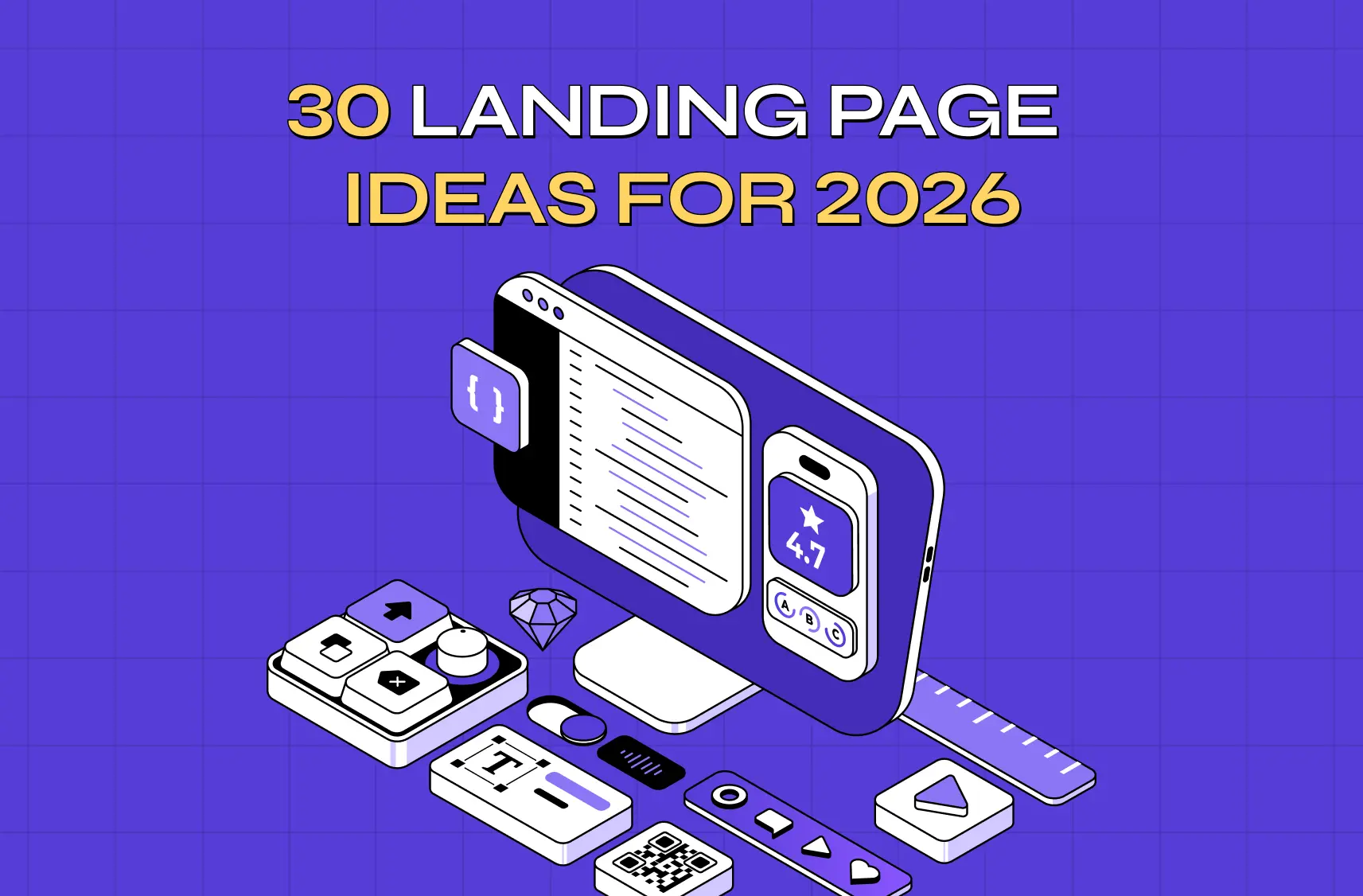
Illustration of a designer creating a website interface with design tools, cloud services, and UI elements.

If you've typed "website redesign timeline" into Google, chances are you're not looking for a lecture on design theory. You want a straight answer: how long is this actually going to take?

Fair question. And an honest one deserves an honest answer instead of a vague "it depends" that agencies love to hide behind.

So here it is. A typical website redesign takes anywhere from 8 to 16 weeks, depending on the size of your site, how much content needs rewriting, and how quickly your team can review and approve work. Enterprise projects with multiple stakeholders can stretch to 6 months or more. A simple, template-based refresh can be done in 3 to 4 weeks.

That's the short version. The rest of this guide breaks down exactly where that time goes, what slows most projects down, and how to build your own timeline so you're not left guessing halfway through. If you want the full step-by-step redesign process behind these phases, we cover that separately.

TL;DR

  • A standard business website redesign takes 8 to 16 weeks from kickoff to launch.

  • Small business or template-based redesigns can be done in 3 to 6 weeks.

  • Enterprise or SaaS platform redesigns typically run 4 to 6 months, sometimes longer.

  • The single biggest cause of delay isn't design or development. It's slow client feedback and missing content.

  • A realistic timeline has 7 phases: discovery, strategy, content, design, development, QA, and launch.

  • You can build a simple timeline template yourself using the framework below, no fancy software required.

Why "It Depends" Is Actually True (And What It Depends On)

Every agency blog says a redesign "depends on scope." That's not a cop-out, it's genuinely how project timelines work. But it's not helpful unless you know what specifically drives the number up or down.

Here's what actually moves the needle on your timeline:

  • Number of pages. A 5-page brochure site and a 60-page enterprise site are not the same project, even if the "redesign" label is the same.

  • Whether content is ready. Redesigns that wait on new copy, photography, or product data almost always run long. This is the number one delay we see at Groto, and it's rarely talked about upfront.

  • Number of decision-makers. One founder approving designs moves fast. A committee of eight stakeholders across three departments does not.

  • Custom functionality. A calculator, a booking system, a membership portal, or an integration with your CRM all add real development time, not just a few extra days.

  • Whether you're rebuilding on a new platform. Migrating from WordPress to a headless CMS or a new framework adds technical work that a simple visual refresh doesn't need.

Keep these five factors in mind as you read the phase breakdown below. They're the reason two "8-week redesigns" can end up taking wildly different amounts of time in practice.

The Website Redesign Timeline, Phase by Phase
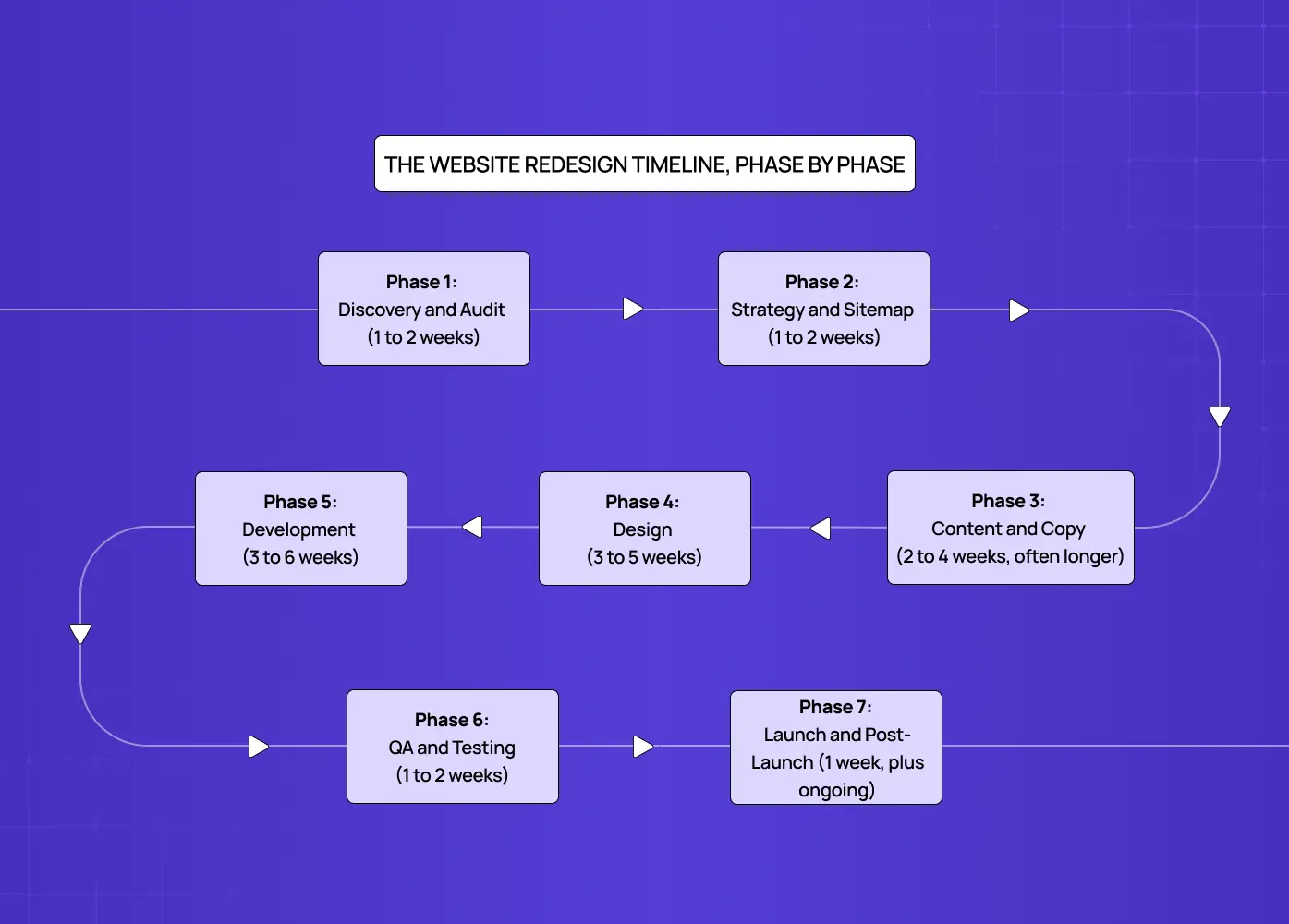
Flowchart outlining the phases of a website redesign project, from discovery and strategy to launch and testing.

Most professional redesigns follow the same core sequence, rooted in a proven UX design process, even if agencies label the phases differently. Here's what typically happens, and how long each stage realistically takes.

1. Discovery and Audit (1 to 2 weeks)

This is where your team and your design partner get aligned on what's actually broken. If you want a head start before this phase even begins, you can self-audit your website first. A good discovery phase typically covers:

  • Analytics review to see where users drop off or bounce

  • User behavior analysis (heatmaps, session recordings, on-site search data) to surface bad UX patterns hurting conversions

  • Page speed and technical performance checks

  • An audit of existing brand assets and design patterns worth keeping

  • Stakeholder interviews to align on business goals and success metrics

Skipping or rushing this phase is how projects end up redesigning the wrong things. If your bounce rate problem is actually a page speed problem, no amount of new design will fix it.

2. Strategy and Sitemap (1 to 2 weeks)

Once you know what's broken, you map out what the new site needs to do, starting with your overall website structure. This phase usually produces:

  • A new sitemap showing how pages connect and how users navigate between them

  • Information architecture decisions, like what belongs in navigation versus footer links

  • A defined primary goal for each key page (lead form fill, purchase, demo request, and so on)

  • Early agreement on what content needs to be created versus what can be reused

This phase runs in parallel with content planning at most agencies, including us, since the sitemap and the content strategy inform each other.

3. Content and Copy (2 to 4 weeks, often longer)

Here's the phase most timelines quietly gloss over, and it's the one that derails more projects than any design or development delay combined.

If you're writing new copy, sourcing new photography, or restructuring your product information, this takes real time. This phase typically includes:

  • Drafting and approving copy for every key page, not just the homepage

  • Sourcing or shooting new photography and graphics

  • Gathering product data, pricing, or technical specs from internal teams

  • Writing SEO metadata and updating URL structures for existing content

Reddit threads on web design projects are full of people frustrated that their "8-week redesign" is in month four, and content is almost always the reason why. Our advice: start content work as early as possible, ideally alongside discovery, not after design begins.

4. Design (3 to 5 weeks)

Design typically moves through a few distinct stages:

  • Low-fidelity wireframes to lock in layout and hierarchy before visual style is added

  • Moodboards or style directions, often pulled from the best website design examples, to align on look and feel

  • High-fidelity designs for the homepage, guided by proven homepage design principles, and one or two key inner pages first

  • Sign-off on that initial system, then design applied across the rest of the site

Design timelines expand fastest when feedback rounds drag. A same-day turnaround on feedback keeps this phase on track. A two-week gap between review rounds can add a month to your project without anyone intending it to.

5. Development (3 to 6 weeks)

Once designs are approved, developers build the site, whether that's on WordPress, Webflow, Framer, a headless CMS, or fully custom code. This phase generally covers:

  • Responsive builds across desktop, tablet, and mobile breakpoints

  • CMS setup so your team can update content without a developer

  • Third-party integrations (CRM, email marketing, analytics, booking tools)

  • Any custom functionality, like calculators, dashboards, or membership areas

Complex functionality is where estimates go sideways most often. A standard content page takes hours. A custom interactive tool, like the cost calculator we built for Meydan, takes considerably longer and should be scoped separately from the rest of the site build.

6. QA and Testing (1 to 2 weeks)

Before launch, the site gets tested across browsers, devices, and screen sizes. A thorough QA pass usually checks:

  • Every form, from contact forms to checkout flows

  • Internal and external links for broken or outdated URLs

  • Page speed and Core Web Vitals scores

  • Accessibility basics like alt text, contrast, and keyboard navigation

  • 301 redirects mapped from every old URL to its new equivalent

This phase is easy to compress under deadline pressure, and it's the one that comes back to bite teams post-launch in the form of broken forms or missing redirects that tank organic traffic.

7. Launch and Post-Launch (1 week, plus ongoing)

Launch day itself is usually quick if QA was thorough. What matters more is the week or two after launch, which typically includes:

  • Monitoring analytics for traffic drops or unexpected behavior changes

  • Watching Search Console for crawl errors or indexing issues

  • Checking for 404s from old URLs that redirects might have missed

  • Fixing anything real users run into that testing didn't catch

Want to know where your users are dropping off?

We’ll break down the exact moments users lose interest, and why.

Want to know where your users are dropping off?

We’ll break down the exact moments users lose interest, and why.

Website Redesign Timeline by Project Size

Here's how these phases typically add up depending on the scope of your project.

Project Type

Typical Timeline

Best For

Template-based refresh (Squarespace, Framer, Webflow templates)

3 to 6 weeks

Small businesses, portfolios, simple service sites

Standard business website redesign

8 to 16 weeks

Most B2B companies, small to mid-size SaaS, ecommerce brands

Complex or custom platform redesign

4 to 6 months

Enterprise sites, platforms with custom functionality, multi-stakeholder approvals

Full product or SaaS platform redesign

4 to 8 months

SaaS companies rebuilding core user experience alongside marketing site

If you're wondering where your project lands, ask yourself these three questions:

  • How many pages am I actually redesigning?

  • Is my content ready, or does it still need to be written and gathered?

  • How many people need to sign off on each decision?

Those three answers will tell you more than any generic timeline chart, and if budget is your other big question, we break down exactly how much a redesign costs in a separate guide.

What Actually Slows Down a Website Redesign
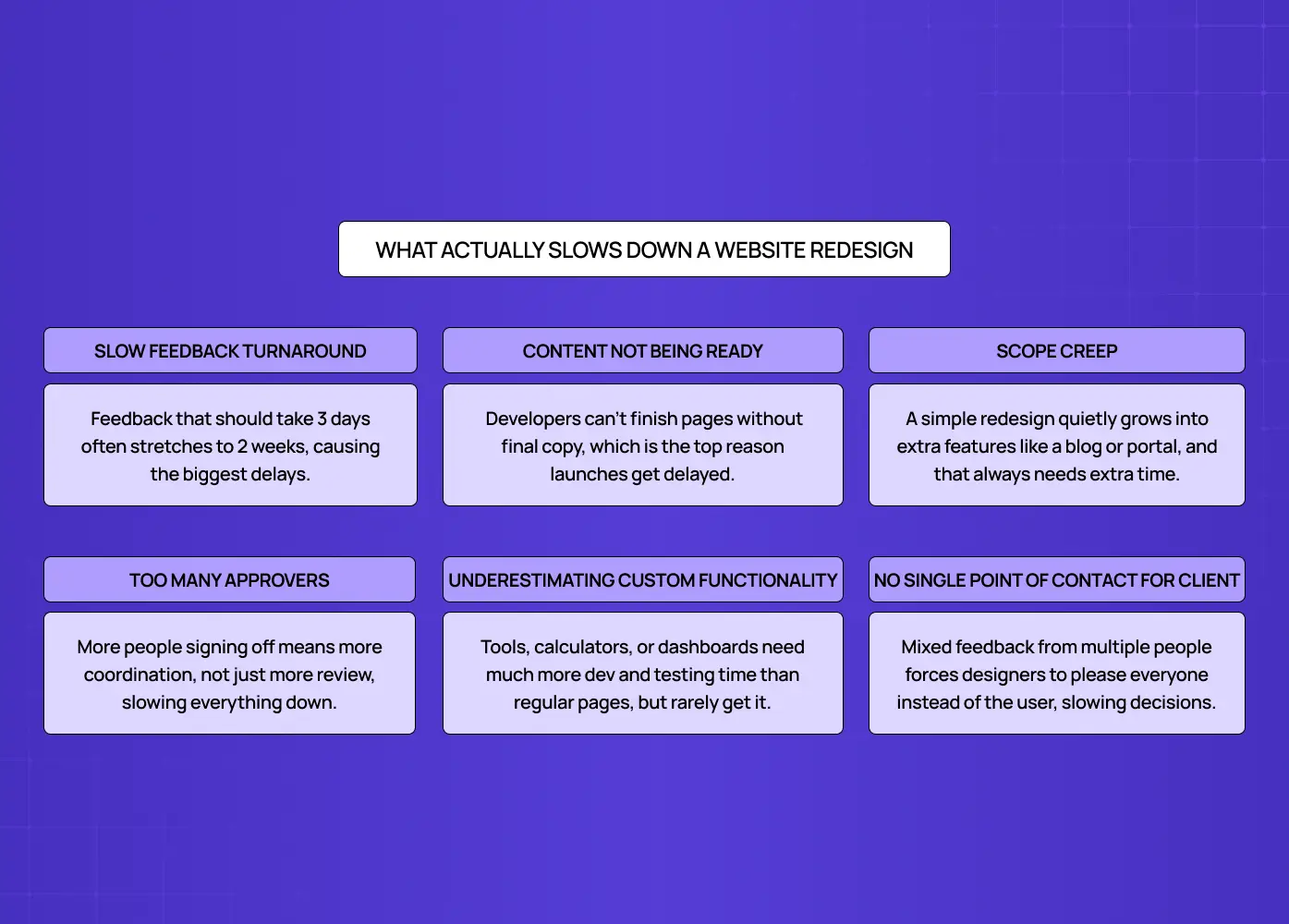
Infographic highlighting common causes of website redesign delays, including feedback cycles, content readiness, and scope creep.

If you've been through a redesign before, or you're reading Reddit threads from people who have, you already know the phase-by-phase breakdown above is the easy part to predict. What's harder to predict is everything that happens between the phases.

Here's what consistently pushes timelines past their original estimate:

  • Slow feedback turnaround. A design phase built for 2 rounds of feedback with 3-day turnarounds can quietly become 5 rounds with 2-week gaps. This alone accounts for more timeline overruns than any other single factor.

  • Content not being ready. Development can't finish building pages that don't have final copy. Waiting on content is the most common reason "final" launch dates slip.

  • Scope creep. A redesign that starts as "update the design" becomes "also let's add a blog, a resource center, and a client portal" halfway through. New scope needs new time, even when the request feels small.

  • Too many approvers. Every additional person who needs to sign off adds coordination time, not just review time. A single decision-maker can approve a homepage in a day. A committee can take two weeks to agree on a button color.

  • Underestimating custom functionality. Interactive tools, calculators, dashboards, or integrations are frequently scoped like static pages when they need dedicated development and testing time.

  • No single point of contact on the client side. When feedback comes from five different people with five different opinions, designers end up building for consensus instead of building for users, and that takes longer.

The good news is that every one of these is preventable with the right planning upfront, which is exactly what the template below is for.

A Simple Website Redesign Timeline Template

You don't need expensive project management software to plan a redesign. A basic table like this, built in a spreadsheet or even a shared doc, covers what most teams actually need.

Week

Phase

What Should Be Done

1-2

Discovery & Audit

Current site audit, stakeholder interviews, goals defined

3-4

Strategy & Sitemap

New sitemap approved, content plan started

3-6

Content & Copy

Draft copy for key pages, photography or assets gathered

5-8

Design

Wireframes, then high-fidelity design for key templates

8-12

Development

Site built, CMS set up, integrations connected

12-13

QA & Testing

Cross-browser and device testing, redirect mapping

13-14

Launch

Go live, monitor analytics and fix issues

To adapt this template to your own project:

  • Copy the structure into a spreadsheet or shared doc

  • Adjust the week numbers based on your project size from the table above

  • Assign a named owner to each row instead of a vague "team"

  • Add a status column so everyone can see what's on track versus at risk

  • Review it weekly, not just at the start of the project

That single change, having a named owner per phase, is one of the simplest ways to keep a project on schedule.

If you want this built out further with task-level detail, we've got downloadable planning resources on our free resources page that go deeper than a basic template.

DIY vs Freelancer vs Agency: How the Timeline Changes
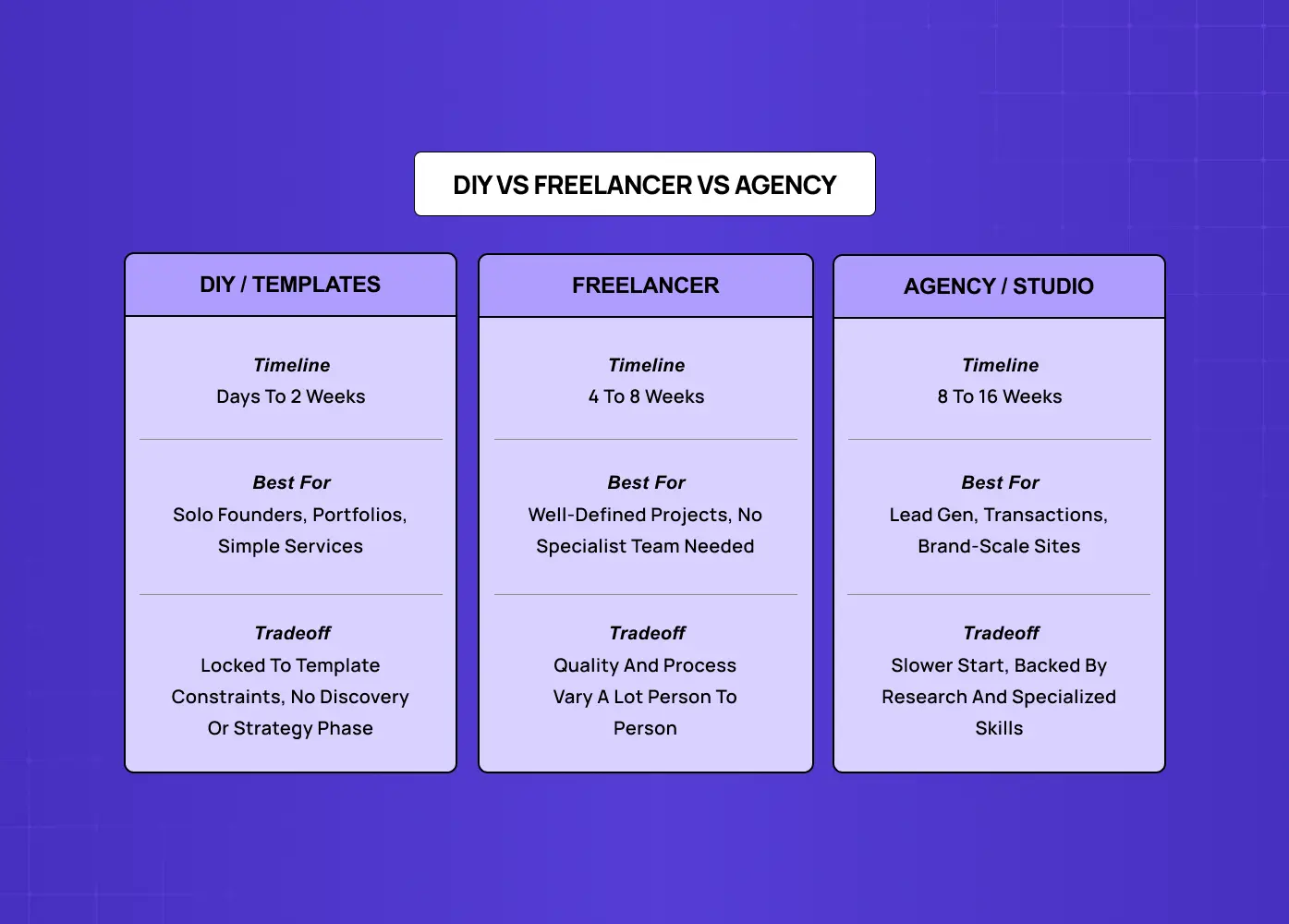
Comparison chart showing the timelines, ideal use cases, and trade-offs of DIY website builders, freelancers, and design agencies.

A lot of the searches around this topic, including questions like "can I make a website in 2 days," come from people trying to figure out if there's a faster path than the multi-month process described above. There is, but it comes with real tradeoffs.

DIY or template builders (Squarespace, Wix, Framer templates)

  • Timeline: a few days to 2 weeks for a basic site

  • Best for: solo founders, portfolios, simple service businesses

  • Tradeoff: you're working within a template's constraints, with no discovery or strategy phase informing your design decisions

Working with a freelancer

  • Timeline: typically 4 to 8 weeks

  • Best for: well-defined projects that don't need a full team of specialists

  • Tradeoff: quality and process consistency vary significantly from freelancer to freelancer

Working with an agency or studio

  • Timeline: typically 8 to 16 weeks for a standard project

  • Best for: sites doing real business work, generating leads, processing transactions, or representing a brand at scale, just make sure you're choosing the right web design agency for the job

  • Tradeoff: slower to start and a bigger investment, so it's worth understanding web design agency pricing upfront, but you're backed by research, strategy, and a team with specialized skills across UX, design, and development

There's no universally correct answer here. A landing page for a weekend event doesn't need a 12-week process. A SaaS platform's marketing site probably does, especially if you're already seeing the signs your SaaS site needs a redesign.

How Groto Approaches a Website Redesign

Rather than talk in the abstract, it's worth looking at what a realistic redesign process looks like in practice.

When Meydan FZ came to us, the goal wasn't just a visual refresh. Their site needed to guide entrepreneurs setting up in Dubai's free zone through a genuinely complex decision process. That meant building a custom cost calculator and streamlining the UX around compliance information, work that went well beyond a template swap and required real discovery and strategy time before design even started.

Similarly, our work with PolicyBazaar focused on reducing drop-offs across the insurance shopping journey. That kind of outcome doesn't come from a fast visual update. It comes from understanding where users were getting stuck first, and from knowing when to redesign your SaaS UX in the first place, which is exactly why the discovery and strategy phases matter as much as they do in the timeline above.

Both projects reinforce the same point made throughout this guide:

  • Timelines stretch or compress based on strategic and content work, not just page count

  • Custom functionality needs to be scoped and timed separately from standard pages

  • Discovery and strategy phases pay off most on projects solving a specific user problem, not just refreshing a look

How to Keep Your Redesign on Schedule

A few practical habits make a bigger difference to your timeline than almost anything else:

  • Assign one person as the single point of feedback on your side, even if multiple people are involved in reviewing.

  • Start content work in week one, not after design is finished.

  • Set feedback turnaround expectations upfront, ideally 2 to 3 business days per round.

  • Scope custom functionality separately from standard page design and development.

  • Build in a buffer week before launch for QA, redirects, and last-minute fixes.

  • Agree on what "done" looks like for each phase before that phase begins.

None of these require extra budget. They just require deciding on them before the project starts instead of figuring them out reactively.

Conclusion

  • A typical website redesign takes 8 to 16 weeks for most businesses, with template-based projects finishing in 3 to 6 weeks and enterprise projects running 4 to 6 months or longer.

  • The 7 core phases are discovery, strategy, content, design, development, QA, and launch.

  • Content readiness and feedback turnaround affect your timeline more than design or development speed does.

  • Use the project size table and the simple timeline template above to build a realistic schedule for your specific project.

  • DIY and template builders can get you live faster, but agency-led redesigns make sense when strategy and custom functionality matter to your business outcomes.

  • The clearest way to protect your timeline is deciding on ownership, feedback speed, and scope before work begins, not after delays happen.


Most website redesigns take 8 to 16 weeks, but the real number depends on factors most agencies never explain upfront. We walk through every phase, what slows projects down, and give you a free template to plan your own timeline.

Wondering how long your website redesign will actually take? Here's the honest answer.

Illustration of a designer creating a website interface with design tools, cloud services, and UI elements.

If you've typed "website redesign timeline" into Google, chances are you're not looking for a lecture on design theory. You want a straight answer: how long is this actually going to take?

Fair question. And an honest one deserves an honest answer instead of a vague "it depends" that agencies love to hide behind.

So here it is. A typical website redesign takes anywhere from 8 to 16 weeks, depending on the size of your site, how much content needs rewriting, and how quickly your team can review and approve work. Enterprise projects with multiple stakeholders can stretch to 6 months or more. A simple, template-based refresh can be done in 3 to 4 weeks.

That's the short version. The rest of this guide breaks down exactly where that time goes, what slows most projects down, and how to build your own timeline so you're not left guessing halfway through. If you want the full step-by-step redesign process behind these phases, we cover that separately.

TL;DR

  • A standard business website redesign takes 8 to 16 weeks from kickoff to launch.

  • Small business or template-based redesigns can be done in 3 to 6 weeks.

  • Enterprise or SaaS platform redesigns typically run 4 to 6 months, sometimes longer.

  • The single biggest cause of delay isn't design or development. It's slow client feedback and missing content.

  • A realistic timeline has 7 phases: discovery, strategy, content, design, development, QA, and launch.

  • You can build a simple timeline template yourself using the framework below, no fancy software required.

Why "It Depends" Is Actually True (And What It Depends On)

Every agency blog says a redesign "depends on scope." That's not a cop-out, it's genuinely how project timelines work. But it's not helpful unless you know what specifically drives the number up or down.

Here's what actually moves the needle on your timeline:

  • Number of pages. A 5-page brochure site and a 60-page enterprise site are not the same project, even if the "redesign" label is the same.

  • Whether content is ready. Redesigns that wait on new copy, photography, or product data almost always run long. This is the number one delay we see at Groto, and it's rarely talked about upfront.

  • Number of decision-makers. One founder approving designs moves fast. A committee of eight stakeholders across three departments does not.

  • Custom functionality. A calculator, a booking system, a membership portal, or an integration with your CRM all add real development time, not just a few extra days.

  • Whether you're rebuilding on a new platform. Migrating from WordPress to a headless CMS or a new framework adds technical work that a simple visual refresh doesn't need.

Keep these five factors in mind as you read the phase breakdown below. They're the reason two "8-week redesigns" can end up taking wildly different amounts of time in practice.

The Website Redesign Timeline, Phase by Phase

Flowchart outlining the phases of a website redesign project, from discovery and strategy to launch and testing.

Most professional redesigns follow the same core sequence, rooted in a proven UX design process, even if agencies label the phases differently. Here's what typically happens, and how long each stage realistically takes.

1. Discovery and Audit (1 to 2 weeks)

This is where your team and your design partner get aligned on what's actually broken. If you want a head start before this phase even begins, you can self-audit your website first. A good discovery phase typically covers:

  • Analytics review to see where users drop off or bounce

  • User behavior analysis (heatmaps, session recordings, on-site search data) to surface bad UX patterns hurting conversions

  • Page speed and technical performance checks

  • An audit of existing brand assets and design patterns worth keeping

  • Stakeholder interviews to align on business goals and success metrics

Skipping or rushing this phase is how projects end up redesigning the wrong things. If your bounce rate problem is actually a page speed problem, no amount of new design will fix it.

2. Strategy and Sitemap (1 to 2 weeks)

Once you know what's broken, you map out what the new site needs to do, starting with your overall website structure. This phase usually produces:

  • A new sitemap showing how pages connect and how users navigate between them

  • Information architecture decisions, like what belongs in navigation versus footer links

  • A defined primary goal for each key page (lead form fill, purchase, demo request, and so on)

  • Early agreement on what content needs to be created versus what can be reused

This phase runs in parallel with content planning at most agencies, including us, since the sitemap and the content strategy inform each other.

3. Content and Copy (2 to 4 weeks, often longer)

Here's the phase most timelines quietly gloss over, and it's the one that derails more projects than any design or development delay combined.

If you're writing new copy, sourcing new photography, or restructuring your product information, this takes real time. This phase typically includes:

  • Drafting and approving copy for every key page, not just the homepage

  • Sourcing or shooting new photography and graphics

  • Gathering product data, pricing, or technical specs from internal teams

  • Writing SEO metadata and updating URL structures for existing content

Reddit threads on web design projects are full of people frustrated that their "8-week redesign" is in month four, and content is almost always the reason why. Our advice: start content work as early as possible, ideally alongside discovery, not after design begins.

4. Design (3 to 5 weeks)

Design typically moves through a few distinct stages:

  • Low-fidelity wireframes to lock in layout and hierarchy before visual style is added

  • Moodboards or style directions, often pulled from the best website design examples, to align on look and feel

  • High-fidelity designs for the homepage, guided by proven homepage design principles, and one or two key inner pages first

  • Sign-off on that initial system, then design applied across the rest of the site

Design timelines expand fastest when feedback rounds drag. A same-day turnaround on feedback keeps this phase on track. A two-week gap between review rounds can add a month to your project without anyone intending it to.

5. Development (3 to 6 weeks)

Once designs are approved, developers build the site, whether that's on WordPress, Webflow, Framer, a headless CMS, or fully custom code. This phase generally covers:

  • Responsive builds across desktop, tablet, and mobile breakpoints

  • CMS setup so your team can update content without a developer

  • Third-party integrations (CRM, email marketing, analytics, booking tools)

  • Any custom functionality, like calculators, dashboards, or membership areas

Complex functionality is where estimates go sideways most often. A standard content page takes hours. A custom interactive tool, like the cost calculator we built for Meydan, takes considerably longer and should be scoped separately from the rest of the site build.

6. QA and Testing (1 to 2 weeks)

Before launch, the site gets tested across browsers, devices, and screen sizes. A thorough QA pass usually checks:

  • Every form, from contact forms to checkout flows

  • Internal and external links for broken or outdated URLs

  • Page speed and Core Web Vitals scores

  • Accessibility basics like alt text, contrast, and keyboard navigation

  • 301 redirects mapped from every old URL to its new equivalent

This phase is easy to compress under deadline pressure, and it's the one that comes back to bite teams post-launch in the form of broken forms or missing redirects that tank organic traffic.

7. Launch and Post-Launch (1 week, plus ongoing)

Launch day itself is usually quick if QA was thorough. What matters more is the week or two after launch, which typically includes:

  • Monitoring analytics for traffic drops or unexpected behavior changes

  • Watching Search Console for crawl errors or indexing issues

  • Checking for 404s from old URLs that redirects might have missed

  • Fixing anything real users run into that testing didn't catch

Want to know where your users are dropping off?

We’ll break down the exact moments users lose interest, and why.

Website Redesign Timeline by Project Size

Here's how these phases typically add up depending on the scope of your project.

Project Type

Typical Timeline

Best For

Template-based refresh (Squarespace, Framer, Webflow templates)

3 to 6 weeks

Small businesses, portfolios, simple service sites

Standard business website redesign

8 to 16 weeks

Most B2B companies, small to mid-size SaaS, ecommerce brands

Complex or custom platform redesign

4 to 6 months

Enterprise sites, platforms with custom functionality, multi-stakeholder approvals

Full product or SaaS platform redesign

4 to 8 months

SaaS companies rebuilding core user experience alongside marketing site

If you're wondering where your project lands, ask yourself these three questions:

  • How many pages am I actually redesigning?

  • Is my content ready, or does it still need to be written and gathered?

  • How many people need to sign off on each decision?

Those three answers will tell you more than any generic timeline chart, and if budget is your other big question, we break down exactly how much a redesign costs in a separate guide.

What Actually Slows Down a Website Redesign

Infographic highlighting common causes of website redesign delays, including feedback cycles, content readiness, and scope creep.

If you've been through a redesign before, or you're reading Reddit threads from people who have, you already know the phase-by-phase breakdown above is the easy part to predict. What's harder to predict is everything that happens between the phases.

Here's what consistently pushes timelines past their original estimate:

  • Slow feedback turnaround. A design phase built for 2 rounds of feedback with 3-day turnarounds can quietly become 5 rounds with 2-week gaps. This alone accounts for more timeline overruns than any other single factor.

  • Content not being ready. Development can't finish building pages that don't have final copy. Waiting on content is the most common reason "final" launch dates slip.

  • Scope creep. A redesign that starts as "update the design" becomes "also let's add a blog, a resource center, and a client portal" halfway through. New scope needs new time, even when the request feels small.

  • Too many approvers. Every additional person who needs to sign off adds coordination time, not just review time. A single decision-maker can approve a homepage in a day. A committee can take two weeks to agree on a button color.

  • Underestimating custom functionality. Interactive tools, calculators, dashboards, or integrations are frequently scoped like static pages when they need dedicated development and testing time.

  • No single point of contact on the client side. When feedback comes from five different people with five different opinions, designers end up building for consensus instead of building for users, and that takes longer.

The good news is that every one of these is preventable with the right planning upfront, which is exactly what the template below is for.

A Simple Website Redesign Timeline Template

You don't need expensive project management software to plan a redesign. A basic table like this, built in a spreadsheet or even a shared doc, covers what most teams actually need.

Week

Phase

What Should Be Done

1-2

Discovery & Audit

Current site audit, stakeholder interviews, goals defined

3-4

Strategy & Sitemap

New sitemap approved, content plan started

3-6

Content & Copy

Draft copy for key pages, photography or assets gathered

5-8

Design

Wireframes, then high-fidelity design for key templates

8-12

Development

Site built, CMS set up, integrations connected

12-13

QA & Testing

Cross-browser and device testing, redirect mapping

13-14

Launch

Go live, monitor analytics and fix issues

To adapt this template to your own project:

  • Copy the structure into a spreadsheet or shared doc

  • Adjust the week numbers based on your project size from the table above

  • Assign a named owner to each row instead of a vague "team"

  • Add a status column so everyone can see what's on track versus at risk

  • Review it weekly, not just at the start of the project

That single change, having a named owner per phase, is one of the simplest ways to keep a project on schedule.

If you want this built out further with task-level detail, we've got downloadable planning resources on our free resources page that go deeper than a basic template.

DIY vs Freelancer vs Agency: How the Timeline Changes

Comparison chart showing the timelines, ideal use cases, and trade-offs of DIY website builders, freelancers, and design agencies.

A lot of the searches around this topic, including questions like "can I make a website in 2 days," come from people trying to figure out if there's a faster path than the multi-month process described above. There is, but it comes with real tradeoffs.

DIY or template builders (Squarespace, Wix, Framer templates)

  • Timeline: a few days to 2 weeks for a basic site

  • Best for: solo founders, portfolios, simple service businesses

  • Tradeoff: you're working within a template's constraints, with no discovery or strategy phase informing your design decisions

Working with a freelancer

  • Timeline: typically 4 to 8 weeks

  • Best for: well-defined projects that don't need a full team of specialists

  • Tradeoff: quality and process consistency vary significantly from freelancer to freelancer

Working with an agency or studio

  • Timeline: typically 8 to 16 weeks for a standard project

  • Best for: sites doing real business work, generating leads, processing transactions, or representing a brand at scale, just make sure you're choosing the right web design agency for the job

  • Tradeoff: slower to start and a bigger investment, so it's worth understanding web design agency pricing upfront, but you're backed by research, strategy, and a team with specialized skills across UX, design, and development

There's no universally correct answer here. A landing page for a weekend event doesn't need a 12-week process. A SaaS platform's marketing site probably does, especially if you're already seeing the signs your SaaS site needs a redesign.

How Groto Approaches a Website Redesign

Rather than talk in the abstract, it's worth looking at what a realistic redesign process looks like in practice.

When Meydan FZ came to us, the goal wasn't just a visual refresh. Their site needed to guide entrepreneurs setting up in Dubai's free zone through a genuinely complex decision process. That meant building a custom cost calculator and streamlining the UX around compliance information, work that went well beyond a template swap and required real discovery and strategy time before design even started.

Similarly, our work with PolicyBazaar focused on reducing drop-offs across the insurance shopping journey. That kind of outcome doesn't come from a fast visual update. It comes from understanding where users were getting stuck first, and from knowing when to redesign your SaaS UX in the first place, which is exactly why the discovery and strategy phases matter as much as they do in the timeline above.

Both projects reinforce the same point made throughout this guide:

  • Timelines stretch or compress based on strategic and content work, not just page count

  • Custom functionality needs to be scoped and timed separately from standard pages

  • Discovery and strategy phases pay off most on projects solving a specific user problem, not just refreshing a look

How to Keep Your Redesign on Schedule

A few practical habits make a bigger difference to your timeline than almost anything else:

  • Assign one person as the single point of feedback on your side, even if multiple people are involved in reviewing.

  • Start content work in week one, not after design is finished.

  • Set feedback turnaround expectations upfront, ideally 2 to 3 business days per round.

  • Scope custom functionality separately from standard page design and development.

  • Build in a buffer week before launch for QA, redirects, and last-minute fixes.

  • Agree on what "done" looks like for each phase before that phase begins.

None of these require extra budget. They just require deciding on them before the project starts instead of figuring them out reactively.

Conclusion

  • A typical website redesign takes 8 to 16 weeks for most businesses, with template-based projects finishing in 3 to 6 weeks and enterprise projects running 4 to 6 months or longer.

  • The 7 core phases are discovery, strategy, content, design, development, QA, and launch.

  • Content readiness and feedback turnaround affect your timeline more than design or development speed does.

  • Use the project size table and the simple timeline template above to build a realistic schedule for your specific project.

  • DIY and template builders can get you live faster, but agency-led redesigns make sense when strategy and custom functionality matter to your business outcomes.

  • The clearest way to protect your timeline is deciding on ownership, feedback speed, and scope before work begins, not after delays happen.

Have a project in mind?

Let’s talk through your idea and see what makes sense.

Harpreet Singh

Founder at Groto

Have a project in mind?

Let’s talk through your idea and see what makes sense.

Harpreet Singh

Founder at Groto

FAQ

Everything you were going to ask (and a few things you didn’t know to)

How long should a website redesign take?

For most small to mid-size businesses, 8 to 16 weeks is a realistic range from kickoff to launch. Simpler template-based sites can take 3 to 6 weeks, while enterprise or highly custom platforms often run 4 to 6 months.

What are the 7 phases of web design?

Most redesigns follow discovery, strategy, content, design, development, QA and testing, and launch. Some teams combine or relabel a couple of these steps, but the underlying work is consistent across most professional processes.

How often should a website be redesigned?

A full redesign is typically worth considering every 2 to 3 years, though this depends more on performance than a fixed calendar. If your site's conversion rate is dropping, your brand has evolved, or your platform can't support what your business needs anymore, that's a stronger signal than time alone.

Can I make a website in 2 days?

Yes, if you're using a template builder like Squarespace or Framer for a simple site with minimal custom functionality. What you won't get in 2 days is the discovery, strategy, and UX research that goes into a redesign meant to drive business results at scale.

What are the 5 stages of website development?

Development specifically (as opposed to the full redesign process) usually breaks into planning, design, build, testing, and deployment. This sits inside the broader design and development phases described in the full redesign timeline above.

What's the difference between a website redesign and a website rebuild?

A redesign typically keeps your existing platform and content structure while updating the visual design and UX. A rebuild involves moving to a new platform or CMS entirely, which adds technical migration work and usually extends your timeline by several weeks.

How long should a website redesign take?

For most small to mid-size businesses, 8 to 16 weeks is a realistic range from kickoff to launch. Simpler template-based sites can take 3 to 6 weeks, while enterprise or highly custom platforms often run 4 to 6 months.

What are the 7 phases of web design?

Most redesigns follow discovery, strategy, content, design, development, QA and testing, and launch. Some teams combine or relabel a couple of these steps, but the underlying work is consistent across most professional processes.

How often should a website be redesigned?

A full redesign is typically worth considering every 2 to 3 years, though this depends more on performance than a fixed calendar. If your site's conversion rate is dropping, your brand has evolved, or your platform can't support what your business needs anymore, that's a stronger signal than time alone.

Can I make a website in 2 days?

Yes, if you're using a template builder like Squarespace or Framer for a simple site with minimal custom functionality. What you won't get in 2 days is the discovery, strategy, and UX research that goes into a redesign meant to drive business results at scale.

What are the 5 stages of website development?

Development specifically (as opposed to the full redesign process) usually breaks into planning, design, build, testing, and deployment. This sits inside the broader design and development phases described in the full redesign timeline above.

What's the difference between a website redesign and a website rebuild?

A redesign typically keeps your existing platform and content structure while updating the visual design and UX. A rebuild involves moving to a new platform or CMS entirely, which adds technical migration work and usually extends your timeline by several weeks.

More Articles

Extreme close-up black and white photograph of a human eye

Let’s bring your vision to life

Tell us what's on your mind? We'll hit you back in 24 hours. No fluff, no delays - just a solid vision to bring your idea to life.

Profile portrait of a man in a white shirt against a light background

Harpreet Singh

Founder and Creative Director

Get in Touch

Extreme close-up black and white photograph of a human eye

Let’s bring your vision to life

Tell us what's on your mind? We'll hit you back in 24 hours. No fluff, no delays - just a solid vision to bring your idea to life.

Profile portrait of a man in a white shirt against a light background

Harpreet Singh

Founder and Creative Director

Get in Touch

Extreme close-up black and white photograph of a human eye

Let’s bring your vision to life

Tell us what's on your mind? We'll hit you back in 24 hours. No fluff, no delays - just a solid vision to bring your idea to life.

Profile portrait of a man in a white shirt against a light background

Harpreet Singh

Founder and Creative Director

Get in Touch